
1. Introduction
Thank you for purchasing the Zerone TS-5210 Digital Projection Alarm Clock Radio. This device combines a digital alarm clock with an FM radio, offering convenient features such as time projection, dual alarms, and displays for temperature and humidity. Please read this manual carefully to ensure proper use and to maximize the product's functionality.
2. Safety Information
- Do not expose the unit to extreme temperatures, direct sunlight, or high humidity.
- Avoid dropping or subjecting the unit to strong impacts.
- Do not disassemble or attempt to repair the unit yourself. Refer all servicing to qualified personnel.
- Use only the specified power adapter (5V DC) to prevent damage.
- Keep the unit away from water or other liquids.
3. Package Contents
Please check the package for the following items:
- 1 x Zerone TS-5210 Digital Projection Alarm Clock Radio
- 1 x USB Charging Cable
- 1 x User Manual (this document)
4. Product Features
- Digital clock with FM radio function.
- 3-color LED display with free switching (Red, Blue, White) for time, temperature, and humidity.
- Full digital screen and adjustable time projection for clear viewing.
- Selectable 12/24-hour time format and dual alarm clock design.
- Ergonomic design for a simple and elegant appearance.
- USB output (5V 100mA) for charging small devices.
5. Controls and Display
Familiarize yourself with the buttons and display elements of your alarm clock radio.
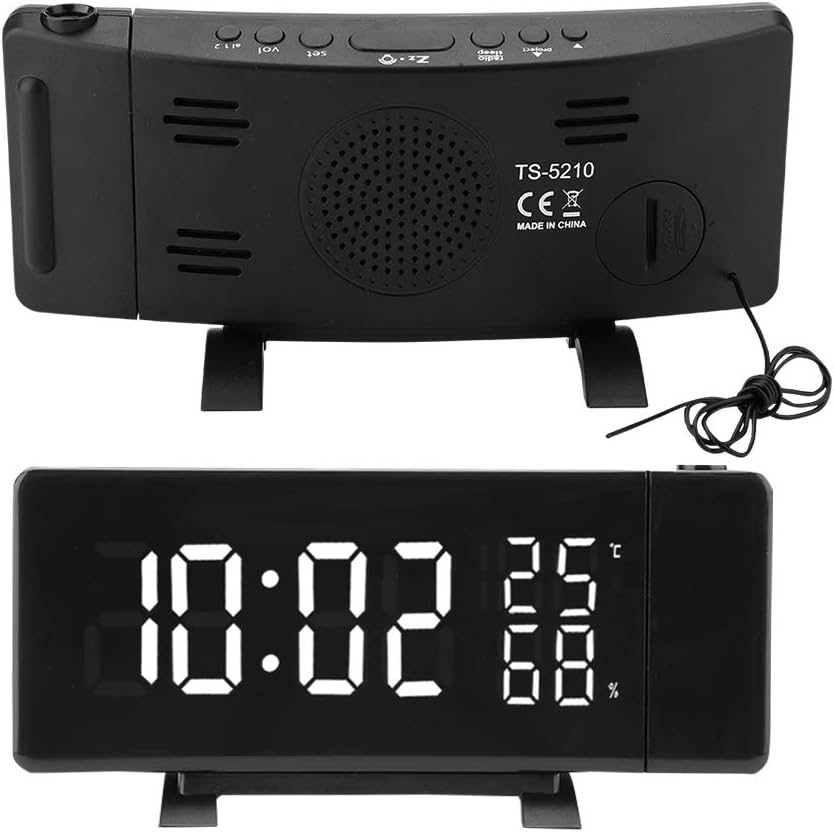
Figure 1: Rear view of the Zerone TS-5210, illustrating the various control buttons and the model number label.

Figure 2: Front view of the Zerone TS-5210, displaying the current time, temperature, and humidity on its LED screen.
Refer to the labels on the device for specific button functions (e.g., SET, VOL, AL1, AL2, RADIO, SLEEP, PROJECTION).
6. Setup
6.1 Power Connection
- Connect the provided USB charging cable to the DC 5V input port on the back of the alarm clock.
- Plug the other end of the USB cable into a compatible 5V DC power adapter (not included) and then into a wall outlet.
- The display will light up, indicating the device is powered on.

Figure 3: Side view of the Zerone TS-5210, highlighting the USB output port and the integrated FM antenna.
7. Operating Instructions
7.1 Setting Time and Date
- Press and hold the SET button to enter time setting mode. The hour digits will flash.
- Use the UP or DOWN buttons to adjust the hour.
- Press SET again to confirm the hour and move to minute setting. Adjust minutes using UP or DOWN.
- Press SET again to confirm minutes. You can then select 12/24-hour format using UP or DOWN.
- Press SET one last time to exit time setting mode.
7.2 Setting Alarms (Alarm 1 and Alarm 2)
The device supports two independent alarms.

Figure 4: Visual representation of the dual alarm clock design, showing options for radio ringing (Rd), buzzer ringing (Bu), or alarm off (OFF).
- Press and hold the AL1 or AL2 button to enter the respective alarm setting mode. The alarm hour digits will flash.
- Use the UP or DOWN buttons to adjust the alarm hour.
- Press AL1 or AL2 again to confirm the hour and move to minute setting. Adjust minutes using UP or DOWN.
- Press AL1 or AL2 again to select the alarm sound: Rd (Radio), Bu (Buzzer), or OFF (Alarm Off).
- Press AL1 or AL2 one last time to exit alarm setting mode.
7.3 Snooze Function
When an alarm sounds, press the SNOOZE button (usually a large button on top) to temporarily silence the alarm. The alarm will sound again after 5-60 minutes, depending on the preset snooze duration. To stop the alarm completely, press any other button.
7.4 FM Radio Operation

Figure 5: The Zerone TS-5210 indicating its FM radio function and the frequency range it covers (87.5MHz - 108MHz).
- Press the RADIO button to turn on the FM radio.
- Press the UP or DOWN buttons to manually tune to a desired frequency.
- Press and hold the UP or DOWN buttons to automatically scan for the next available station.
- Adjust the volume using the VOL buttons.
- To turn off the radio, press the RADIO button again.
- For better reception, extend the integrated antenna fully.
7.5 Projection Function
The clock can project the time onto a wall or ceiling.

Figure 6: The Zerone TS-5210 featuring its full digital screen and the adjustable time projection capability.
- Press the PROJECTION button to activate the time projection.
- Rotate the projection lens (located on the side) to adjust the focus and clarity of the projected image.
- Adjust the angle of the projection arm to position the time display where desired.
- Press the PROJECTION button again to turn off the projection.
7.6 Display Color Switching
The LED display can switch between three colors: Red, Blue, and White.
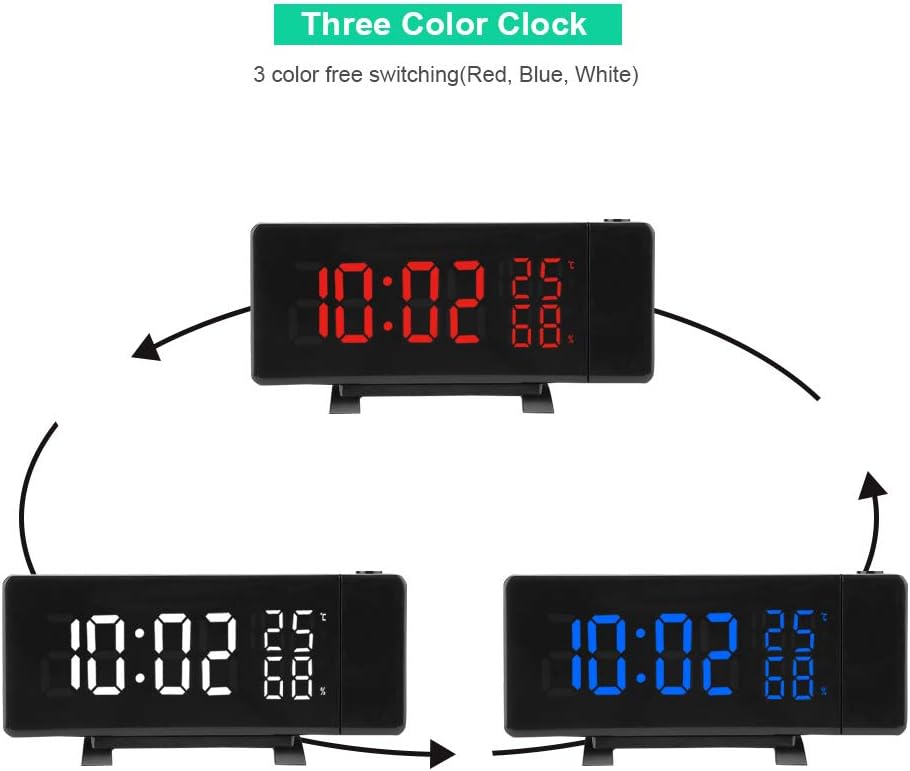
Figure 7: The Zerone TS-5210 demonstrating its ability to display the time in three different colors: red, blue, and white.
To change the display color, locate the dedicated color switch button (refer to Figure 1 for button layout) and press it to cycle through the available colors.
7.7 Temperature and Humidity Display
The clock automatically detects and displays the current indoor temperature (in Celsius) and humidity percentage. No manual adjustment is required for these readings.
8. Maintenance
- Cleaning: Wipe the unit with a soft, dry cloth. Do not use abrasive cleaners or solvents.
- Storage: If storing the unit for an extended period, disconnect it from the power source and keep it in a cool, dry place.
9. Troubleshooting
| Problem | Possible Cause | Solution |
|---|---|---|
| Display is blank. | No power. | Ensure the power cable is securely connected and the power adapter is plugged into a working outlet. |
| Alarm does not sound. | Alarm is not set or is set to OFF. | Verify alarm settings (AL1/AL2) and ensure it's set to Radio (Rd) or Buzzer (Bu). |
| Poor FM radio reception. | Antenna not extended or interference. | Fully extend the integrated antenna. Try repositioning the unit to reduce interference. |
| Projection is blurry. | Projection focus needs adjustment. | Rotate the projection lens to adjust the focus. Ensure the projection surface is within optimal range. |
10. Specifications
| Feature | Specification |
|---|---|
| Model | TS-5210 |
| USB Output | 5V 100mA |
| Power Supply | 5V DC (via USB cable) |
| Temperature Range | 0 – 50 °C |
| Humidity Range | 20% – 95% |
| Material | ABS (Acrylonitrile Butadiene Styrene) |
| Weight | Approx. 299 g |
| Dimensions (L x W x H) | 18.49 x 7.01 x 1.5 cm |
| Display Type | Digital LED |
| Mounting | Tabletop |
11. Warranty and Support
Zerone products are designed for reliability and performance. For warranty information or technical support, please refer to the documentation provided at the time of purchase or contact your retailer. Keep your purchase receipt as proof of purchase.