
1. Introduction
The Fuzion Ultra Mini Scale MT1000 is a compact and precise digital weighing instrument designed for various applications requiring accurate measurements up to 1000 grams. Its small size and multiple features make it suitable for weighing small items such as jewelry, food ingredients, or other small components.
This manual provides essential information for the proper setup, operation, maintenance, and troubleshooting of your Fuzion Ultra Mini Scale MT1000.
2. Product Overview
The Fuzion Ultra Mini Scale MT1000 features a durable stainless steel weighing platform, a clear blue backlit LCD display, and intuitive button controls. Its ultra-compact design ensures portability and ease of storage.

A compact digital scale with a stainless steel weighing platform and a blue backlit LCD display.

A diagram illustrating the main components and features of the scale, including the protective cover (which doubles as a weighing pan), battery compartment, bright backlit LCD display, Tare function, and stainless steel weighing platform.
Key Features:
- Ultra Mini Design: Highly portable and easy to store.
- High-Precision: Accurate measurements with 0.1g readability.
- Backlit LCD Display: Provides clear readings in various lighting conditions.
- Tare Function: Allows you to subtract the weight of a container.
- Multiple Units: Supports 6 different weighing units (g, oz, gn, ct, dwt, ozt).
- Auto-Off Function: Conserves battery life.
- Overload Indication: Alerts when capacity is exceeded.
- Low Battery Indication: Notifies when batteries need replacement.
3. Setup
3.1 Battery Installation
- Open the battery compartment cover located on the underside of the scale.
- Insert two (2) AAA batteries, ensuring correct polarity (+/-).
- Close the battery compartment cover securely.

The Fuzion Ultra Mini Scale shown alongside two AAA batteries, indicating the power source required for operation.
3.2 Initial Placement
Place the scale on a hard, flat, and stable surface. Avoid placing it on soft or uneven surfaces, as this can affect accuracy. Ensure there are no vibrations or air currents that could interfere with weighing.
4. Operation
4.1 Power On/Off
- To turn on the scale, press the [ON/OFF] button. The display will show "88888" then "0.0" or "0.00".
- To turn off the scale, press and hold the [ON/OFF] button for a few seconds until the display turns off. The scale also features an automatic shut-off function after a period of inactivity to save battery life.
4.2 Unit Conversion
To change the weighing unit, press the [M] (Mode) button repeatedly. The scale will cycle through the available units: grams (g), ounces (oz), grains (gn), carats (ct), pennyweights (dwt), and troy ounces (ozt).
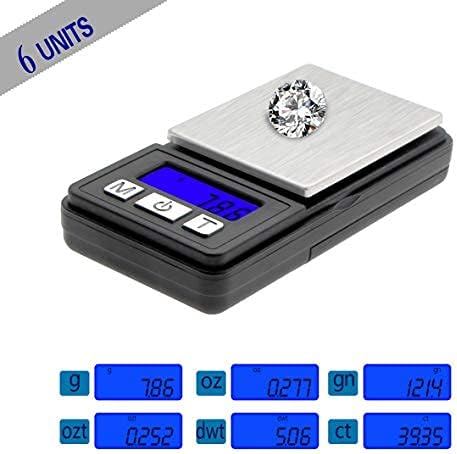
The scale displaying various units of measurement including grams (g), ounces (oz), grains (gn), carats (ct), pennyweights (dwt), and troy ounces (ozt), highlighting its versatility.
4.3 Tare Function
The Tare function allows you to subtract the weight of a container, so you only measure the net weight of the contents.
- Turn on the scale and wait for it to display "0.0" or "0.00".
- Place an empty container (e.g., a bowl or the scale's protective cover) on the weighing platform. The display will show the weight of the container.
- Press the [T] (Tare) button. The display will reset to "0.0" or "0.00".
- Place the items you wish to weigh into the container. The display will now show only the weight of the items.

A visual guide demonstrating how to use the Tare function: 1) Turn on the scale, 2) Place a container on the scale, 3) Press the 'T' button to zero the scale, 4) Add items to the container for weighing.
4.4 Weighing Items
- Ensure the scale is on and displaying "0.0" or "0.00" in your desired unit.
- Carefully place the item(s) to be weighed onto the center of the weighing platform.
- Read the stable weight displayed on the LCD screen.

An image showcasing the multi-purpose applications of the scale, suitable for weighing small items like jewelry, coins, pills, and coffee beans.
5. Calibration
Calibration ensures the accuracy of your scale over time. It is recommended to calibrate your scale periodically or if you suspect inaccurate readings. A 1000g calibration weight (not included) is typically required for this model.
- Turn the scale OFF.
- Press and hold the [M] (Mode) button, then press the [ON/OFF] button simultaneously until "CAL" appears on the display.
- Release both buttons. The display will then show the required calibration weight (e.g., "1000.0g").
- Place the exact calibration weight (e.g., 1000g) onto the center of the weighing platform.
- Wait for the display to show "PASS" and then return to normal weighing mode (e.g., "0.0" or "0.00").
- Remove the calibration weight. The scale is now calibrated and ready for use.
6. Maintenance and Care
- Cleaning: Wipe the scale with a slightly damp cloth. Do not immerse the scale in water or use abrasive cleaners.
- Storage: Store the scale in a clean, dry environment. Avoid extreme temperatures and humidity. The protective cover can be used to shield the weighing platform.
- Battery Replacement: Replace batteries when the "Lo" indicator appears on the display. Remove batteries if the scale will not be used for an extended period.
- Handling: Handle the scale with care. Avoid dropping it or subjecting it to strong impacts, as this can damage the internal sensors.
7. Troubleshooting
| Problem | Possible Cause | Solution |
|---|---|---|
| Display shows "Lo" | Low battery power. | Replace the AAA batteries. |
| Display shows "OUE2" | Overload. Weight exceeds maximum capacity. | Remove excess weight immediately. Do not exceed 1000g. |
| Inaccurate readings | Unstable surface, scale not tared, needs calibration, or damaged sensor. | Place on a stable surface. Use Tare function. Perform calibration. If problem persists, contact support. |
| Scale does not turn on | Batteries incorrectly installed or dead. | Check battery polarity or replace batteries. |
8. Specifications

An image illustrating the compact size of the Fuzion Ultra Mini Scale, showing its length (3.4 inches), width (1.7 inches), and height (0.59 inches), along with the platform size.
- Model: MT1000
- Capacity: 1000g (1kg)
- Readability: 0.1g
- Weighing Units: g, oz, gn, ct, dwt, ozt
- Display: Blue Backlit LCD
- Power: 2 x AAA Batteries (included)
- Scale Dimensions (L x W x H): 3.4 in x 1.7 in x 0.59 in
- Platform Size (L x W): 1.93 in x 1.5 in
- Net Weight: Approximately 58.7g (2.08 oz)
- Materials: ABS Plastic, Stainless Steel
- Special Features: Tare Function, Auto-Off, Overload Indication, Low Battery Indication
9. Warranty and Support
Fuzion products are manufactured with quality and precision. For warranty information or technical support, please refer to the contact details provided with your purchase or visit the official Fuzion website. Please retain your proof of purchase for any warranty claims.