
1. Introduction
Thank you for choosing the Bestier Modern Crystal Raindrop Chandelier. This elegant lighting fixture is designed to enhance the ambiance of your dining room, bathroom, bedroom, or living room with its unique crystal glass design. This manual provides detailed instructions for safe installation, proper operation, and effective maintenance of your new chandelier.

Image 1.1: The Bestier Modern Crystal Raindrop Chandelier, showcasing its design and crystal elements.
2. Safety Information
Please read all instructions carefully before beginning installation. Failure to follow these instructions may result in electrical shock, fire, or other hazards that could cause injury or property damage.
- WARNING: Risk of electrical shock. Disconnect power at the circuit breaker or fuse box before installation or servicing.
- All electrical connections must be in accordance with local codes, ordinances, or the National Electric Code (NEC). Consult a qualified electrician if you are unfamiliar with electrical wiring.
- Wear safety glasses and gloves during installation.
- Ensure the mounting surface can support the weight of the fixture (approximately 16.61 pounds or 7.55 kg).
- Do not exceed the maximum wattage specified for the bulbs (240 watts total, 6 E12 bulbs).
- Keep flammable materials away from the light fixture.
- This fixture is designed for indoor use only.
3. Package Contents
Carefully unpack all components and check for any damage. Retain all packaging materials until you are certain the product is fully assembled and operational. If any parts are missing or damaged, contact customer support.
- Chandelier Frame (Metal)
- Crystal Elements (Various shapes and sizes)
- Mounting Hardware (Canopy, Chain, Screws, Wire Nuts)
- Instruction Manual (This document)
- Note: E12 bulbs are not included and must be purchased separately.
4. Specifications
| Brand | Bestier |
| Model | D17xH31 |
| Fixture Dimensions | Diameter 17 inches x Height 31 inches |
| Canopy Dimensions | Diameter 5 inches x Height 2 inches |
| Adjustable Hanging Chain | Max Length 40 inches |
| Bulb Base | 6 x E12 (Bulbs not included) |
| Maximum Wattage | 240 Watts (40W per bulb max) |
| Voltage | 110 Volts |
| Material | Crystal, Metal |
| Finish Type | Polished |
| Shade Color | Silver |
| Item Weight | 16.61 pounds (7.55 kg) |
| Mounting Type | Hanging, Hung |
| Control Method | Push Button (via wall switch) |
| Assembly Required | Yes |
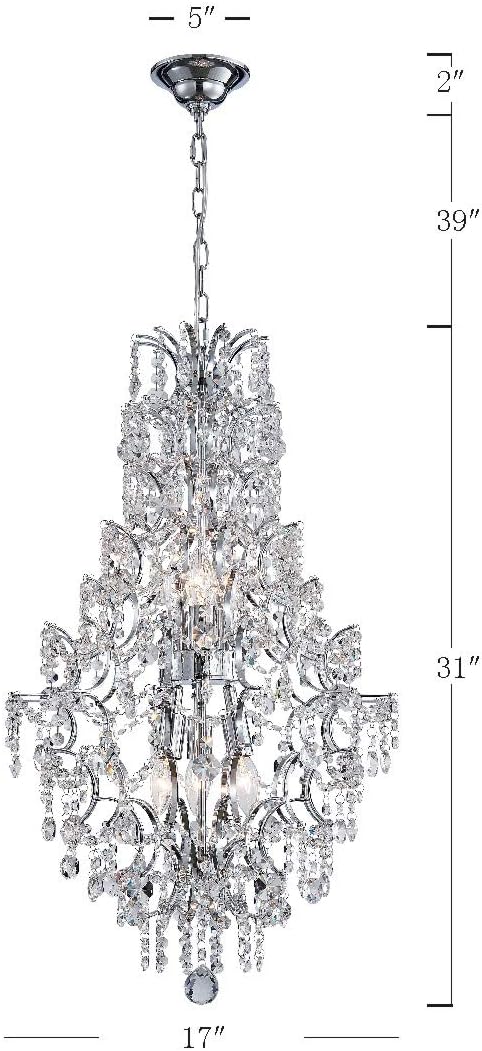
Image 4.1: Dimensional diagram of the chandelier, indicating its height, diameter, and canopy size.
5. Setup and Installation
Professional installation is recommended. If you are performing the installation yourself, ensure you have the necessary tools and follow all safety precautions.
5.1 Pre-Installation
- Turn off power: Locate the circuit breaker or fuse box and turn off the power to the junction box where you will install the fixture.
- Prepare the area: Clear the work area and ensure you have a stable ladder or platform.
- Unpack components: Carefully remove all parts from the packaging. Lay them out on a clean, soft surface to prevent scratches.
- Identify parts: Refer to the package contents list to ensure all parts are present.
5.2 Mounting the Fixture
- Attach the mounting bracket to the junction box using the provided screws. Ensure it is securely fastened.
- Determine the desired hanging height for the chandelier. Adjust the chain length by removing links as needed.
- Thread the electrical wires through the chain and canopy.
- Secure the chain to the mounting bracket.
5.3 Electrical Connections
- Connect the bare copper ground wire from the fixture to the ground wire from the junction box (usually green or bare copper) using a wire nut.
- Connect the white wire from the fixture to the white (neutral) wire from the junction box using a wire nut.
- Connect the black wire from the fixture to the black (hot) wire from the junction box using a wire nut.
- Carefully tuck all wires into the junction box.
- Raise the canopy to the ceiling and secure it to the mounting bracket with the provided screws.
5.4 Attaching Crystal Elements
This step requires patience and care. It is often easier to attach the crystals after the main fixture is mounted but before bulbs are installed. Refer to the diagram provided with your specific crystal set for placement.
- Identify the different types and sizes of crystal elements.
- Attach each crystal strand or individual crystal to the designated hooks or loops on the chandelier frame.
- Handle crystals carefully to avoid fingerprints or damage. Wearing clean cotton gloves can help.
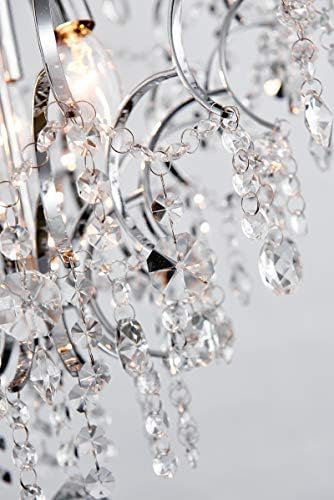
Image 5.1: A detailed view of the crystal elements, showing their attachment points and intricate design.
5.5 Bulb Installation
- Ensure power is still off.
- Screw six (6) E12 base bulbs into the sockets. Do not overtighten.
- Verify that the total wattage does not exceed 240 watts.
- Compatible bulb types include Dimmable, Energy-saving, LED, and Halogen bulbs.
6. Operating Instructions
Once installation is complete and all safety checks are performed:
- Restore Power: Turn the power back on at the circuit breaker or fuse box.
- Turn On/Off: Operate the chandelier using your standard wall switch.
- Dimming (Optional): If you have installed dimmable E12 bulbs and connected the fixture to a compatible dimmer switch, you can adjust the light intensity using the dimmer control.
7. Maintenance
Regular maintenance will help preserve the beauty and functionality of your chandelier.
- Cleaning:
- Always turn off power and allow the fixture to cool before cleaning.
- Dust the metal frame with a soft, dry cloth.
- For crystals, use a soft, lint-free cloth dampened with a mild glass cleaner or distilled water. Avoid abrasive cleaners or harsh chemicals.
- Do not spray cleaner directly onto the fixture; spray onto the cloth first.
- Bulb Replacement:
- Turn off power at the circuit breaker.
- Allow bulbs to cool completely before touching.
- Unscrew the old bulb and replace it with a new E12 base bulb of the correct wattage (max 40W per bulb).
- Inspection: Periodically check all connections and mounting hardware to ensure they remain secure.
8. Troubleshooting
If you encounter issues with your chandelier, refer to the following common problems and solutions:
| Problem | Possible Cause | Solution |
|---|---|---|
| Light does not turn on. |
|
|
| Lights flicker. |
|
|
| Chandelier hangs unevenly. |
|
|
9. Warranty and Support
For warranty information or technical support, please refer to the contact details provided at the point of purchase or visit the official Bestier website. Keep your purchase receipt as proof of purchase.
Customer Support: Please contact your retailer or visit www.bestier.net for assistance.