
Introduction
This manual provides detailed instructions for the operation, maintenance, and troubleshooting of your PRUNUS J-919 Retro Bluetooth Speaker and FM Portable Radio. Please read this manual thoroughly before using the device to ensure proper function and longevity.
Important Safety Instructions
- Do not expose the device to rain, moisture, or extreme temperatures.
- Avoid dropping or subjecting the device to strong impacts.
- Do not disassemble or attempt to repair the device yourself. Refer all servicing to qualified personnel.
- Keep the device away from direct sunlight and heat sources.
- Use only the specified charging cable and power adapter (DC5V/500mA-2A USB adapter).
- Clean the device only with a soft, dry cloth.
Package Contents
Please check the package for the following items:
- PRUNUS J-919 Retro Bluetooth Speaker and FM Portable Radio
- USB Charging Cable
- User Manual (this document)
Product Overview
The PRUNUS J-919 is a compact and portable retro-style radio featuring FM radio, Bluetooth connectivity, TF card MP3 playback, and AUX input. Its wooden cabinet and vintage design make it a unique addition to any space.
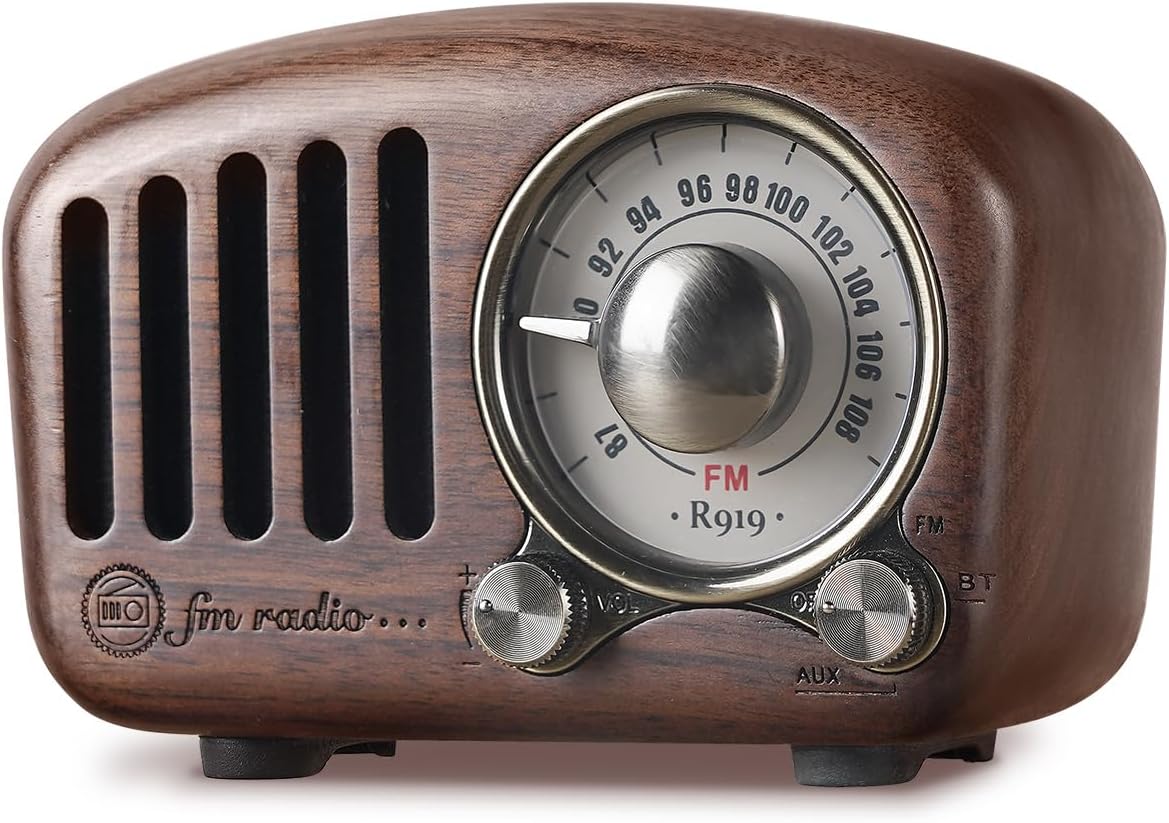
Image: Front view of the PRUNUS J-919 radio, showcasing its walnut finish, large tuning dial, and control knobs.
Dimensions and Portability

Image: The PRUNUS J-919 radio held in a hand, illustrating its compact size and dimensions (106mm length, 50mm width, 68mm height) and weight (245g).
Controls and Ports
The PRUNUS J-919 features intuitive controls for easy operation:
- Tuning Dial: Large circular dial for precise FM frequency selection.
- Volume Knob: Adjusts the audio output level.
- Mode Switch: Selects between FM, Bluetooth (BT), and AUX input modes.
- Power Switch: Turns the device on or off.
- TF Card Slot: For playing MP3 audio files from a TF (Micro SD) card.
- AUX Input Port: For connecting external audio devices via a 3.5mm audio cable.
- USB Charging Port: For charging the internal battery.
Setup
Initial Charging
Before first use, fully charge the PRUNUS J-919. Connect the supplied USB charging cable to the radio's USB port and the other end to a DC5V/500mA-2A USB adapter, computer USB port, car charger, or power bank. The charging indicator light will illuminate during charging and turn off when fully charged. A full charge typically takes a few hours.
Powering On/Off
To power on the radio, turn the Power Switch to the ON position. To power off, turn the Power Switch to the OFF position.
Operating Instructions
The PRUNUS J-919 offers multiple audio playback options:

Image: Diagram illustrating the universal compatibility of the PRUNUS J-919 with various devices via Bluetooth, TF card (MP3 format), and AUX jack.
FM Radio Mode
- Turn the Power Switch to ON.
- Set the Mode Switch to "FM".
- Rotate the Tuning Dial to search for FM radio stations. The large 270° tuning window allows for precise station selection.
- Adjust the Volume Knob to your desired listening level.

Image: The PRUNUS J-919 radio in a dimly lit room, highlighting the warm light on the frequency display for easy tuning at night.

Image: The PRUNUS J-919 radio on a windowsill, depicting its smooth tuning and good reception capabilities for FM frequencies from 87.5 to 108 MHz.
Bluetooth Mode
- Turn the Power Switch to ON.
- Set the Mode Switch to "BT" (Bluetooth). The radio will enter pairing mode, indicated by an audible prompt.
- On your Bluetooth-enabled device (smartphone, tablet, laptop), search for "PRUNUS J-919" in the Bluetooth settings and select it to pair.
- Once paired, you can play audio from your device through the radio.
- Adjust the Volume Knob on the radio and/or your connected device.

Image: The PRUNUS J-919 radio on a coffee table next to a smartphone, illustrating its wireless Bluetooth connection capability.
TF Card (MP3) Mode
- Turn the Power Switch to ON.
- Insert a TF (Micro SD) card (up to 32GB) with MP3 audio files into the TF card slot. The radio will automatically switch to TF card mode and begin playback.
- Adjust the Volume Knob as needed. (Note: There are no dedicated track control buttons on the radio for TF card playback.)
AUX Input Mode
- Turn the Power Switch to ON.
- Set the Mode Switch to "AUX".
- Connect an external audio device (e.g., MP3 player, computer) to the radio's AUX input port using a 3.5mm audio cable (not included).
- Play audio from your external device. The sound will be output through the radio's speaker.
- Adjust the Volume Knob on the radio and/or your connected device.
Maintenance
- Cleaning: Use a soft, dry cloth to wipe the surface of the radio. Do not use liquid cleaners or abrasive materials.
- Storage: When not in use for extended periods, store the radio in a cool, dry place, away from direct sunlight and extreme temperatures.
- Battery Care: To prolong battery life, avoid fully discharging the battery frequently. Charge the radio regularly, even if not in use.
Troubleshooting
| Problem | Possible Cause | Solution |
|---|---|---|
| No power / Radio does not turn on | Battery is depleted. | Charge the radio using the supplied USB cable. |
| Poor FM reception / Static | Weak signal; Antenna not extended; Interference. | Adjust the radio's position; Extend the antenna fully; Move away from electronic devices causing interference. |
| Bluetooth not connecting | Radio not in BT mode; Device too far; Already connected to another device. | Ensure radio is in BT mode; Bring devices closer; Disconnect from other devices and try pairing again. |
| No sound from TF card | TF card not inserted correctly; No MP3 files on card; Card corrupted. | Reinsert TF card; Ensure MP3 files are present; Try a different TF card. |
| No sound from AUX input | Radio not in AUX mode; Cable not connected properly; External device volume too low. | Ensure radio is in AUX mode; Check cable connections; Increase volume on external device. |
Specifications
| Feature | Detail |
|---|---|
| Brand | PRUNUS |
| Model | J-919 (Model Number: 1) |
| Part Number | CRADIO919CA |
| Connectivity Technology | Auxiliary, Bluetooth, USB |
| Tuner Technology | FM |
| FM Frequency Range | 87.5 - 108 MHz |
| Power Source | Battery Powered (Built-in Non-Removable 1100mAh rechargeable battery) |
| Speakers Maximum Output Power | 3 Watts |
| Display Type | Analogue/Analog |
| Material Type | Wood (Walnut finish) |
| Product Dimensions (L x W x H) | 9 x 3.9 x 5.2 cm (3.54 x 1.54 x 2.05 inches) |
| Item Weight | 293 g (0.65 lbs) |
| Special Features | Portable, Rechargeable, Bass Enhancement Sound, 270° Large Compass Tuning Window, AUX Input, TF Card MP3 Player |
| Compatible Devices | Smartphone, Tablet, Speaker, MP3 player, Headphones, Laptop |
Warranty and Support
For warranty information and technical support, please refer to the documentation provided with your purchase or contact PRUNUS customer service directly. Contact details can typically be found on the product packaging or the official PRUNUS website.