
Introduction
This manual provides essential information for the safe and effective operation, setup, and maintenance of your Bosch GWS 18-125 L Heavy Duty Electric Angle Grinder. Please read these instructions carefully before using the tool and keep them for future reference. Proper use and adherence to safety guidelines will ensure optimal performance and prolong the life of your angle grinder.

Figure 1: The Bosch GWS 18-125 L Angle Grinder, showcasing its robust design with an attached grinding disc and auxiliary handle.
Safety Instructions
Always observe the following safety precautions to prevent electric shock, fire, and serious injury. Keep this instruction manual accessible for all users.
General Power Tool Safety
- Work Area Safety: Keep the work area clean and well-lit. Cluttered or dark areas invite accidents. Do not operate power tools in explosive atmospheres, such as in the presence of flammable liquids, gases, or dust.
- Electrical Safety: Power tool plugs must match the outlet. Never modify the plug in any way. Avoid body contact with earthed or grounded surfaces.
- Personal Safety: Always wear eye protection, hearing protection, and a dust mask when operating the grinder. Dress properly; avoid loose clothing or jewelry.
Angle Grinder Specific Safety
- Protective Guard: Always use the protective guard. Ensure it is securely fastened and positioned for maximum safety.
- Auxiliary Handle: Always operate the grinder with the auxiliary handle firmly attached. Maintain a firm grip with both hands.
- Disc Selection: Use only discs that are correctly rated for the grinder's speed and intended application. Ensure the disc is securely mounted before operation.
- KickBack Control: This tool features KickBack Control, which automatically shuts down the tool if the disc jams. However, always be prepared for potential kickback.
- Restart Protection: The tool will not restart automatically after a power interruption if the switch is in the ON position. The switch must be reset to OFF and then ON to resume operation.
- Overload Protection: Avoid excessive pressure on the tool, which can lead to overheating and damage. The tool is equipped with overload protection.
Product Overview
Package Contents

Figure 2: The package typically contains one Bosch GWS 18-125 L Professional Angle Grinder. Additional accessories may be sold separately.
Key Features
- Powerful 1800W Motor: Delivers high performance for efficient grinding and cutting tasks.
- Enhanced Safety: Features KickBack Control, restart protection, and an anti-rotation protective guard.
- Ergonomic Design: Main handle designed for fatigue-free operation and improved handling during extended use.
- Low Vibration: Engineered for reduced vibration, enhancing control and user comfort.
- Durable Construction: Built to withstand demanding job site conditions, ensuring long-lasting reliability.

Figure 3: The Bosch GWS 18-125 L Professional Angle Grinder is engineered for powerful performance and user comfort, featuring a robust 1800W motor and advanced safety features.
Technical Data
| Specification | Value |
|---|---|
| Brand | Bosch |
| Model Number | 06017A30K0 |
| Rated Input Power | 1800 W |
| No-Load Speed | 11,500 RPM |
| Disc Diameter | 125 mm |
| Grinding Spindle Thread | M14 |
| Wire Cup Brush Diameter | 75 mm |
| Rubber Backing Pad Diameter | 125 mm |
| Item Weight | 3.32 kg |
| Power Source | Corded Electric |
| Product Dimensions (LxWxH) | 14.6 x 16.2 x 46.2 cm |

Figure 4: Visual representation of the angle grinder's key technical specifications.
Setup
1. Attaching the Auxiliary Handle
Screw the auxiliary handle firmly into one of the designated threaded holes on the gear head. Ensure it is tightened securely to provide a stable grip during operation.
2. Mounting the Protective Guard
Position the protective guard over the spindle collar. Rotate it until it clicks into place or is securely fastened, ensuring it covers the grinding disc as much as possible for user protection. Adjust its position to deflect sparks away from your body.
3. Installing the Grinding Disc
- Press the spindle lock button to prevent the spindle from rotating.
- Place the backing flange onto the spindle.
- Attach the correct disc securely to the grinder using the spindle lock. Ensure the disc is centered and the clamping nut is tightened with the appropriate wrench.
- Release the spindle lock.
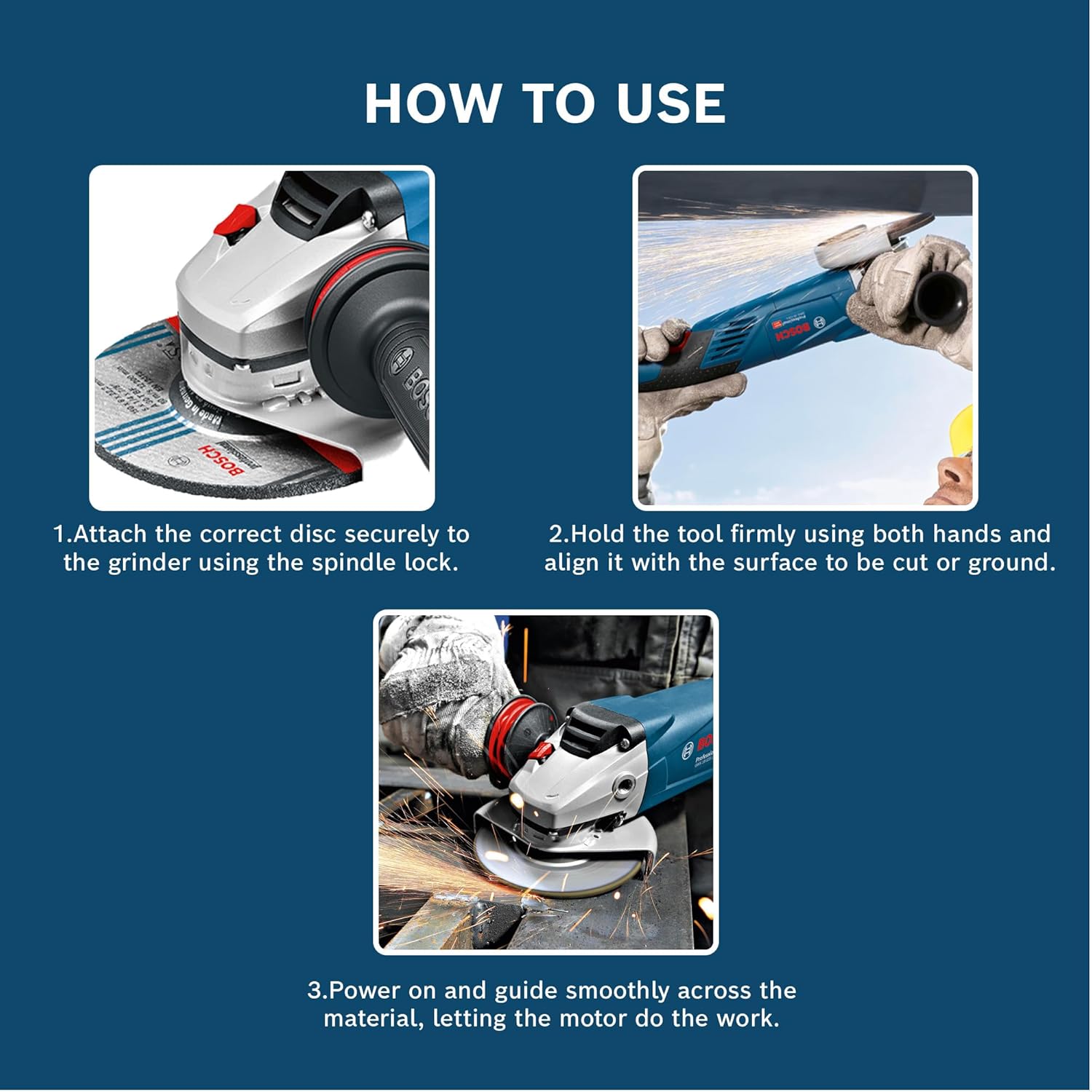
Figure 5: Step-by-step visual guide for disc attachment and proper tool handling.
Operating Instructions
1. Powering On/Off
- To Turn On: Slide the ON/OFF switch forward until it locks into the ON position. The tool will start with a soft-start feature.
- To Turn Off: Release the ON/OFF switch. For continuous operation, press the switch and then release it to turn off.
- Restart Protection: If power is interrupted while the tool is running, it will not restart automatically. You must switch the tool OFF and then ON again to resume operation.
2. Grinding and Cutting Techniques
- Hold the tool firmly using both hands, one on the main handle and one on the auxiliary handle.
- Align the grinding or cutting disc with the surface of the workpiece.
- Power on the tool and allow the disc to reach full speed before making contact with the material.
- Guide the tool smoothly across the material, applying consistent, moderate pressure. Avoid excessive force, which can reduce efficiency and increase wear on the disc and tool.
- For cutting, maintain a consistent cutting line. For grinding, move the tool back and forth to ensure even material removal.

Figure 6: Examples of typical applications for the Bosch GWS 18-125 L Angle Grinder in industrial and construction settings.
Maintenance
Regular maintenance ensures the longevity and safe operation of your Bosch GWS 18-125 L Angle Grinder. Always disconnect the tool from the power supply before performing any maintenance.
- Cleaning: Regularly clean the ventilation slots to prevent motor overheating. Use a soft brush or compressed air to remove dust and debris.
- Disc Inspection: Before each use, inspect grinding and cutting discs for damage, cracks, or excessive wear. Replace damaged discs immediately.
- Power Cord: Check the power cord for any signs of damage. If damaged, have it replaced by a qualified service technician.
- Carbon Brushes: The carbon brushes may require periodic inspection and replacement. This should be performed by a qualified service center to ensure proper function and safety.
Troubleshooting
This section addresses common issues you might encounter with your angle grinder.
| Problem | Possible Cause | Solution |
|---|---|---|
| Tool does not start | No power supply; Restart protection activated; Faulty switch | Check power connection; Switch tool OFF then ON again; Contact service center |
| Reduced performance/Overheating | Blocked ventilation slots; Excessive pressure during operation; Worn carbon brushes | Clean ventilation slots; Reduce pressure; Have carbon brushes checked/replaced by service center |
| Excessive vibration | Damaged or improperly mounted disc; Loose auxiliary handle | Inspect and replace disc if damaged, ensure proper mounting; Tighten auxiliary handle |
Warranty and Support
Your Bosch GWS 18-125 L Angle Grinder comes with a 1-Year Warranty from the date of invoice. To claim warranty service, please provide a copy of your purchase invoice.
For any queries, technical assistance, or warranty claims, please contact Bosch Power Tools India Customer Service. You can also join Bosch BeConnected for extended warranty benefits and rewards.
Bosch Power Tools India Customer Service: Please refer to your product packaging or the official Bosch India website for the current Toll-Free number.
For more information and to register your product, visit the official Bosch website: www.bosch-pt.co.in


