
1. Introduction
Thank you for choosing the OXO On Conical Burr Coffee Grinder with Intelligent Dosing Scale. This appliance is designed to provide precise and consistent coffee grounds for various brewing methods, from espresso to French press. Its integrated scale measures coffee by weight, ensuring accuracy for your desired brew. This manual provides essential information for the safe and efficient operation, maintenance, and troubleshooting of your new coffee grinder.
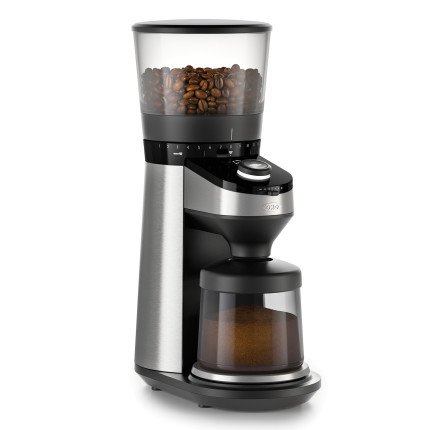
Figure 1: OXO On Conical Burr Coffee Grinder, showing the bean hopper, grind adjustment dial, and grounds bin.
2. Important Safety Information
Please read all instructions carefully before using the appliance. Failure to follow these instructions may result in electric shock, fire, or serious injury.
- Do not immerse the motor base in water or other liquids.
- Unplug from outlet when not in use, before putting on or taking off parts, and before cleaning.
- Avoid contact with moving parts.
- Do not operate any appliance with a damaged cord or plug, or after the appliance malfunctions or has been dropped or damaged in any manner.
- The use of attachments not recommended or sold by the manufacturer may cause fire, electric shock, or injury.
- Do not use outdoors.
- Do not let cord hang over edge of table or counter, or touch hot surfaces.
- Do not place on or near a hot gas or electric burner, or in a heated oven.
- Always ensure the grounds bin is properly in place before operating the grinder.
- This appliance is for household use only.
3. Parts Identification
Familiarize yourself with the components of your OXO On Conical Burr Coffee Grinder:
- Bean Hopper: Holds whole coffee beans (capacity: 16 oz). Features a "trap door" to retain beans when removed.
- Hopper Lid: Covers the bean hopper.
- Grind Adjustment Dial: Allows selection of 38 grind settings, from fine to coarse.
- Conical Burrs: Durable 40 mm stainless steel burrs for uniform grinding.
- Control Dial: Used to switch between Cups Mode, Grams Mode, or Manual Mode.
- Start/Stop Button: Initiates and stops the grinding process.
- Grounds Bin: Collects ground coffee (capacity: up to 125 grams).
- Motor Base: Contains the high torque/low speed motor and integrated scale.
4. Setup
Follow these steps for initial setup of your coffee grinder:
- Unpack: Carefully remove all components from the packaging. Retain packaging for future storage or transport.
- Clean: Wash the bean hopper, hopper lid, and grounds bin with warm, soapy water. Rinse thoroughly and dry completely. The motor base should be wiped with a damp cloth.
- Assemble:
- Place the grounds bin onto the scale platform on the motor base. Ensure it is seated correctly.
- Align the bean hopper with the opening on the top of the motor base. Twist clockwise until it locks into place.
- Place the hopper lid on top of the bean hopper.
- Placement: Place the grinder on a stable, flat, and dry surface. Ensure there is adequate space around the unit for ventilation.
- Power Connection: Plug the power cord into a grounded electrical outlet.
5. Operating Instructions
Your OXO On Conical Burr Coffee Grinder offers precise control over your coffee grinding.
5.1 Filling the Bean Hopper
Remove the hopper lid and pour whole coffee beans into the bean hopper. Replace the lid securely. The hopper can hold up to 16 ounces of coffee beans.
5.2 Selecting Grind Setting
Rotate the grind adjustment dial to select your desired grind size. The grinder offers 38 settings:
- Fine: Suitable for Espresso machines.
- Medium: Ideal for Drip coffee makers and Pour Over.
- Coarse: Best for French Press and Cold Brew.
Experiment with different settings to find the perfect grind for your brewing method and taste preference.
Figure 2: Grind adjustment dial, showing various settings from fine to coarse.
5.3 Grinding Modes
Use the single control dial to switch between the available grinding modes:
- Cups Mode: Grind based on the number of cups of coffee you intend to brew. The integrated scale will automatically measure and stop grinding once the pre-set weight for the selected number of cups is reached.
- Grams Mode: Grind a specific weight of coffee in grams. Rotate the dial to select the desired gram amount. The grinder will stop automatically when the target weight is achieved.
- Manual Mode: Grind continuously until you press the Start/Stop button again. This mode does not use the integrated scale for automatic stopping.
Ensure the grounds bin is properly seated on the scale platform before starting any grinding operation. The "no-bean detector" feature prevents grinding if the hopper is empty.
6. Maintenance and Cleaning
Regular cleaning ensures optimal performance and extends the life of your grinder. Always unplug the grinder before cleaning.
6.1 Daily Cleaning
- Empty and wash the grounds bin and hopper lid with warm, soapy water. Rinse and dry thoroughly.
- Wipe the exterior of the motor base with a damp cloth. Do not immerse the motor base in water.
6.2 Burr Cleaning (Weekly/Bi-weekly)
Coffee oils and fine particles can accumulate on the burrs, affecting grind consistency.
- Ensure the grinder is unplugged.
- Remove the bean hopper by twisting it counter-clockwise and lifting it off. The "trap door" will close, retaining any remaining beans.
- Locate the upper burr assembly. Twist the wire handle counter-clockwise and lift the upper burr out.
- Use the provided cleaning brush (or a stiff brush) to remove any loose coffee grounds from both the upper and lower burrs.
- Clean the grinding chamber with the brush.
- Reinsert the upper burr, aligning the tabs, and twist clockwise to lock it into place.
- Reattach the bean hopper by aligning and twisting clockwise until it locks.
Figure 3: Disassembled view of the grinder, highlighting the removable upper burr for cleaning.
7. Troubleshooting
If you encounter issues with your grinder, refer to the following common problems and solutions:
| Problem | Possible Cause | Solution |
|---|---|---|
| Grinder does not start. |
|
|
| Inconsistent grind. |
|
|
| Grinder stops unexpectedly. |
|
|
8. Specifications
| Brand | OXO |
| Model Number | 8710200 |
| Material | Stainless Steel |
| Color | Silver |
| Item Weight | 7.4 Pounds |
| Wattage | 151.00 W |
| Power Source | Electric |
| Hopper Capacity | 16 oz (coffee beans) |
| Grounds Bin Capacity | Up to 125 grams |
| Grind Settings | 38 (Fine to Coarse) |
9. Warranty and Support
OXO stands behind the quality of its products. This product comes with a 100% satisfaction guarantee.
For warranty claims, product support, or further assistance, please contact OXO Customer Service through their official website or the contact information provided with your purchase.


