
1. Introduction
Thank you for choosing the Tefal Virtuo Steam Iron FV1320. This manual provides essential information for the safe and efficient use, maintenance, and troubleshooting of your new steam iron. Please read these instructions carefully before first use and keep them for future reference.
2. Important Safety Instructions
- Always ensure the voltage indicated on the iron's rating plate matches your mains voltage.
- Do not leave the iron unattended while it is switched on or connected to the power supply.
- Keep the iron and its cord out of reach of children and persons with reduced physical, sensory, or mental capabilities.
- Never immerse the iron, power cord, or plug in water or any other liquid.
- Do not operate the iron if it has been dropped, if there are visible signs of damage, or if it is leaking.
- Always place the iron on a stable, heat-resistant surface when resting.
- Unplug the iron from the electrical outlet before filling with water, cleaning, or when not in use.
- The soleplate of the iron can become extremely hot and cause burns. Avoid direct contact.
3. Product Overview
Familiarize yourself with the components of your Tefal Virtuo Steam Iron FV1320:
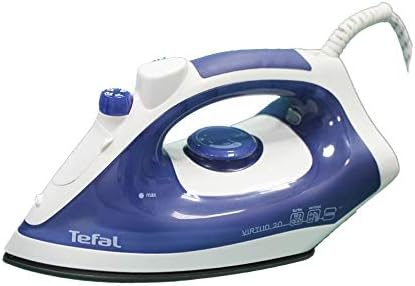
This image displays the Tefal Virtuo Steam Iron FV1320. It features a blue and white casing, a comfortable handle, a transparent water tank, and clearly visible temperature and steam control dials. The soleplate is dark, indicating its non-stick or stainless steel composition.
- Water Spray Nozzle: For moistening stubborn creases.
- Water Filling Inlet: Where water is added to the tank.
- Steam Control Dial: Adjusts steam output or selects dry ironing.
- Temperature Control Dial: Sets the soleplate temperature for different fabrics.
- Pilot Light Indicator: Illuminates when the iron is heating up and turns off when the set temperature is reached.
- Transparent Water Tank: Allows visibility of the water level.
- Soleplate: The heated surface that glides over fabrics.
- Power Cord: Connects the iron to the electrical outlet.
4. Setup
- Unpacking: Carefully remove the iron from its packaging. Retain the packaging for storage or future transport.
- First Use: Before using for the first time, remove any protective film or stickers from the soleplate. It is recommended to iron an old piece of fabric (e.g., a cotton cloth) for a few minutes to eliminate any manufacturing residues. A slight odor or smoke may occur during the first use; this is normal and will dissipate quickly.
- Filling the Water Tank: Ensure the iron is unplugged. Open the water filling inlet and slowly pour clean tap water into the transparent water tank up to the 'MAX' level indicator. Do not overfill. Close the inlet securely.
5. Operating Instructions
5.1. Temperature and Steam Settings
- Plug the iron into a suitable electrical outlet.
- Adjust the Temperature Control Dial to the desired setting based on the fabric type. Refer to the fabric care labels on your garments.
- The pilot light will illuminate, indicating the iron is heating. It will turn off once the selected temperature is reached.
- For steam ironing, ensure the water tank is filled. Set the Steam Control Dial to the desired steam level (e.g., 'MIN' for light steam, 'MAX' for heavy steam). Steam is only produced at higher temperatures (usually from the '••' or '•••' settings on the temperature dial).
- For dry ironing, set the Steam Control Dial to the '0' (no steam) position.
- To use the water spray function, press the spray button. This is useful for dampening stubborn creases.
5.2. Ironing Tips
- Sort clothes by fabric type and iron those requiring lower temperatures first.
- Always check garment care labels for recommended ironing temperatures.
- For delicate fabrics, iron on the reverse side or use a pressing cloth.
- To avoid water spots, ensure the iron has reached the correct temperature before activating steam.
6. Maintenance and Cleaning
6.1. Cleaning the Soleplate
- After each use, allow the iron to cool completely.
- Wipe the soleplate with a damp cloth and a non-abrasive cleaner if necessary. Do not use metallic pads or abrasive cleaners as they can scratch the soleplate.
6.2. Descaling (Anti-Calc System)
To maintain optimal steam performance and prolong the life of your iron, regular descaling is important, especially in hard water areas. Refer to your iron's specific anti-calc system instructions if available. Generally, this involves flushing the steam chamber with water.
6.3. Storage
- Empty the water tank after each use to prevent mineral buildup.
- Allow the iron to cool down completely before storing.
- Store the iron in an upright position to protect the soleplate, in a dry and safe place.
7. Troubleshooting
| Problem | Possible Cause | Solution |
|---|---|---|
| Iron does not heat up. | Not plugged in; power outlet fault; temperature dial set to 'OFF'. | Check power connection; test outlet with another appliance; turn temperature dial to a heat setting. |
| No steam or insufficient steam. | Water tank empty; temperature too low for steam; steam dial set to '0'. | Fill water tank; set temperature to '••' or '•••'; set steam dial to desired steam level. |
| Water leaks from soleplate. | Temperature too low for steam; overfilled water tank. | Increase temperature to steam setting; do not overfill water tank. |
| White flakes coming from soleplate. | Mineral buildup (calcification). | Perform descaling procedure as per instructions. |
8. Specifications
- Brand: Tefal
- Model Number: FV1320
- Power/Wattage: 1400 watts
- Color: Blue
- Special Features: Temperature Control, Steam Function, Water Spray, Pilot Light Indicator, Transparent Water Tank
- Base Material: Stainless Steel
9. Warranty and Support
Your Tefal Virtuo Steam Iron FV1320 is covered by a manufacturer's warranty. For specific warranty terms and conditions, please refer to the warranty card included with your product or visit the official Tefal website. For technical support, spare parts, or service inquiries, please contact Tefal customer service in your region.


