
1. Product Overview
The IKEA MICKE Corner Workstation, Model 203.542.84, is a versatile and space-saving desk designed for home or office use. Its corner design maximizes your workspace, and integrated features help keep your area organized.

Figure 1: Front view of the assembled IKEA MICKE Corner Workstation.
2. Setup and Assembly
Assembly of the MICKE Corner Workstation is required. Please refer to the separate assembly instructions provided with your product for detailed, step-by-step guidance. Ensure all components are present before beginning assembly.
- Component Identification: Unpack all parts and identify them using the assembly manual's component list.
- Leg Orientation: The steel legs can be mounted on either the left or right side, offering flexibility in configuration.
- Tools: Ensure you have the necessary tools as specified in the assembly instructions.
- Safety: Assemble on a clean, flat surface to prevent scratches and ensure stability. It is recommended to have two people for assembly.
3. Operating Features
- Magnetic Whiteboard Back Panel: The back panel functions as a magnetic whiteboard. Use dedicated whiteboard markers for writing and magnets to attach notes or documents.
- Adjustable Storage Shelves: The storage shelves are movable, allowing you to adjust their position to suit the items you wish to store, maximizing your desk space efficiency.
- Cable Management: A cable outlet is provided at the back of the desktop to help organize and conceal power cords and cables, keeping your workspace tidy.
- Compatibility: All desks and drawer units in the MICKE series are designed to be the same height, enabling you to combine them to extend your workspace seamlessly.
- Monitor Placement: This workstation can accommodate slim monitors up to 22 inches.
4. Maintenance and Care
- Cleaning: Wipe the surfaces with a cloth dampened in a mild cleaner. Follow with a dry, clean cloth to remove any residue.
- Whiteboard Care: Only use dedicated whiteboard markers on the magnetic back panel. Using other types of markers may permanently stain the surface.
- Electrical Safety: When charging electrical products, always follow the instructions in their respective manuals. If the workstation will not be used for an extended period, disconnect power to any connected electrical devices.
5. Troubleshooting
If you encounter any issues with your MICKE Corner Workstation, consider the following:
- Stability Issues: Ensure all screws and fittings are tightened correctly. Periodically check and retighten as needed.
- Damaged Parts: If any part is damaged or missing, contact IKEA customer service for assistance. Do not attempt to use damaged components.
- Whiteboard Stains: If non-whiteboard markers were used, specialized whiteboard cleaner might help, but permanent staining is possible.
6. Specifications
| Attribute | Detail |
|---|---|
| Model Number | 203.542.84 |
| Color | White |
| Dimensions (Max Width x Depth x Height) | 100 cm x 100 cm x 142 cm |
| Product Weight | 46.22 kg |
| Package Weight | 47 kg |
| Main Materials | Particleboard, Fiberboard, Paper, Acrylic paint, ABS plastic, Steel, Epoxy/polyester powder coating, Melamine foil |
| Desk Type | Computer Desk |
| Features | Magnetic whiteboard, Adjustable shelves, Cable management, Reversible legs |
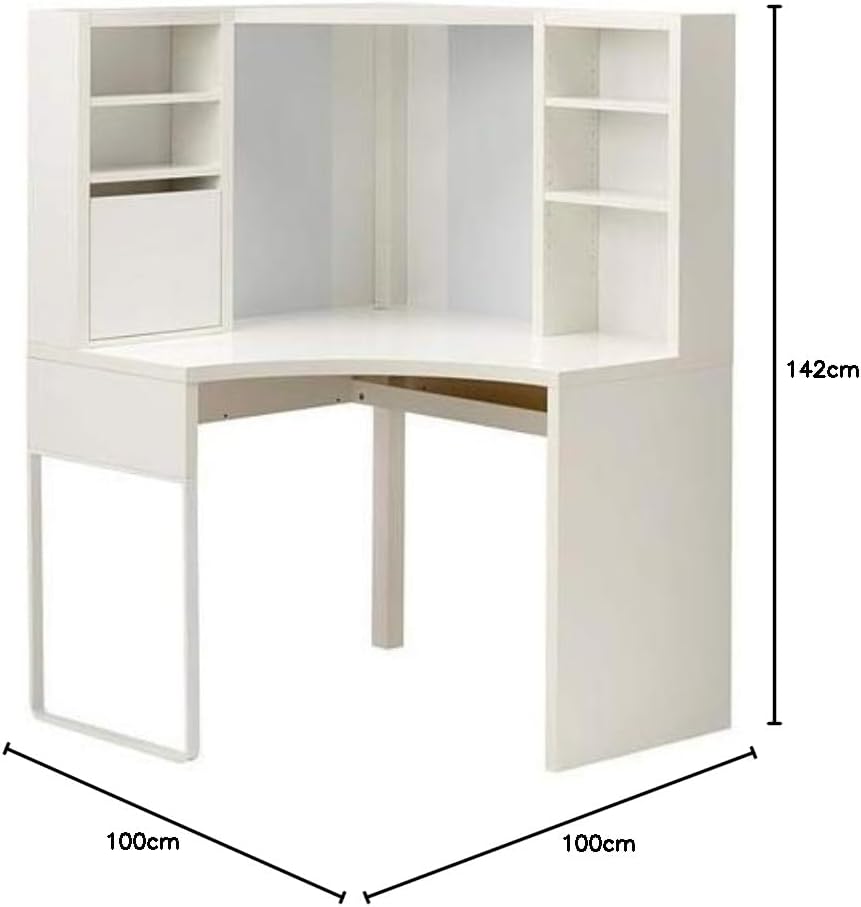
Figure 2: Dimensions of the IKEA MICKE Corner Workstation.
7. Warranty and Support
For information regarding product warranty, returns, or additional support, please refer to the documentation provided at the time of purchase or visit the official IKEA website. You may also contact IKEA customer service directly for assistance with your MICKE Corner Workstation.


