
Introduction
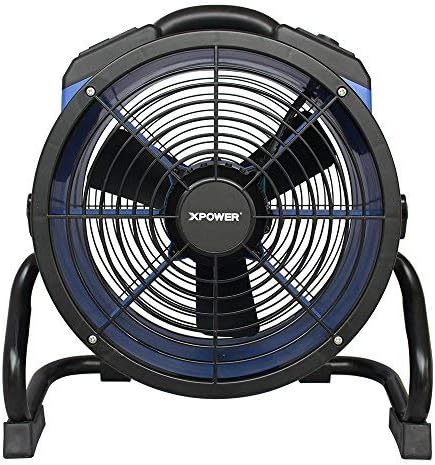
This manual provides essential information for the safe and efficient operation, maintenance, and troubleshooting of your XPOWER X-35AR Pro Industrial Axial Fan. Please read all instructions carefully before use and retain this manual for future reference.
Safety Information
- Always ensure the fan is placed on a stable, level surface.
- Do not operate the fan with a damaged cord or plug.
- Keep children and pets away from the fan during operation.
- Avoid placing objects through the fan grilles.
- Unplug the fan from the power outlet before cleaning or performing any maintenance.
- This fan is designed for indoor use in high-temperature environments up to 180°F (82°C). It does not produce heat.
Setup
Follow these steps to set up your XPOWER X-35AR Pro Axial Fan:
- Unpacking: Carefully remove the fan from its packaging. Inspect for any damage during transit.
- Placement: Position the fan on a firm, flat surface. Ensure there is adequate clearance around the intake and exhaust grilles for optimal airflow.
- Rack/Stand Adjustment: The fan includes a rack/stand that allows for 360-degree rotation. Loosen the adjustment knobs on the sides of the stand to tilt the fan to your desired angle. Tighten the knobs securely to lock the position.

Operating Instructions
To operate your XPOWER X-35AR Pro Axial Fan:
- Power Connection: Plug the fan's power cord into a standard electrical outlet.
- Power On/Off: Locate the power switch or button on the control panel. Press to turn the fan ON. Press again to turn it OFF.
- Variable Speed Control: The fan features variable speed control. Use the designated knob or buttons to adjust the airflow intensity from low to high, according to your requirements.
- Built-in Power Outlets: The fan is equipped with built-in power outlets. These allow you to daisy-chain multiple XPOWER fans for extended coverage or to power other compatible devices (e.g., power tools, mobile phone chargers). Ensure the total current draw does not exceed the fan's rated capacity.
- Adjusting Airflow Direction: Loosen the side knobs on the stand, adjust the fan to the desired angle (up to 360 degrees), and then re-tighten the knobs to secure its position.
Maintenance
Regular maintenance ensures optimal performance and longevity of your fan:
- Cleaning: Disconnect the fan from the power source before cleaning. Use a soft, damp cloth to wipe down the exterior surfaces. For the grilles and blades, use a vacuum cleaner with a brush attachment or compressed air to remove dust and debris. Do not use harsh chemicals or abrasive cleaners.
- Storage: When not in use, store the fan in a clean, dry place. The fan can be stacked up to 5 units high for efficient storage or transportation. Wrap the 20 ft. power cord around the integrated cord wrap for neat storage.
Troubleshooting
| Problem | Possible Cause | Solution |
|---|---|---|
| Fan does not turn on. | No power supply; power cord not fully plugged in; circuit breaker tripped. | Check power outlet; ensure cord is securely plugged in; reset circuit breaker. |
| Reduced airflow. | Grilles or blades are obstructed by dust/debris. | Unplug fan and clean grilles and blades as per maintenance instructions. |
| Unusual noise during operation. | Loose components; debris inside the fan. | Unplug fan and inspect for loose parts or foreign objects. If noise persists, contact customer support. |
Specifications
| Feature | Detail |
|---|---|
| Model Number | X-35AR Pro |
| Brand | XPOWER |
| Motor | 1/4 HP Sealed Induction Motor |
| Airflow (Max) | 1720 CFM (Cubic Feet Per Minute) |
| Amperage (Max) | 1.6 Amps |
| Power Source | Corded Electric |
| Voltage | 12 Volts |
| Wattage | 184 watts |
| Product Dimensions (D x W x H) | 9.2" x 18.6" x 19.4" |
| Weight | 17.6 pounds |
| Material | Polycarbonate Housing, Plastic Blades |
| Cord Length | 20 ft. |
| Special Features | Variable Speed, Built-in Power Outlets, 360-degree Rotation, Stackable |
| Indoor/Outdoor Usage | Indoor |
Warranty & Support
The XPOWER X-35AR Pro Industrial Axial Fan is backed by a 1-year manufacturer limited warranty. This warranty covers defects in materials and workmanship under normal use.
For warranty claims, technical support, or service inquiries, please contact XPOWER customer support. Refer to the official XPOWER website or product packaging for the most current contact information.


