
Introduction
This manual provides essential information for the safe and efficient installation, operation, and maintenance of the MEAN WELL RD-65A Dual Output Switching Power Supply. Please read this manual thoroughly before using the product and retain it for future reference.
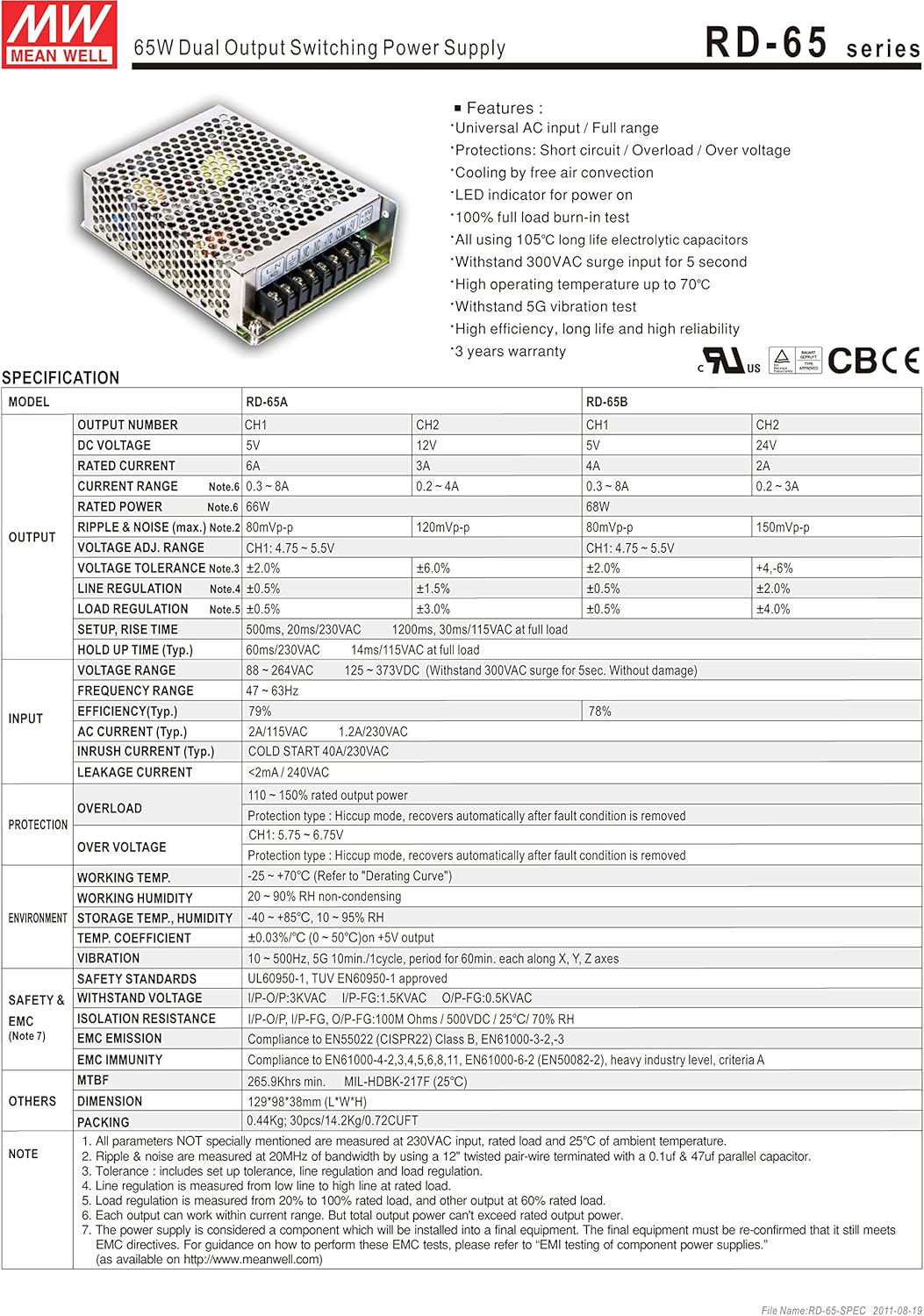
Figure 0: MEAN WELL RD-65A Dual Output Switching Power Supply.
The RD-65A is a 66W dual output power supply designed for various electronic applications, providing stable 5V and 12V DC outputs.
Product Features
- Universal AC input / Full range
- Protections: Short circuit / Overload / Over voltage
- Cooling by free air convection
- LED indicator for power on
- 100% full load burn-in test
- All using 105°C long life electrolytic capacitors
- Withstand 300VAC surge input for 5 seconds
- High operating temperature up to 70°C
- Withstand 5G vibration test
- High efficiency, long life and high reliability
- 3 years warranty
Specifications
Output Characteristics (RD-65A)
| Output Number | CH1 | CH2 |
|---|---|---|
| DC Voltage | 5V | 12V |
| Rated Current | 6A | 3A |
| Current Range | 0.3 - 6A | 0.2 - 3A |
| Rated Power | 66W | |
| Ripple & Noise (max.) | 120mVp-p | 120mVp-p |
| Voltage ADJ. Range | CH1: 4.75 - 5.5V | |
| Voltage Tolerance | ±2.0% | ±6.0% |
| Line Regulation | ±0.5% | ±1.0% |
| Load Regulation | ±1.0% | ±3.0% |
| Setup, Rise Time | 500ms, 20ms/230VAC; 1200ms, 20ms/115VAC at full load | |
| Hold Up Time (typ.) | 80ms/230VAC; 14ms/115VAC at full load | |
Input Characteristics
| Characteristic | Value |
|---|---|
| Voltage Range | 88 ~ 264VAC; 125 ~ 373VDC (Withstand 300VAC surge for 5sec. Without damage) |
| Frequency Range | 47 ~ 63Hz |
| Efficiency (typ.) | 78% |
| AC Current (typ.) | 2A/115VAC; 1.2A/230VAC |
| Inrush Current (typ.) | COLD START 40A/230VAC |
| Leakage Current | <2mA / 240VAC |
Protection
| Type | Description |
|---|---|
| Overload | 105 ~ 160% rated output power. Protection type: Hiccup mode, recovers automatically after fault condition is removed. |
| Over Voltage | CH1: 5.75 ~ 6.75V. Protection type: Hiccup mode, recovers automatically after fault condition is removed. |
Environmental & Safety
| Characteristic | Value |
|---|---|
| Working Temp. | -25 ~ +70°C (Refer to "Derating Curve") |
| Working Humidity | 20 ~ 90% RH non-condensing |
| Storage Temp., Humidity | -40 ~ +85°C, 10 ~ 95% RH |
| Temp. Coefficient | ±0.03%/°C (0 ~ 50°C) on 5V output |
| Vibration | 10 ~ 500Hz, 5G 10min./1cycle, period for 60min. each along X, Y, Z axes |
| Safety Standards | UL60950-1, TUV EN60950-1 approved |
| Withstand Voltage | I/P-O/P:3KVAC; I/P-FG:1.5KVAC; O/P-FG:0.5KVAC |
| Isolation Resistance | I/P-O/P, I/P-FG, O/P-FG: >100M Ohms / 500VDC / 25°C / 70% RH |
| EMI Emission | Compliance to EN55022 (CISPR22) Class B, EN61000-3-2,-3 |
| EMI Immunity | Compliance to EN61000-4-2,3,4,5,6,8,11, EN61000-6-2 (EN50082-2), heavy industry level, criteria A |
| MTBF | 265.9Khrs min. MIL-HDBK-217F (25°C) |
Physical Dimensions
- Item dimensions L x W x H: 5.08 x 3.86 x 1.5 inches (129 x 98 x 38 mm)
- Item Weight: 5 Grams (Note: This weight seems unusually low for a power supply of this type. Please verify with product packaging.)
- Packing: 0.7kg; 20pcs/14.7kg/1.72CUFT
Setup and Installation
Mechanical Installation
The power supply should be mounted in a location that allows for adequate air circulation for cooling. Refer to the mechanical drawing for dimensions and mounting hole positions.
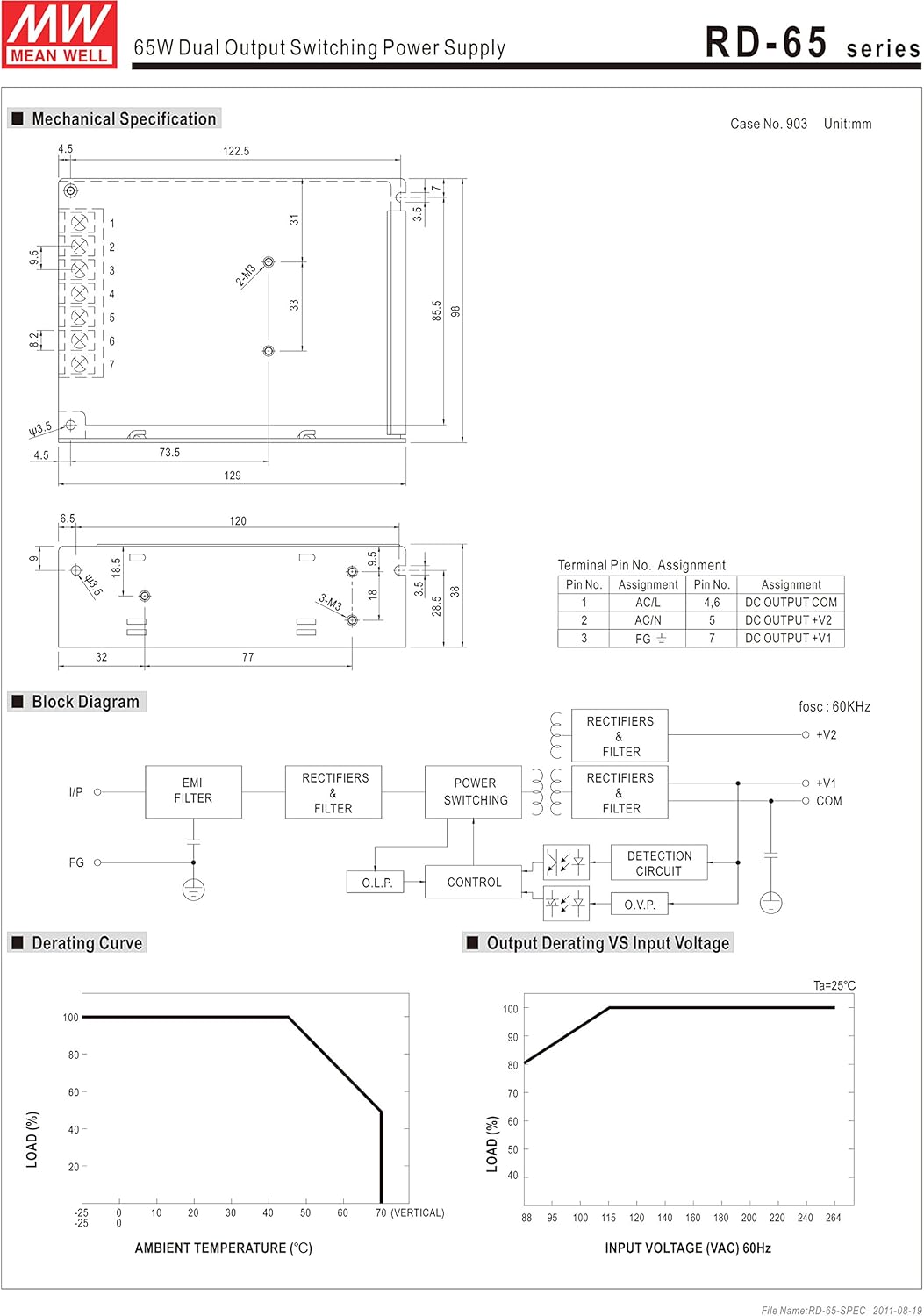
Figure 1: Mechanical dimensions and mounting points for the RD-65A power supply. Dimensions are in millimeters.
Ensure the power supply is securely mounted to prevent movement or vibration during operation.
Wiring Connections
Connect the input and output wires according to the terminal pin assignments. Ensure all connections are secure and properly insulated to prevent short circuits.
| Pin No. | Assignment | Pin No. | Assignment |
|---|---|---|---|
| 1 | AC/L | 4,5 | DC OUTPUT COM |
| 2 | AC/N | 6 | DC OUTPUT +V2 |
| 3 | FG | 7 | DC OUTPUT +V1 |
Input Connections:
- Connect the AC Live wire to Pin 1 (AC/L).
- Connect the AC Neutral wire to Pin 2 (AC/N).
- Connect the Frame Ground (FG) to Pin 3. This connection is crucial for safety.
Output Connections:
- Connect the common ground for DC outputs to Pins 4 and 5 (DC OUTPUT COM).
- Connect the +12V DC output to Pin 6 (DC OUTPUT +V2).
- Connect the +5V DC output to Pin 7 (DC OUTPUT +V1).
Note: Always ensure the power supply is disconnected from the AC mains before making any wiring connections.
Operating Instructions
Once the power supply is correctly installed and wired, it is ready for operation. The RD-65A is designed for continuous operation within its specified limits.
Power On/Off
Connect the AC input to a suitable power source. The LED indicator on the unit will illuminate, indicating that the power supply is active and providing output voltage.
To turn off the power supply, disconnect the AC input from the power source.
Block Diagram Overview
Figure 2: Internal block diagram of the RD-65A power supply.
The block diagram illustrates the internal functional stages:
- EMI Filter: Reduces electromagnetic interference from the AC input.
- Rectifiers & Filter: Converts AC input to DC voltage.
- Power Switching: High-frequency switching to regulate the output voltage.
- Control: Monitors and regulates the output, including Over Load Protection (O.L.P.) and Over Voltage Protection (O.V.P.) circuits.
- Output Rectifiers & Filter: Converts the switched voltage back to stable DC outputs (+V1, +V2, COM).
The power supply is designed to operate efficiently and reliably within its specified load and environmental conditions.
Derating Curve
The derating curve indicates the maximum permissible output load as a function of ambient temperature and input voltage. Operating the power supply within these curves ensures optimal performance and longevity.
Figure 3: Output Derating Curve vs. Ambient Temperature and Input Voltage.
- Ambient Temperature Derating: As the ambient temperature increases, the maximum allowable output load decreases. Ensure adequate ventilation to maintain the temperature within safe operating limits.
- Input Voltage Derating: The power supply can deliver full rated power across its specified input voltage range. However, for prolonged operation at the lower end of the input voltage range, it is advisable to refer to the input voltage derating curve.
Exceeding these limits can lead to reduced lifespan or damage to the unit.
Safety Precautions
To ensure safe operation and prevent damage to the power supply or connected equipment, observe the following precautions:
- Electrical Safety: Always disconnect the AC input power before performing any installation, wiring, or maintenance. Ensure proper grounding (FG) is established.
- Ventilation: Do not obstruct the ventilation holes. Ensure sufficient airflow around the unit to prevent overheating.
- Environment: Operate the power supply within the specified temperature and humidity ranges. Avoid exposure to moisture, dust, and corrosive substances.
- Load Capacity: Do not exceed the rated output power or current for each channel. Overloading can trigger protection mechanisms or cause damage.
- Protection Features: The unit includes short circuit, overload, and over voltage protections. While these protect the unit, continuous triggering of these protections should be avoided. Investigate and resolve the cause of any protection activation.
- Qualified Personnel: Installation and servicing should only be performed by qualified personnel.
Troubleshooting
If the power supply is not functioning as expected, consider the following common issues and solutions:
- No Output Voltage / LED Off:
- Check if the AC input power is connected and active.
- Verify the input voltage is within the specified range (88-264VAC).
- Inspect input fuses (if external).
- Output Voltage Fluctuating or Low:
- Ensure the load connected does not exceed the rated output current or power.
- Check for loose wiring connections at the output terminals.
- Verify the ambient temperature is within the operating range and ventilation is adequate.
- Unit Shuts Down:
- This may indicate activation of overload or over voltage protection. Disconnect the load and re-apply power. If it operates normally, the issue is with the load.
- Check for short circuits in the output wiring or connected device.
- Ensure the unit is not overheating due to insufficient ventilation or high ambient temperature.
If the problem persists after checking these points, contact qualified service personnel or MEAN WELL support.
Maintenance
The MEAN WELL RD-65A power supply is designed for long-term, reliable operation with minimal maintenance. However, periodic checks can help ensure its longevity:
- Cleaning: Periodically clean the exterior of the unit to prevent dust accumulation, especially around ventilation openings. Use a soft, dry cloth. Do not use liquid cleaners.
- Connection Checks: Occasionally inspect all wiring connections for tightness and signs of corrosion or damage.
- Environmental Monitoring: Ensure the operating environment remains within specified temperature and humidity limits.
No user-serviceable parts are inside. Do not attempt to open or repair the unit yourself. Refer all servicing to qualified personnel.
Warranty and Support
The MEAN WELL RD-65A Dual Output Switching Power Supply is generally covered by a 3-year warranty from the date of purchase, ensuring high quality and reliability.
For technical support, warranty claims, or service inquiries, please contact your authorized MEAN WELL distributor or reseller. Provide your product model number (RD-65A) and purchase details when seeking assistance.
For more information, you may visit the official MEAN WELL website.


