GDSTIME 4020 12V Brushless DC Blower Cooling Fan Instruction Manual
Model: 4020 (40mm x 20mm)
1. Introduction
This manual provides detailed instructions for the safe and effective use of your GDSTIME 4020 12V Brushless DC Blower Cooling Fan. Please read this manual thoroughly before installation and operation to ensure proper function and longevity of the product. This fan is designed for various cooling applications, including 3D printers, humidifiers, purifiers, projectors, and small PC enclosures.
2. Safety Information
- Ensure the power supply voltage matches the fan's rated voltage (12V DC). Connecting to an incorrect voltage can damage the fan.
- Observe correct polarity when connecting the fan. The red wire is positive (+), and the black wire is negative (-). Incorrect polarity will prevent the fan from operating.
- Avoid touching the fan blades while the fan is operating.
- Do not obstruct the air intake or outlet of the fan, as this can reduce performance and lead to overheating.
- Keep the fan away from water and excessive moisture.
- Installation should be performed by individuals familiar with electronic components and wiring.
3. Package Contents
Verify that all items are present in your package:
- 2x GDSTIME 4020 Blower Fans
- 6x Mounting screws and nuts

Figure 3.1: Package contents including two fans and mounting hardware.
4. Product Features
- Dual Ball Bearings: Ensures a long lifespan of approximately 50,000 hours and allows the fan to be mounted in any orientation (flat or upright).
- Durable Construction: Made from PBT plastic, meeting UL 94 flammability standards.
- 2-Pin Connector: Features an XH2.54-2Pin connector for power supply, with a 21cm cable length.
- Efficient Airflow: Designed to pull air in from the sides and force it out at a concentrated 90-degree angle.

Figure 4.1: Illustration of dual ball bearings and PBT plastic construction.

Figure 4.2: Airflow direction of the blower fan.
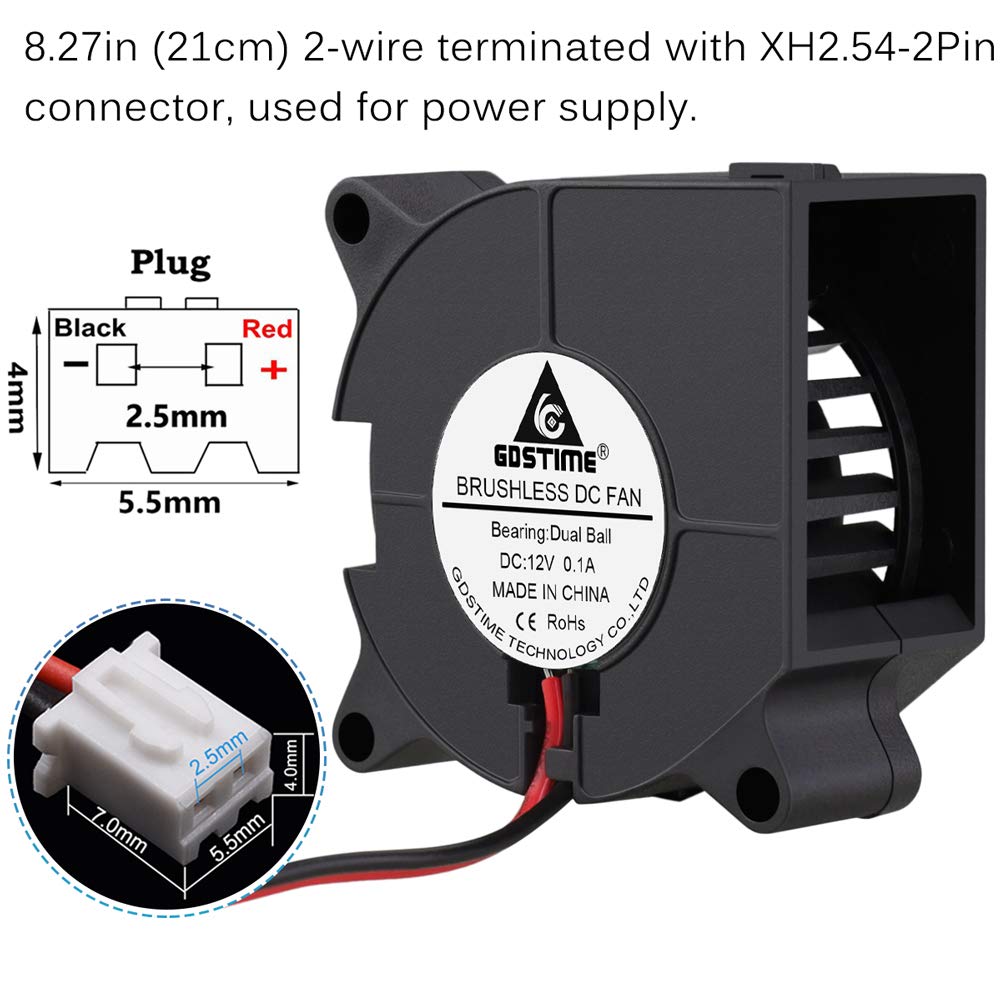
Figure 4.3: XH2.54-2Pin connector and wiring details.
5. Specifications
| Specification | Value |
|---|---|
| Fan Size | 40mm x 40mm x 20mm (1.57"L x 1.57"W x 0.79"H) |
| Air Intake Size | 27 mm (1.06 in) |
| Air Outlet Size | 30mm x 20mm (1.18" x 0.79") |
| Hole Pitch | 35 mm (1.38 in) |
| Connector | XH2.54-2Pin |
| Cable Length | 210 mm (8.27 in) |
| Life Span | 50,000 hours |
| Operating Voltage Range | 4V to 5.5V |
| Operating Temperature | 14°F to 175°F (-10°C to 79.4°C) |
| Bearings | Dual Ball |
| Rated Voltage | 12V DC |
| Rated Current | 0.1 Amp |
| Power | 1.2 Watt |
| Fan Speed | 6500 RPM ±10% |
| Airflow | 3.67 CFM |
| Air Pressure | 0.46 In H₂O |
| Noise Level | 32.5 dBA |
| Net Weight | 22g / 0.78oz |
| Material | PBT Plastic |

Figure 5.1: Detailed dimensions and specifications of the fan.
6. Setup and Installation
Follow these steps to install your GDSTIME 4020 blower fan:
- Identify Mounting Location: Determine the optimal location for the fan, ensuring adequate space for both air intake and exhaust. The fan can be mounted flat or upright.
- Secure the Fan: Use the provided mounting screws and nuts to firmly attach the fan to your device or enclosure. Ensure the fan is stable and does not vibrate excessively.
- Connect Power: Connect the XH2.54-2Pin connector to a compatible 12V DC power source. Pay close attention to the polarity: the red wire connects to the positive (+) terminal, and the black wire connects to the negative (-) terminal.
- Test Functionality: After installation, briefly power on the device to confirm the fan operates correctly and moves air in the desired direction.

Figure 6.1: Examples of fan applications.
7. Operating Instructions
Once properly installed and connected to a 12V DC power source, the GDSTIME 4020 blower fan will begin operating. The fan is designed for continuous operation within its specified voltage and temperature ranges.
- Power On/Off: The fan's operation is controlled by the power supply it is connected to. Turn on the power to activate the fan and turn it off to stop.
- Airflow Direction: The fan is designed to draw air from its sides and expel it through the rectangular outlet. Ensure this airflow direction aligns with your cooling requirements.
8. Maintenance
Regular maintenance helps ensure optimal performance and extends the lifespan of your fan.
- Cleaning: Periodically inspect the fan for dust accumulation on the blades and within the housing. Use a soft brush or compressed air to gently remove dust. Ensure the power is disconnected before cleaning.
- Inspection: Check the power cable and connector for any signs of wear or damage. Ensure mounting screws remain tight.
9. Troubleshooting
If you encounter issues with your GDSTIME 4020 blower fan, refer to the following common problems and solutions:
- Fan does not start:
- Check if the power supply is active and providing 12V DC.
- Verify that the power connector is securely attached.
- Confirm correct wire polarity (Red: +, Black: -).
- Fan is unusually noisy:
- Ensure the fan is securely mounted and not vibrating against other components.
- Check for any obstructions (e.g., loose wires, debris) hitting the fan blades.
- Dust accumulation can sometimes cause noise; clean the fan as described in the Maintenance section.
- Reduced airflow:
- Check for obstructions at the air intake or outlet.
- Clean any dust or debris from the fan blades and housing.
10. Warranty and Support
GDSTIME products are manufactured to high-quality standards. For any issues or support needs, please contact the seller or manufacturer directly. Keep your purchase receipt for warranty claims, if applicable. The dual ball bearings are designed for a long operational life of 50,000 hours under normal conditions.


