
1. Introduction
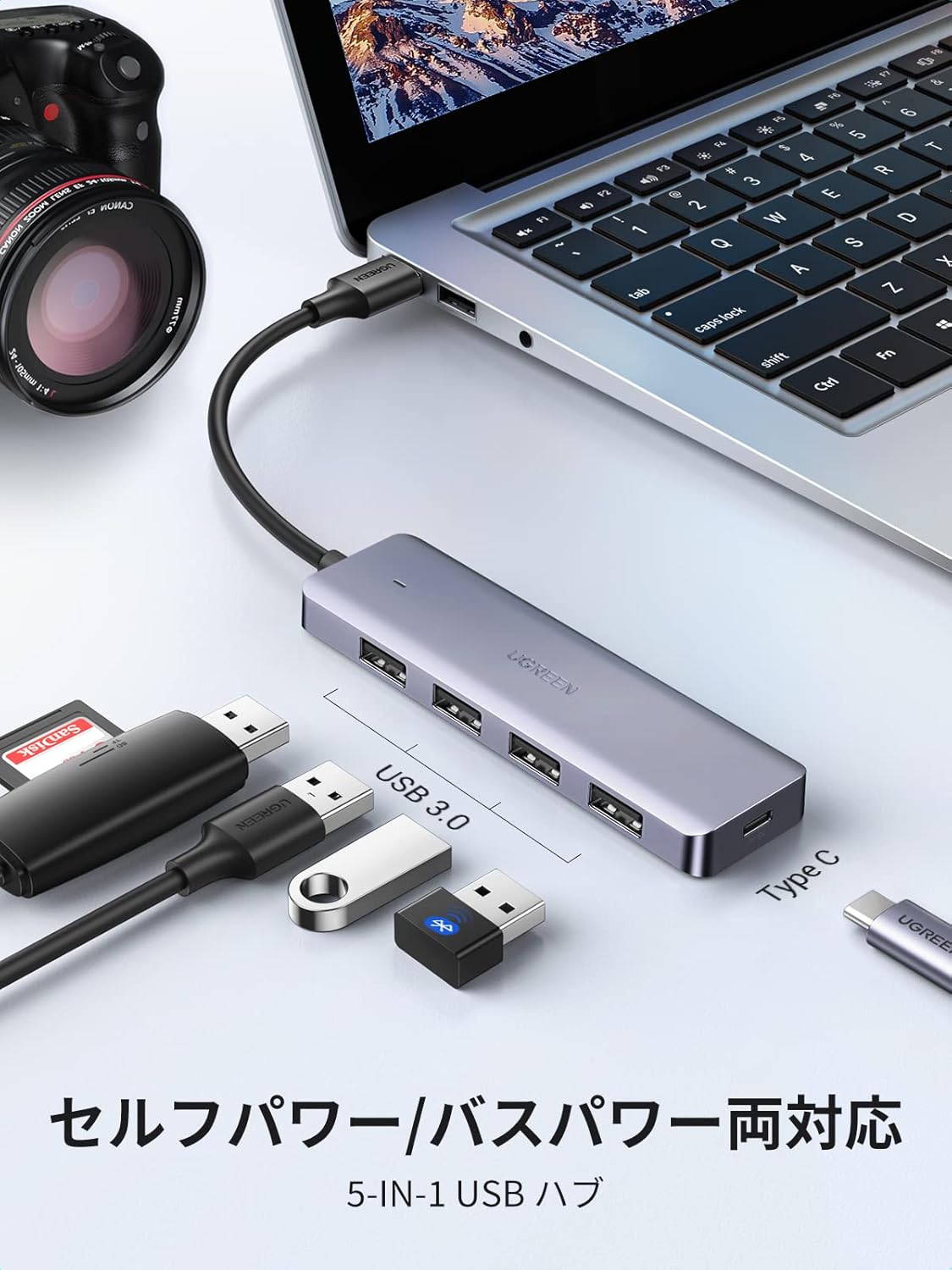
The UGREEN USB 3.0 4-Port Hub (Model 50985) is designed to expand a single USB port into four USB 3.0 ports, enabling simultaneous connection of multiple USB devices. This hub supports both bus-powered and self-powered modes, ensuring stable operation across various devices and applications. Its compact and lightweight design makes it ideal for both desktop use and travel.
2. Product Features
- 4 USB 3.0 Ports: Adds four USB ports to your laptop or computer, supporting a wide range of USB devices such as flash drives, printers, card readers, mice, keyboards, and external hard drives.
- Plug and Play: No drivers are required for installation. Simply connect the hub to your device and it's ready to use.
- Wide Compatibility: Compatible with various operating systems including Windows 10/8.1/8/7/Vista/XP, Mac OS X 10.6-10.9, Linux 2.6.14 and later, iOS, and Chrome OS. Works with devices like PS4, PS5, Xbox One, MacBook mini/Pro, Surface Pro, and MateBook X Pro.
- High-Speed Data Transfer: Each USB 3.0 port offers data transfer speeds of up to 5Gbps, approximately 10 times faster than USB 2.0, allowing for rapid transfer of large files. It is backward compatible with USB 2.0 and USB 1.1 devices.
- Stable Power Supply: For connecting four USB devices simultaneously or devices with high power consumption (e.g., external hard drives), connect an external USB-C power supply (sold separately) to the hub's USB-C power port for enhanced stability.
- Compact and Portable Design: With dimensions of 10.4 x 3 x 1 cm, this hub helps organize connected USB devices and maximizes desk space. Its lightweight design allows for easy storage in a bag, making it perfect for travel.
- LED Indicator: An integrated LED lamp indicates the hub's operational status.
3. Setup
- Connect the Hub: Plug the USB-A connector of the UGREEN USB 3.0 4-Port Hub into an available USB-A port on your computer, laptop, or compatible device.
- Connect USB Devices: Insert your USB devices (e.g., flash drives, mouse, keyboard, printer) into the available USB 3.0 ports on the hub.
- Optional External Power (for high-power devices): If you are connecting multiple high-power devices (such as external hard drives), connect a USB-C power adapter (sold separately) to the USB-C power input port on the hub. This provides additional power for stable operation.

4. Operating Instructions
- Automatic Recognition: Once connected, your operating system should automatically detect the hub and any connected devices without requiring manual driver installation.
- Data Transfer: To achieve optimal data transfer speeds of up to 5Gbps, ensure that both the connected device and your computer's USB port support USB 3.0.
- LED Indicator: The small LED light on the hub will illuminate when it is powered and functioning correctly.

5. Compatibility
The UGREEN USB 3.0 4-Port Hub offers broad compatibility with various devices and operating systems:
Supported Operating Systems:
- Windows 10 / 8.1 / 8 / 7 / Vista / XP (32/64 bit)
- Mac OS X 10.6 ~ 10.9 and later
- Linux 2.6.14 and later
- iOS
- Chrome OS
Compatible Devices:
- Laptops and Desktop Computers
- Game Consoles: PS5, PS4, Xbox One, Xbox One S, Xbox 360
- Tablets: iPad Pro, Surface Pro
- Smartphones: MateBook X Pro, Galaxy S23 (and other compatible devices)
- USB Peripherals: USB flash drives, printers, card readers, mice, keyboards, external hard drives, USB cameras, USB microphones.


6. Specifications
| Feature | Description |
|---|---|
| Brand | UGREEN |
| Model Number | 50985 |
| Color | Black |
| Hardware Interface | USB 3.0 |
| Number of Ports | 4 |
| Data Transfer Rate | 5 Gigabits per second (5Gbps) |
| Compatible Devices | Game consoles, PCs, Laptops, USB peripherals |
| Operating System Compatibility | Mac, Windows, Linux, iOS, Chrome OS |
| Product Dimensions (L x W x H) | 10.3 x 3 x 1 cm |
| Material | Rubber shell coating |
| Country of Origin | China |

7. Troubleshooting
Common Issues and Solutions:
- Device Not Recognized:
- Ensure all connections are secure between the hub, your computer, and the connected USB device.
- Try connecting the USB device directly to your computer's port to verify if the device itself is functioning correctly.
- If connecting a high-power device, ensure an external USB-C power adapter (sold separately) is connected to the hub.
- Try connecting the hub to a different USB port on your computer.
- Slow Data Transfer Speeds:
- Verify that both the connected USB device and your computer's USB port support USB 3.0 for optimal 5Gbps speeds. If either is USB 2.0, speeds will be limited to USB 2.0 rates.
- Avoid connecting too many high-bandwidth devices simultaneously if not using an external power supply.
- Intermittent Connection:
- Ensure the hub is receiving sufficient power. Use an external USB-C power adapter for high-power devices.
- Check for any physical damage to the cables or ports.
8. Warranty and Support
Warranty Information:
This UGREEN product comes with a 24-month warranty from the date of purchase. This warranty covers manufacturing defects and malfunctions under normal use.
Warranty Exclusions:
The warranty does not cover damages caused by intentional misuse, accidents, unauthorized modifications, or repairs by the customer or third parties.
Customer Support:
For any questions, technical assistance, or warranty claims, please contact UGREEN customer service. Our professional support team is available to assist you.


