
1. Product Overview
The Real HD 16 Port PoE Switch is an unmanaged Power over Ethernet (PoE) switch designed for reliable and efficient network connectivity. It features 16 10/100Mbps PoE+ ports and 2 Gigabit uplink Ethernet ports, providing a total PoE power budget of 300W, with up to 30W per port. This plug-and-play device is ideal for various applications, including IP cameras, wireless access points, and VoIP phones.
Key Features:
- 802.3af/at Compliant: Provides up to 30W per port, compatible with standard PoE devices.
- Unmanaged Plug and Play: Easy setup with no software configuration required.
- Sturdy Metal Casing: Durable design with good heat dissipation and fan-less operation for quiet integration.
- Extend Mode: Extends data and power transmission up to 250m for PoE devices.
- VLAN Function: Isolates PoE ports for enhanced network performance and security.
- AI Watchdog Function: Automatically detects and restarts offline PoE devices.
- Wide Temperature Operation: Operates reliably in environments from -20°C to 50°C.

Front view of the Real HD 16 Port PoE Switch, showcasing its compact design and port layout.
2. Package Contents
Please verify that all items are present and in good condition upon opening the package:
- Real HD 16 Port PoE Switch
- Power cable
- Rack mount brackets (1U)

Image showing the rear of the PoE switch with its power input and the included 1U rack mount brackets, indicating multiple mounting options.
3. Product Layout and Indicators
Familiarize yourself with the ports and LED indicators on your PoE switch:

Diagram illustrating the front and rear panels of the PoE switch, highlighting the 16 PoE ports, 2 Gigabit uplink RJ45 ports, VLAN/Extend switch, and built-in power supply.
- 1-16 10/100M PoE Ports: These ports support Power over Ethernet (PoE/PoE+) for connecting compatible devices like IP cameras and wireless access points.
- 17-18 1000M Uplink Ports: These Gigabit Ethernet ports are used to connect the switch to your router, NVR, or other network devices.
- VLAN/Extend Switch: A physical switch to toggle between VLAN mode and Extend mode.
- PWR LED: Indicates power status.
- Link/Act LEDs (per port): Indicates network activity and connection status.
- PoE LEDs (per port): Indicates PoE power delivery status.
4. Setup and Installation
The Real HD 16 Port PoE Switch is designed for simple plug-and-play installation.
- Placement: Position the switch on a desktop or mount it in a rack using the included brackets. Ensure adequate ventilation around the device.
- Power Connection: Connect the provided power cable to the AC input on the rear of the switch and then to a standard power outlet. The PWR LED will illuminate.
- Connect Uplink: Connect one of the Gigabit uplink ports (17 or 18) to your router, NVR, or main network switch using a standard Ethernet cable.
- Connect PoE Devices: Connect your PoE-compatible devices (e.g., IP cameras, wireless access points) to any of the 16 PoE ports (1-16). The Link/Act and PoE LEDs for the respective ports will light up, indicating a successful connection and power delivery.
- Connect Non-PoE Devices (Optional): If you have non-PoE network devices that need to connect through the switch, ensure they are connected to the uplink ports or through another non-PoE switch connected to an uplink port.

Example network setup showing how the PoE switch connects various devices such as PTZ IP cameras, standard IP cameras, access points (PoE/PoE+), and non-PoE devices like routers, NVRs, and VoIP phones, distinguishing between PoE, PoE+, and non-PoE connections.
5. Operating Modes and Functions
The switch offers specialized operating modes to optimize network performance and security.
5.1. Extend Mode
When enabled via the VLAN/Extend switch, Extend Mode allows for longer data and power transmission distances for PoE devices. This is particularly useful for surveillance systems where cameras might be located far from the switch.
- Function: Increases the maximum transmission distance for data and PoE power up to 250 meters.
- Note: When Extend Mode is active, the data speed for the PoE ports will be reduced to 10Mbps.

Visual representation of the Extend Mode feature, showing how it increases data and power transmission distance up to 250 meters at 10Mbps, compared to the default 100 meters at 10/100Mbps.
5.2. VLAN Function
When enabled via the VLAN/Extend switch, VLAN mode enhances network security and performance by isolating the PoE ports.
- Function: In VLAN mode, PoE ports (1-16) are isolated from each other, preventing direct communication between devices connected to different PoE ports.
- Communication: All PoE ports can still communicate with the uplink ports (17-18), allowing them to access the main network and the internet.
- Benefit: This isolation helps prevent broadcast storms and improves overall network security, especially in surveillance or multi-device environments.

Illustration of the VLAN mode, where PoE ports (1-16) are isolated from each other but can communicate with the uplink ports, enhancing network security and performance for various devices like cameras, access points, and VoIP phones.
5.3. AI Watchdog Function
The AI Watchdog function is an intelligent feature designed to maintain continuous operation of your PoE devices.
- Function: The switch automatically monitors the status of connected PoE devices. If a device becomes unresponsive or offline, the AI Watchdog will automatically restart the corresponding PoE port to re-establish the connection.
- Benefit: This feature reduces the need for manual intervention and lowers maintenance costs, ensuring your network devices remain operational.
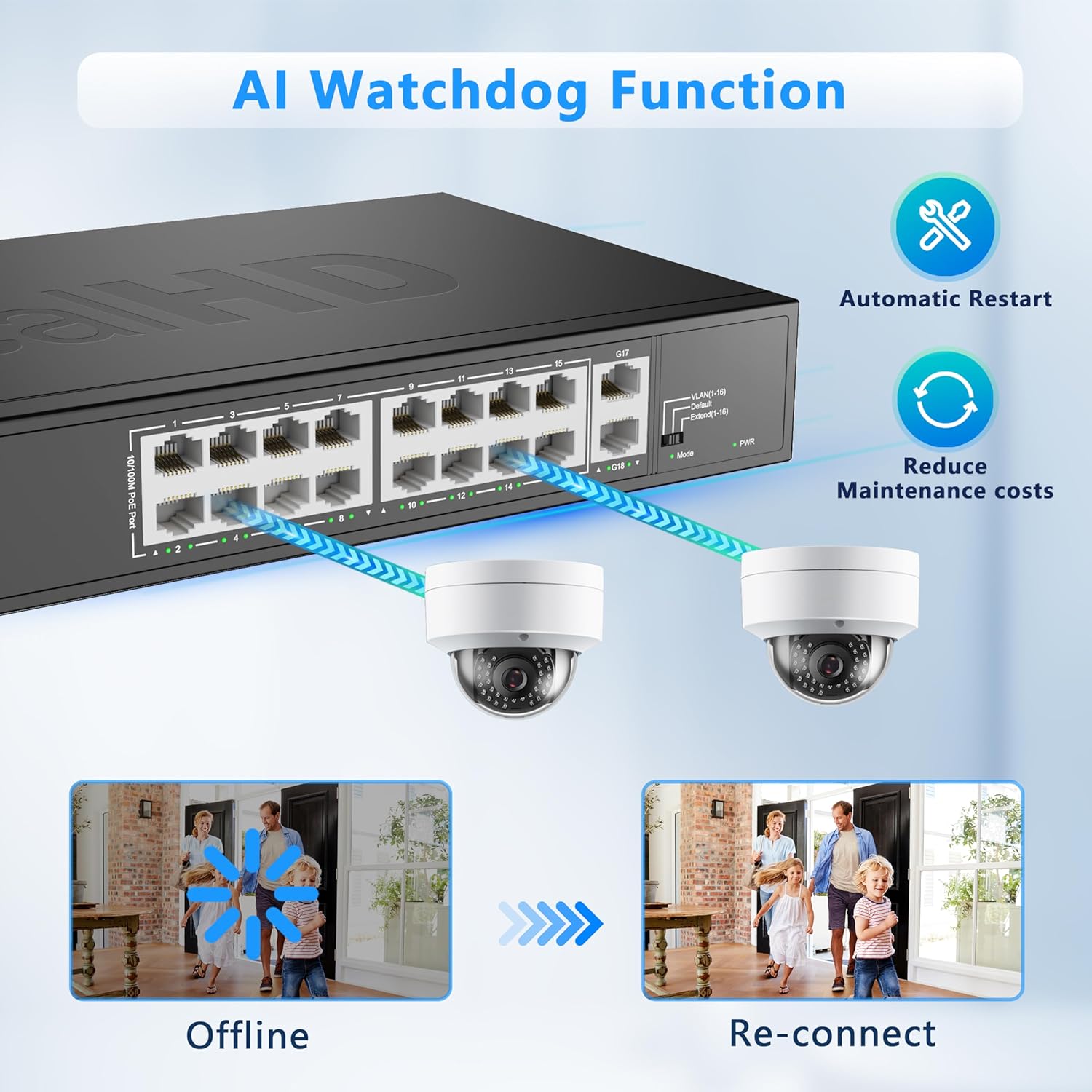
Diagram explaining the AI Watchdog function, which automatically detects offline PoE devices and restarts them, reducing maintenance costs and ensuring continuous operation.
6. Maintenance
To ensure the longevity and optimal performance of your Real HD 16 Port PoE Switch, follow these maintenance guidelines:
- Cleaning: Use a soft, dry cloth to clean the exterior of the switch. Do not use liquid or aerosol cleaners.
- Ventilation: Ensure that the ventilation openings are not blocked. Although the switch has a fanless design for quiet operation and good heat dissipation, proper airflow is still important.
- Temperature: Operate the switch within its specified temperature range of -20°C to 50°C ( -4°F to 122°F). Avoid placing it in direct sunlight or near heat sources.
- Power Supply: Use only the provided power cable. Disconnect power during electrical storms or when unused for long periods.
- Lightning Protection: The switch is engineered with 4KV lightning protection surge capabilities, providing enhanced durability against electrical surges.

Collage of images demonstrating the switch's robust features, including 4KV lightning protection, rack-mount capability, fanless design for quiet operation and good heat dissipation, and wide temperature operation.
7. Troubleshooting
If you encounter issues with your Real HD 16 Port PoE Switch, refer to the following common problems and solutions:
| Problem | Possible Cause | Solution |
|---|---|---|
| No Power (PWR LED Off) | Power cable not connected or power outlet issue. | Ensure the power cable is securely connected to both the switch and a working power outlet. Try a different outlet. |
| No Link/Activity on a Port | Faulty Ethernet cable, device not connected, or device issue. | Check the Ethernet cable connection at both ends. Try a different cable. Ensure the connected device is powered on and functioning correctly. |
| No PoE Power to Device (PoE LED Off) | Device is not PoE compatible, power budget exceeded, or faulty cable. | Verify the device is 802.3af/at compliant. Check the total power consumption of all connected PoE devices against the 300W budget. Try a different Ethernet cable. The AI Watchdog function may automatically restart the port if the device is unresponsive. |
| Network Performance Issues in Extend Mode | Speed reduction is inherent to Extend Mode. | This is normal. Extend Mode prioritizes distance over speed (10Mbps). If higher speed is required, operate in default mode (100Mbps) and ensure cable length is within 100m. |
| Devices on PoE ports cannot communicate with each other | VLAN mode is enabled. | This is expected behavior in VLAN mode, where ports are isolated. If direct communication between PoE devices is needed, disable VLAN mode using the VLAN/Extend switch. |
8. Specifications
| Feature | Detail |
|---|---|
| Model Number | 16 port poe switch |
| Number of Ports | 16 (PoE+) + 2 (Gigabit Uplink) |
| PoE Standard | IEEE 802.3af/at |
| Data Transfer Rate | 10/100 Mbps (PoE Ports), 1000 Mbps (Uplink Ports) |
| Max Power Per Port | 30W |
| Total PoE Power Budget | 300W |
| Voltage | 48 Volts (DC) |
| Case Material | Metal |
| Operating Temperature | -20°C to 50°C ( -4°F to 122°F) |
| Item Weight | 4.29 pounds (1.95 Kilograms) |
| Package Dimensions | 14.57 x 11.54 x 3.39 inches |
| UPC | 722390680906 |
9. Warranty and Support
Real HD is committed to providing reliable products and excellent after-sales service. For any inquiries or support needs regarding your 16 Port PoE Switch, please contact our US local office. We are dedicated to quickly responding to your questions and providing necessary assistance.
For the most up-to-date support information, please refer to the official Real HD website or contact your point of purchase.