
1. Important Safety Instructions
Please read all instructions carefully before using your Mayer Electric Oven MMO76. Retain this manual for future reference. Failure to follow these safety guidelines may result in fire, electric shock, injury, or property damage.
- Electrical Safety: Ensure the oven is connected to a properly grounded electrical outlet. Do not operate the oven with a damaged cord or plug.
- Hot Surfaces: The oven exterior and interior become extremely hot during operation. Always use oven mitts or pot holders when handling hot items or touching oven surfaces.
- Supervision: Close supervision is necessary when the oven is used by or near children or individuals with reduced physical, sensory, or mental capabilities.
- Ventilation: Ensure adequate ventilation around the oven. Do not block any ventilation openings.
- Flammable Materials: Do not place flammable materials (e.g., paper, plastic, cloth) in or near the oven.
- Cleaning: Always unplug the oven and allow it to cool completely before cleaning.
- Double Protection Glass Window: This oven features a double protection glass window for enhanced safety, reducing external surface temperature.
- Auto Shut-off and Ready Bell: The oven is equipped with an auto shut-off feature and a ready bell to indicate the end of the cooking cycle, enhancing safety and convenience.
2. Product Overview
The Mayer Electric Oven MMO76 is a versatile countertop oven designed for various cooking tasks. It features a spacious interior and precise controls for optimal results.
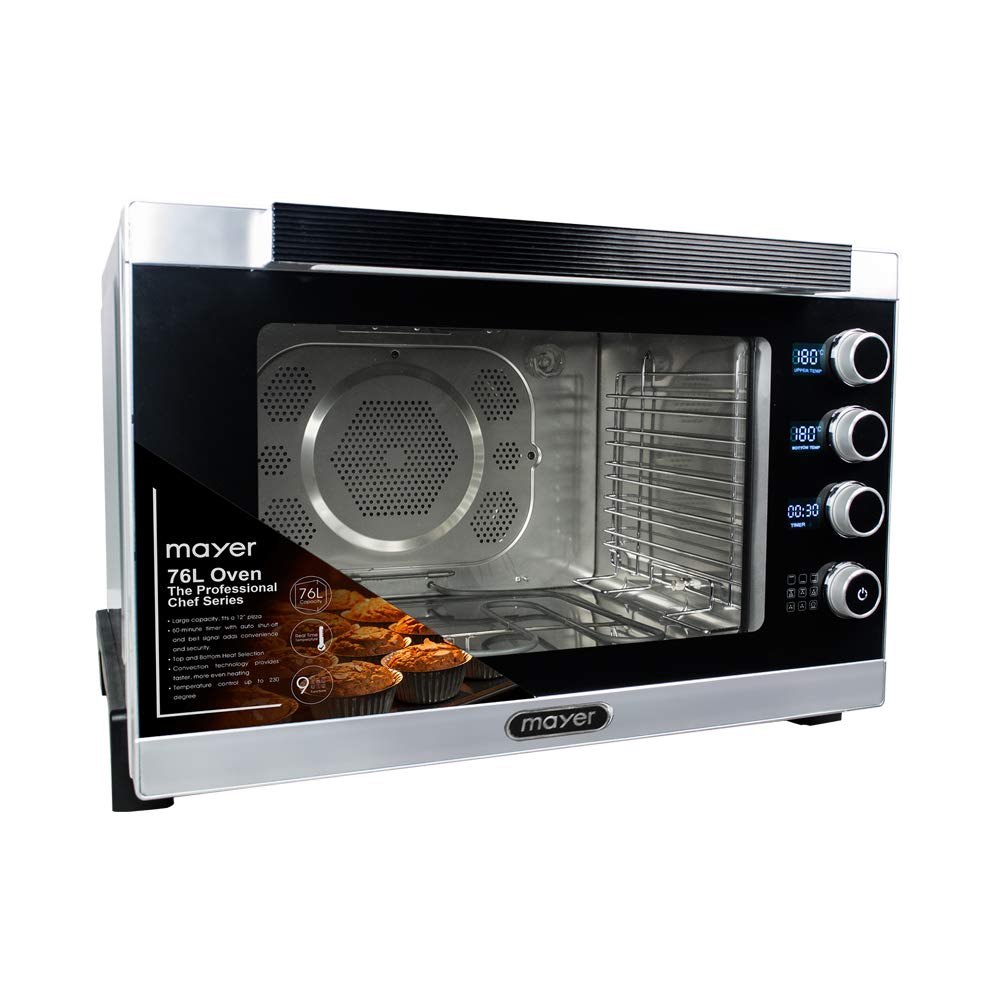
Figure 2.1: Mayer Electric Oven MMO76 with its door open, showcasing the interior racks and control knobs on the right side.
Key Features:
- Capacity: 76 Liters, capable of fitting a 12-inch pizza.
- Temperature Control: Adjustable up to 230 °C.
- Timer: 120-minute timer with auto shut-off and ready bell.
- Heating Elements: Independent top and bottom stainless steel heating elements.
- Inner Cavity: Durable stainless steel inner cavity with an internal lamp for visibility.
- Convection Function: Integrated convection fan for even heat distribution.
- Controls: Digital control panel with intuitive knobs for temperature, function, and timer.
- Detachable Front Panel: Designed for easy cleaning and maintenance.
Included Components:
The following accessories are included with your Mayer Electric Oven MMO76:
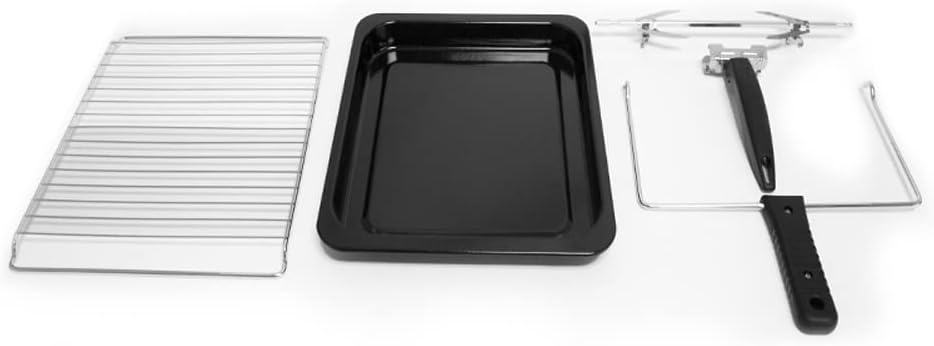
Figure 2.2: Included accessories: two bake trays, two baking racks, and a grill handle.
- 2 x Bake Tray
- 2 x Baking Rack
- 1 x Grill (Rotisserie Spit and Handle)
3. Setup
Proper setup ensures safe and efficient operation of your oven.
- Unpacking: Carefully remove the oven and all accessories from the packaging. Retain packaging materials for future transport or storage.
- Placement: Place the oven on a stable, flat, and heat-resistant surface. Ensure there is at least 10-15 cm (4-6 inches) of clear space on all sides and above the oven for proper ventilation. Do not place the oven near flammable materials or under cabinets that are not heat-resistant.
- Power Connection: Plug the oven into a grounded electrical outlet. Ensure the voltage rating of the oven matches your household's power supply.
- Initial Cleaning: Before first use, wipe the interior and exterior of the oven with a damp cloth. Wash all accessories (bake trays, racks, grill) with warm soapy water, rinse, and dry thoroughly.
- First Use (Burn-in): To eliminate any manufacturing odors, operate the empty oven for approximately 15-20 minutes at the maximum temperature (230 °C) on the 'Bake' function. Ensure the area is well-ventilated during this process. A slight odor or smoke is normal during the first use.
4. Operating Instructions
Familiarize yourself with the control knobs for precise cooking.
Control Panel:
The oven features three main control knobs:
- Temperature Knob: Used to set the desired cooking temperature from 70 °C to 230 °C.
- Function Knob: Selects the heating mode (e.g., Top Heat, Bottom Heat, Top & Bottom Heat, Convection, Rotisserie). This oven includes a heating element select control.
- Timer Knob: Sets the cooking duration up to 120 minutes. The oven will automatically shut off and sound a bell when the timer expires. For continuous operation, turn the timer knob to the 'Stay On' position (if available).
General Operation:
- Preheating: Turn the Temperature knob to the desired temperature and the Function knob to the desired heating mode (e.g., Top & Bottom Heat). Allow the oven to preheat for 10-15 minutes, or until the indicator light turns off (if applicable).
- Loading Food: Carefully place food on the bake tray or baking rack, then slide it into the appropriate rack position inside the oven. Close the oven door securely.
- Setting Timer: Turn the Timer knob to the desired cooking time. The oven will begin heating.
- Monitoring: The internal lamp allows you to monitor cooking progress without opening the door.
- Completion: When the timer reaches zero, the oven will automatically shut off and a bell will sound. Carefully remove the cooked food using oven mitts.
Using the Convection Function:
Select a function that includes the convection fan (usually indicated by a fan symbol on the Function knob). The convection fan circulates hot air, promoting faster and more even cooking, which can be beneficial for baking and roasting.
Using the Rotisserie (Grill):
For rotisserie cooking, assemble the grill spit and forks, securing the food item. Insert the assembled spit into the designated rotisserie sockets inside the oven. Select the rotisserie function on the Function knob and set the temperature and timer as required.
5. Care and Maintenance
Regular cleaning and maintenance will prolong the life of your oven and ensure optimal performance.
- Always Unplug: Before any cleaning or maintenance, always unplug the oven from the power outlet and allow it to cool completely.
- Interior Cleaning: Wipe the stainless steel inner cavity with a damp cloth and mild detergent. For stubborn stains, a non-abrasive oven cleaner designed for stainless steel can be used, following the product instructions. Avoid harsh chemicals or abrasive scrubbers that can damage the surface.
- Exterior Cleaning: Wipe the exterior surfaces with a soft, damp cloth. Do not use abrasive cleaners or scourers.
- Detachable Front Panel: The front panel is detachable for easier access to the interior for cleaning. Refer to the specific instructions in the full manual for safe removal and reattachment.
- Accessories: Wash bake trays, baking racks, and the grill spit with warm soapy water. Rinse thoroughly and dry completely before storing or reusing.
- Door Seal: Regularly check the door seal for any damage or debris. Clean gently with a damp cloth to ensure a tight seal during operation.
6. Troubleshooting
If you encounter issues with your oven, refer to the following common problems and solutions.
- Oven Not Heating:
- Check if the oven is properly plugged into a working power outlet.
- Ensure the Timer knob is set to a cooking duration or 'Stay On' position, not 'Off'.
- Verify that the Temperature and Function knobs are set correctly.
- Uneven Cooking:
- Ensure the oven is preheated sufficiently before placing food inside.
- Try using the convection function for more even heat distribution.
- Avoid overcrowding the oven; allow space for air circulation.
- Rotate food halfway through cooking for consistent results.
- Timer Not Working:
- Ensure the timer knob is turned past the 10-minute mark to activate the mechanical timer.
- If the timer is stuck or not advancing, unplug the oven and plug it back in after a few minutes.
- Excessive Smoke/Odor:
- A slight odor is normal during the first few uses (burn-in process).
- Ensure the oven interior and accessories are clean and free of food residue or grease.
- Check for any plastic or packaging materials accidentally left inside.
If the problem persists after attempting these solutions, please contact customer support.
7. Specifications
| Feature | Specification |
|---|---|
| Model | MMO76 |
| Brand | Mayer |
| Capacity | 76 Liters |
| Temperature Control | Up to 230 °C |
| Timer | 120 minutes with auto shut-off |
| Heating Elements | Top & Bottom, Stainless Steel |
| Inner Cavity Material | Stainless Steel |
| Control Type | Knob, Digital Control |
| Power Source | Electric |
| Special Features | Temperature Control, Timer, Convection, Double Protection Glass Window, Auto Shut-off, Ready Bell |
| Approximate Package Dimensions (L x W x H) | 80.2 x 72.4 x 57.8 cm |
| Approximate Package Weight | 36.6 kg |
8. Warranty and Support
Your Mayer Electric Oven MMO76 comes with a warranty to ensure your peace of mind.
- Warranty Period: This product is covered by a 1 Year Local (Singapore) Warranty. Please retain your proof of purchase for warranty claims.
- Customer Support: For technical assistance, warranty claims, or any other inquiries, please contact Mayer customer service. Refer to the contact information provided on your purchase receipt or the official Mayer website.


