
1. Product Overview
The Aurora 3 Inch Amber Off Road LED Cube Light Kit (Model ALO-2-E4A) is designed to provide powerful amber illumination for off-road applications, particularly effective in fog and adverse weather conditions. Each light features four 10-watt Cree LEDs, producing a combined 3,880 lumens with a flood beam pattern. The robust construction ensures durability in challenging environments.

Figure 1: Two Aurora 3-inch amber LED cube lights with mounting brackets.

Figure 2: Close-up view of a single Aurora 3-inch amber LED cube light, highlighting the four amber LEDs and black housing.
Key Features:
- High Performance: Equipped with four 10-watt Cree LED chips for 3,880 lumens of amber light.
- Durable Construction: IP69K rated 6063 aluminum housing, 316 stainless steel screws, and GE Lexan lens.
- Weather Resistant: Waterproof Deutsch connector and a special breather apparatus to prevent condensation.
- Complete Kit: Includes a deluxe wiring harness for professional installation.
2. Specifications
| Feature | Detail |
|---|---|
| Model Number | ALO-2-E4A |
| Dimensions (L x W x H) | 3.2 x 3.3 x 3 inches |
| Light Source | 4 x 10 Watt Cree LED Chips |
| Lumen Output | 3,880 Lumens |
| Beam Pattern | Flood |
| Color Temperature | Amber |
| Wattage | 40 watts |
| Amperage | 2.1 Amps |
| IP Rating | IP69K (Waterproof & Shock Resistant) |
| Housing Material | 6063 Aluminum |
| Lens Material | GE Lexan (UV & Scratch Resistant) |
| Connector Type | Deutsch Connector |
| Item Weight | 2 Pounds |

Figure 3: Detailed dimensions of the Aurora LED cube light.
3. Installation Guide
3.1 Components Included:
- Aurora 3 Inch Amber LED Cube Lights (x2)
- Deluxe Wiring Harness (with on/off switch, in-line fuse, 12V40A relay)
- Mounting Brackets
- Mounting Hardware (bolts, nuts, washers)
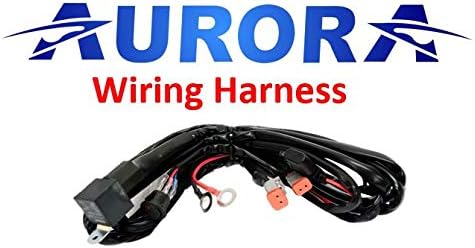
Figure 4: The included deluxe wiring harness.

Figure 5: Mounting hardware and a side view of the LED cube light.
3.2 Mounting Instructions:
- Select Mounting Location: Choose a secure and appropriate location on your vehicle for the LED cube lights. Ensure the location allows for proper beam projection and does not obstruct other vehicle functions.
- Attach Brackets: Secure the provided mounting brackets to the LED cube lights using the supplied hardware. The flexible mount allows for over 100 degrees of rotation for optimal aiming.
- Install Lights: Mount the assembled lights and brackets to your chosen location on the vehicle. Tighten all hardware securely, but do not overtighten.
- Adjust Angle: Adjust the angle of the lights to achieve the desired beam direction. Once set, tighten the bracket bolts to lock the position.

Figure 6: Flexible mounting bracket allows for precise beam adjustment.
3.3 Wiring Instructions:
The included deluxe wiring harness simplifies installation. It is designed for a 12V system.
- Connect Lights: Connect the Deutsch connectors from the LED cube lights to the corresponding connectors on the wiring harness. Ensure a secure, waterproof connection.
- Power Connection: Connect the positive (+) wire from the harness to a 12V power source (e.g., battery positive terminal) and the negative (-) wire to a suitable ground point on the vehicle chassis. The harness includes an in-line fuse for circuit protection.
- Switch Installation: Install the on/off switch in a convenient location within the vehicle's cabin. Route the switch wiring safely, away from moving parts or heat sources.
- Relay Placement: Secure the 12V40A relay in a dry, protected area, ensuring it is not exposed to excessive heat or moisture.
- Test Functionality: Before finalizing all connections, briefly test the lights to ensure they power on and off correctly using the switch.
Note: If you are unsure about any wiring steps, it is recommended to consult a professional automotive electrician.
4. Operating Instructions
Once installed and wired, operating your Aurora LED Cube Lights is straightforward:
- Power On/Off: Use the installed on/off switch to activate or deactivate the lights. The switch typically includes an LED indicator to show when the lights are active.
- Beam Pattern: These lights feature a flood beam pattern, designed to illuminate a wide area directly in front of your vehicle, which is ideal for off-road trails and improving visibility in foggy conditions.

Figure 7: Example of the amber flood beam pattern in use.
5. Maintenance
To ensure the longevity and optimal performance of your Aurora LED Cube Lights, follow these simple maintenance guidelines:
- Cleaning: Periodically clean the lens and housing with a soft cloth and mild soap and water. Avoid abrasive cleaners or harsh chemicals that could damage the Lexan lens or the paint finish.
- Connection Checks: Regularly inspect all electrical connections, especially the Deutsch connectors, for any signs of corrosion or looseness. Ensure they remain securely fastened.
- Breather Apparatus: The lights are equipped with a special breather apparatus designed to prevent condensation. Ensure this is not obstructed by dirt or debris.
- Mounting Hardware: Check mounting bolts and brackets periodically to ensure they remain tight and secure, especially after off-road use.
6. Troubleshooting
If you encounter issues with your Aurora LED Cube Lights, consider the following troubleshooting steps:
- Lights Not Turning On:
- Check the in-line fuse on the wiring harness. Replace if blown.
- Verify all electrical connections are secure and properly seated (power, ground, switch, Deutsch connectors).
- Ensure the vehicle's battery has sufficient charge.
- Test the switch for proper functionality.
- Flickering Lights:
- Inspect wiring for loose connections or damaged insulation.
- Ensure the ground connection is solid and free of corrosion.
- Check for voltage fluctuations in the vehicle's electrical system.
- Reduced Brightness:
- Clean the lens surface to remove any dirt or debris.
- Verify proper voltage supply to the lights.
If these steps do not resolve the issue, please contact Aurora customer support for further assistance.
7. Warranty and Support
Aurora products are built with quality and durability in mind. The exterior Dupont painting coat is designed to remain unchanged for 5 years, contributing to the product's long-term aesthetic and protective qualities. The overall construction, including the IP69K rating and robust materials, is engineered for extreme conditions.
For specific warranty details, technical support, or assistance with any product-related inquiries, please refer to the official Aurora website or contact their customer service department directly. When contacting support, please have your product model number (ALO-2-E4A) and purchase information readily available.


