
1. Product Overview
The Legrand Green'up Premium three-phase charging station is designed for safe and efficient recharging of electric vehicles and plug-in hybrids. This station supports both Mode 2 and Mode 3 charging, accommodating vehicles equipped with single-phase and three-phase chargers. It complies with international standards IEC 61851-1 and IEC 61851-22, ensuring reliable and secure operation.

Image 1.1: Front view of the Legrand Green'up Premium Three-Phase Charging Station.
2. Setup and Installation
This section provides general guidelines for setting up your Legrand Green'up Premium charging station. For detailed installation instructions, please refer to the dedicated installation manual included in the product packaging. Installation must be performed by a qualified electrician in accordance with local electrical codes and regulations.
2.1. Unpacking the Box
Carefully unpack all components and verify that all items are present.
- Legrand Green'up Premium Charging Station
- Installation Instructions (French, if applicable)
2.2. Mounting the Station
Choose a suitable location for mounting the charging station, ensuring it is protected from direct impact and adverse weather conditions if installed outdoors. The station should be mounted securely to a solid surface at an appropriate height for user access.

Image 2.1: Rear view of the charging station, indicating potential mounting points or cable entry.
2.3. Electrical Connection
Connect the charging station to the electrical supply. This is a three-phase unit requiring a 32A supply. Ensure proper grounding and overcurrent protection are in place as per local regulations. Refer to the wiring diagrams in the installation manual for specific connection details.
3. Operating Instructions
Follow these steps to safely charge your electric vehicle using the Legrand Green'up Premium charging station.
- Prepare Your Vehicle: Ensure your electric vehicle is parked safely and switched off.
- Open Charging Port: Open the charging port cover on your vehicle.
- Connect Charging Cable: Take the appropriate charging cable (not included with the station) and connect one end to the charging station's port.
- Connect to Vehicle: Connect the other end of the charging cable to your vehicle's charging port.
- Initiate Charging: The charging station will typically detect the connection and initiate the charging process automatically. Indicators on the station (if present) or your vehicle will show the charging status.
- Monitor Charging: Monitor the charging progress via your vehicle's dashboard or the station's indicators.
- End Charging: Once charging is complete, or if you need to stop charging, follow your vehicle's instructions to safely disconnect the cable from the vehicle first, then from the charging station.
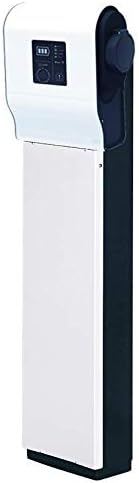
Image 3.1: Close-up of the charging station's port cover, ready for cable connection.
Important: Always ensure the charging cable is fully inserted and secured before initiating charging. Never force connections. If an error occurs, refer to the Troubleshooting section.
4. Maintenance
Regular maintenance ensures the longevity and safe operation of your charging station. Always disconnect power to the unit before performing any maintenance.
- Cleaning: Periodically clean the exterior of the charging station with a soft, damp cloth. Do not use abrasive cleaners or solvents. Ensure the charging port is free from dust, dirt, and moisture.
- Cable Inspection: Regularly inspect the charging cable (if permanently attached or your own) for any signs of damage, wear, or fraying. Replace damaged cables immediately.
- Port Inspection: Check the charging port for any foreign objects or damage. Ensure the protective cover (if applicable) is functioning correctly.
- Professional Inspection: It is recommended to have the charging station inspected by a qualified electrician at least once a year to ensure all electrical connections are secure and the unit is operating safely.
5. Troubleshooting
This section addresses common issues you might encounter with your charging station. For more complex problems, contact a qualified electrician or Legrand customer support.
| Problem | Possible Cause | Solution |
|---|---|---|
| No Power to Station | Circuit breaker tripped; loose electrical connection. | Check the circuit breaker in your electrical panel and reset if tripped. Ensure all connections are secure (requires a qualified electrician). |
| Vehicle Not Charging | Cable not fully connected; vehicle charging fault; station fault. | Ensure the charging cable is securely connected to both the station and the vehicle. Check your vehicle's dashboard for error messages. Disconnect and reconnect the cable. |
| Slow Charging | Vehicle settings; external factors (e.g., grid load); cable issue. | Check your vehicle's charging settings. Ensure the charging cable is rated for the station's capacity. Consult your vehicle's manual. |
| Error Indicator Light On | Internal fault; external electrical issue. | Disconnect the charging cable, then power cycle the station (turn off and on the circuit breaker). If the error persists, contact Legrand support. |
6. Technical Specifications
| Feature | Detail |
|---|---|
| Brand | Legrand |
| Model Number | 59002 (Part Number: 059002) |
| Product Type Name | Car Charging Socket |
| Capacity | 22 kW |
| Current Rating | 32 A |
| Voltage | Three-phase (specific voltage depends on regional supply, typically 400V AC) |
| Charging Mode | Mode 3 (compatible with Mode 2 vehicles) |
| Compliant Standards | IEC 61851-1, IEC 61851-22 |
| Item Weight | 3.79 Kilograms |
| Volume | 20.40 dm³ |
| Estimated Charging Time | 9 hours (dependent on vehicle battery capacity and state of charge) |
| Material | Plastic |
7. Warranty and Support
7.1. Manufacturer's Warranty
This Legrand Green'up Premium charging station is covered by a 2-year manufacturer's warranty. This warranty covers defects in materials and workmanship under normal use. Please retain your proof of purchase for warranty claims. The warranty does not cover damage caused by improper installation, misuse, accidents, or unauthorized modifications.
7.2. Customer Support
For technical assistance, warranty claims, or further information, please contact Legrand customer support. Visit the official Legrand website for contact details specific to your region.
Legrand Official Website: www.legrand.com
When contacting support, please have your product model number (59002) and proof of purchase readily available.


