
ANCHEER jf-b01 C
Ancheer Fitness Vibration Platform User Manual
Model: jf-b01 C | Brand: ANCHEER
Your guide to effective and safe use of your Ancheer Vibration Platform.
1. Introduction
Thank you for choosing the Ancheer Fitness Vibration Platform. This manual provides essential information for the safe and effective operation of your new fitness equipment. Please read this manual thoroughly before use and keep it for future reference.
The Ancheer jf-b01 C Vibration Platform is designed to enhance your fitness routine by providing a full-body workout through oscillating vibrations. It features 5 automatic programs, 1 manual mode, and 20 adjustable speed levels, along with a smart display and a convenient wrist remote control. Its compact design allows for easy storage and transport.
2. Important Safety Instructions
WARNING: To reduce the risk of serious injury, read all instructions before using this product.
- Consult your physician before starting any new exercise program, especially if you have pre-existing medical conditions, are pregnant, or have recently undergone surgery.
- Use the platform only as described in this manual.
- Keep children and pets away from the equipment during operation.
- Ensure the platform is placed on a stable, level surface. Do not use on uneven ground.
- Do not exceed the maximum user weight capacity of 120 kg (approximately 265 lbs).
- Wear appropriate athletic footwear. Do not use barefoot or in socks only.
- Do not insert any objects into openings.
- If you experience pain, dizziness, or discomfort, stop exercising immediately and consult a physician.
- Unplug the platform from the power outlet when not in use and before cleaning.
- Keep the power cord away from heated surfaces.
- Do not operate if the power cord or plug is damaged.
3. Package Contents
Please check the package contents carefully. If any items are missing or damaged, contact customer support.
- Ancheer Fitness Vibration Platform
- Wrist Remote Control (battery included)
- Power Cord
- 2 Elastic Training Bands
- User Manual (this document)
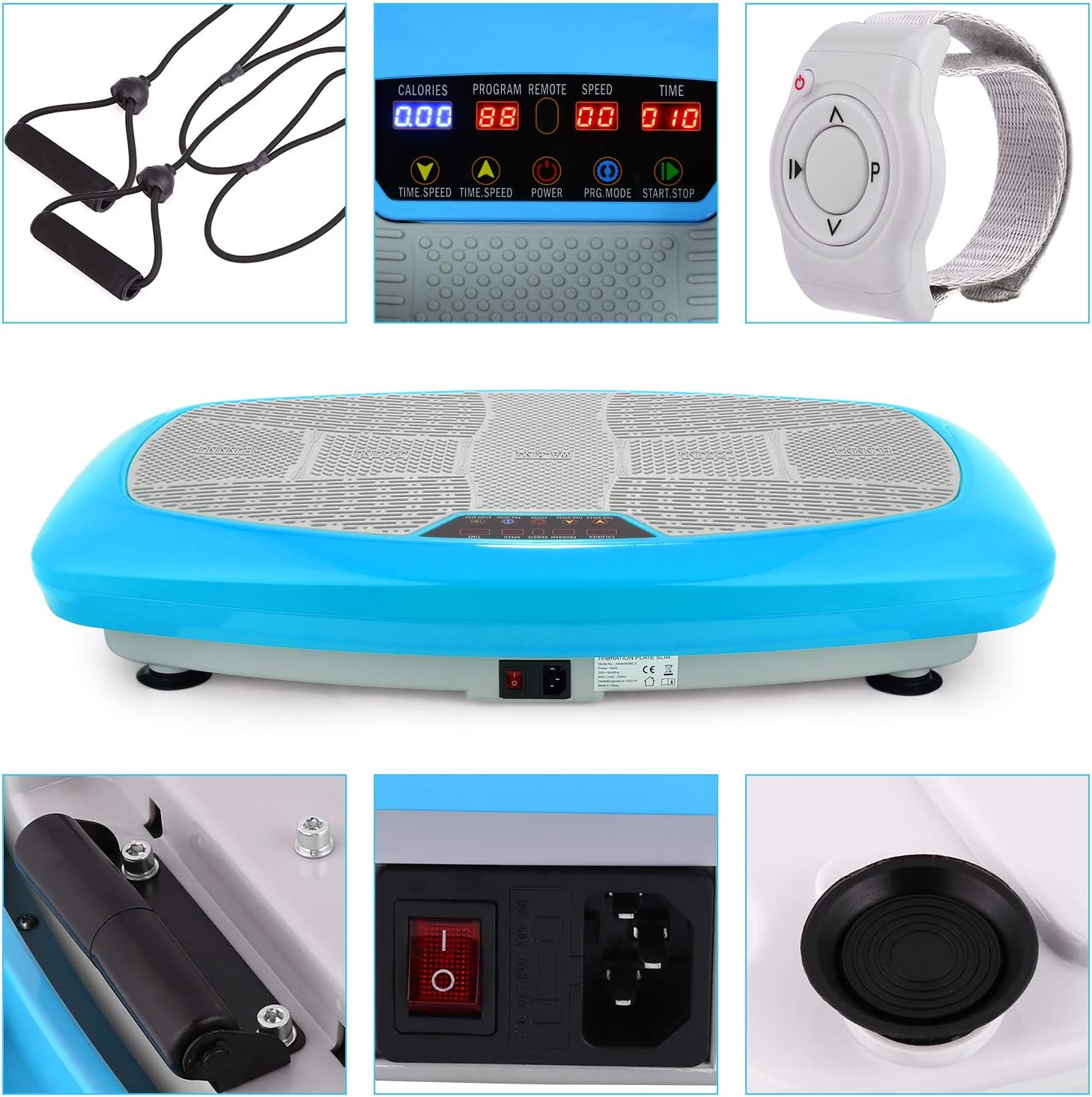
Figure 3.1: Included components of the Ancheer Vibration Platform. This image shows the main platform unit, the wrist-worn remote control, the power cable, and two elastic resistance bands with handles, which attach to the platform for upper body exercises.
4. Product Features
- Smart Display: Indicates estimated calories burned, exercise time, current speed, and active program.
- Wrist Remote Control: Allows convenient adjustment of modes and speeds during your workout.
- Multiple Programs: Features 5 automatic program modes and 1 manual mode for varied training.
- Adjustable Speeds: Offers 20 levels of adjustable vibration intensity.
- 3 Vibration Zones: Different foot placement zones (Running, Jogging, Walking) provide varying vibration intensities.
- Quiet Motor: Designed for a comfortable and quiet workout experience.
- High Load Capacity: Supports users up to 120 kg (265 lbs).
- Compact Design: Space-saving and easy to store. Equipped with wheels for effortless transport.
- Resistance Bands: Includes two elastic bands for full-body workouts.

Figure 4.1: The control panel and foot placement zones. The platform surface is divided into three zones: "Running" (outer edges for higher intensity), "Jogging" (middle area for medium intensity), and "Walking" (center for lower intensity). The display shows current settings.

Figure 4.2: Program and speed options. This image visually represents the platform's capabilities: 1 manual program, 5 automatic programs, and 20 adjustable speed levels, offering a wide range of workout intensities.
5. Setup
- Unpack: Carefully remove all components from the packaging. Retain packaging for future storage or transport.
- Placement: Place the vibration platform on a firm, level, and non-slip surface. Ensure there is enough clear space around the unit for safe exercise.
- Power Connection: Locate the power input port on the side of the platform. Connect the power cord to the platform and then plug it into a standard electrical outlet.
- Main Power Switch: Turn on the main power switch, usually located near the power cord input. The display should light up.
- Remote Control: The wrist remote control comes with a battery installed. Ensure the battery tab (if present) is removed before first use.
- Attach Resistance Bands (Optional): If desired, attach the elastic training bands to the designated attachment points on the sides of the platform.

Figure 5.1: Ancheer Vibration Platform ready for use. This image displays the complete setup of the vibration platform with a user standing on it, demonstrating its primary function. The remote control and resistance bands are also visible, indicating their role in the overall system.
6. Operating Instructions
6.1 Control Panel and Remote Control
The Ancheer Vibration Platform can be controlled via the integrated control panel on the unit or the convenient wrist remote control.

Figure 6.1: Detailed view of the control panel and remote. This image provides a close-up of the platform's display and buttons, along with the wrist remote control. Labels indicate functions such as Calories, Program, Remote status, Speed, Time, Time/Speed adjustment buttons, Power switch, Program Mode, and Start/Stop.
- CALORIES: Displays estimated calories burned.
- PROGRAM (P): Shows the currently selected program (P1-P5 for automatic, H for manual).
- REMOTE: Indicates if the remote control is connected/active.
- SPEED: Displays the current vibration speed level (1-20).
- TIME: Shows the remaining exercise time.
- TIME/SPEED +/-: Adjusts time in manual mode or speed level.
- POWER: Main power switch (on the side of the unit).
- PRG. MODE: Cycles through automatic programs (P1-P5) and manual mode (H).
- START/STOP: Starts or stops the vibration.
- Remote Control: Replicates most functions of the main control panel for convenience.
6.2 Starting a Workout
- Ensure the platform is plugged in and the main power switch is ON.
- Step onto the platform. For beginners, start with feet closer to the center (Walking zone) for lower intensity.
- Press the START/STOP button on the control panel or remote to begin.
- Select your desired program or adjust settings:
- Automatic Programs (P1-P5): Press PRG. MODE to cycle through the 5 pre-set programs. Each program has varying speeds and durations.
- Manual Mode (H): Select 'H' using PRG. MODE. Then use the TIME/SPEED +/- buttons to adjust the vibration speed (1-20) and workout duration.
- To stop the workout at any time, press the START/STOP button.
6.3 Understanding Vibration Zones
The platform features three distinct zones to vary the intensity of your workout:
- Walking Zone (Center): Placing your feet closer to the center provides the lowest vibration intensity, ideal for warm-ups, cool-downs, or gentle exercise.
- Jogging Zone (Middle): Stepping slightly wider into the middle zone increases the vibration intensity, suitable for moderate workouts.
- Running Zone (Outer Edges): Placing your feet on the outer edges delivers the highest vibration intensity, perfect for intense workouts and muscle activation.
Figure 6.2: Foot placement for varying intensity. This image clearly illustrates the three designated foot placement zones on the platform's surface, allowing users to easily adjust the intensity of their vibration workout by simply changing their stance.
6.4 Recommended Exercises
The Ancheer Vibration Platform can be used for a variety of exercises to target different muscle groups. Here are some examples:

Figure 6.3: Diverse exercise modes. This diagram illustrates various exercises that can be performed on the vibration platform, such as squats, push-ups, sit-ups, bicep curls using the resistance bands, leg raises, tricep dips, and stretching, demonstrating its versatility for full-body training.

Figure 6.4: Examples of home exercises. This image shows users performing common exercises on the Ancheer Vibration Platform, including squats for lower body, resistance band exercises for upper body, and glute bridges, highlighting how easily fitness can be integrated into a home environment.
- Squats: Stand on the platform with feet shoulder-width apart, lower into a squat position.
- Push-ups: Place hands on the platform, perform push-ups.
- Sit-ups: Lie on the floor with feet on the platform, perform sit-ups.
- Bicep Curls: Attach resistance bands, stand on the platform, perform bicep curls.
- Leg Raises: Lie on your back with legs on the platform, perform leg raises.
- Stretching: Use the platform to enhance stretches.
Even 10 minutes of exercise on the Ancheer Vibration Platform can be equivalent to longer sessions of other activities, as shown below:

Figure 6.5: Exercise equivalency. This infographic suggests that 10 minutes of exercise on the Ancheer Vibration Platform can offer benefits comparable to longer durations of other physical activities, such as 30 minutes of swimming or running, and 60 minutes of yoga, cycling, walking, or tennis.
7. Maintenance
- Cleaning: Wipe down the platform with a soft, damp cloth after each use. Do not use abrasive cleaners or solvents. Ensure the unit is unplugged before cleaning.
- Storage: Store the platform in a cool, dry place away from direct sunlight and moisture. Its compact design and transport wheels make it easy to move and store in a corner.
- Inspection: Periodically check the power cord for any damage. Ensure all connections are secure.
8. Troubleshooting
| Problem | Possible Cause | Solution |
|---|---|---|
| Platform does not turn on. |
|
|
| No vibration or weak vibration. |
|
|
| Remote control not working. |
|
|
| Unusual noise during operation. |
|
|
9. Specifications
| Feature | Detail |
|---|---|
| Model | jf-b01 C |
| Brand | ANCHEER |
| Dimensions (L x W x H) | 82 x 49 x 18 cm (32.3 x 19.3 x 7.1 inches) |
| Weight | 17.44 kg (38.45 lbs) |
| Max. Load Capacity | 120 kg (265 lbs) |
| Programs | 5 Automatic, 1 Manual |
| Speed Levels | 20 |
| Vibration Type | Oscillating |
| Color | Blue |
10. Warranty and Support
ANCHEER offers a one-year warranty for this product. Additionally, you may return undamaged items within 30 days of purchase for any reason.
If you encounter any problems or have questions regarding your Ancheer Fitness Vibration Platform, please do not hesitate to contact ANCHEER customer support. Please have your model number (jf-b01 C) and purchase details ready when contacting support.
For the most up-to-date contact information, please refer to the ANCHEER official website or your purchase documentation.
Ask a question about this manual
Ask about setup, troubleshooting, compatibility, parts, safety, or missing instructions. Manuals+ will review the question and use this page’s manual context to help answer it.