1. Introduction
The HONONJO Universal TV Remote Control RM-L1098+8 is designed to provide seamless control over a wide range of television brands. This remote features an intelligent chipset for broad compatibility and includes dedicated buttons for popular smart TV functions like Netflix and YouTube. This manual provides instructions for setup, operation, and troubleshooting to ensure optimal use of your universal remote.
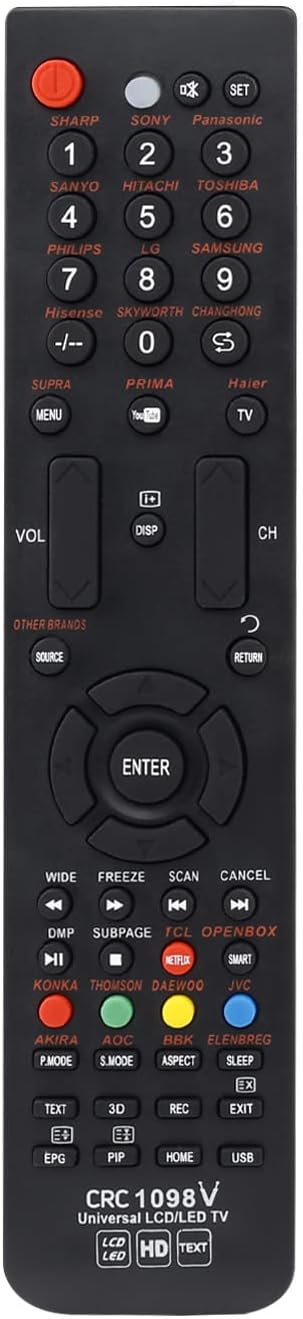
Image 1.1: Front view of the HONONJO Universal TV Remote Control RM-L1098+8, showcasing its button layout and sleek design.
2. Product Features
- Universal Compatibility: Compatible with most major TV brands including Panasonic, Sony, Sharp, LG, Samsung, Sanyo, Philips, Hitachi, Toshiba, Changhong, Haier, and many others.
- Advanced Chipset: Utilizes an intelligent chipset for powerful and reliable compatibility across various TV models.
- Smart TV Functionality: Includes dedicated buttons for popular streaming services such as My APP, YouTube, and Netflix for quick access.
- Durable Design: Constructed with high-quality materials for long-lasting performance.
3. Setup
3.1 Battery Installation
To power your remote control, you will need to install two AAA batteries (not included).
- Locate the battery compartment cover on the back of the remote control.
- Press down on the tab and slide the cover downwards to open the compartment.
- Insert two AAA batteries, ensuring the positive (+) and negative (-) terminals align correctly with the markings inside the compartment.
- Slide the battery cover back into place until it clicks securely.

Image 3.1: Rear view of the remote control, showing the open battery compartment and the battery cover.
3.2 Programming the Remote (Brand Express Method)
The remote features a 'Brand Express' auto-search function for quick setup with your TV.
- Ensure your television is turned ON.
- Press and hold the specific Brand Key on the remote that corresponds to your TV's brand (e.g., SHARP, SONY, Panasonic, LG, SAMSUNG, etc.). The remote will begin an automatic search process.
- Observe your TV screen. As soon as the VOLUME symbol appears on your TV screen, immediately release the Brand Key.
- Test the remote's functions (e.g., volume, channel, power). If the remote works correctly, the setup is complete.
- If the remote does not function as expected, repeat steps 2-4. It may take a few attempts to find the correct code.
Note: For brands not explicitly listed with a dedicated key, refer to the 'Other Brands' section on the remote and the compatibility lists provided in Section 5.
4. Operating Instructions
This section details the functions of the various buttons on your universal remote control.

Image 4.1: Detailed view of the remote control with key functions labeled for easy identification.
- POWER: Turns the TV on or off.
- SET: Used for advanced settings or programming.
- Brand Keys (SHARP, SONY, Panasonic, etc.): Used for programming and direct channel selection for corresponding brands.
- Number Keys (0-9): For direct channel input.
- MENU: Accesses the TV's main menu.
- VOL +/-: Adjusts the volume level.
- CH +/-: Changes the TV channel.
- DISP: Displays current channel information.
- SOURCE: Selects input sources (HDMI, AV, etc.).
- RETURN: Returns to the previous screen or menu.
- Navigation Keys (Up, Down, Left, Right, ENTER): Used to navigate menus and confirm selections.
- Netflix, YouTube, My APP: Direct access buttons for these streaming applications.
- Media Control Keys (DMP, SUBPAGE, WIDE, FREEZE, SCAN, CANCEL): For controlling media playback and other specific functions.
- Special Function Keys (TEXT, 3D, REC, EPG, HOME, USB, PIP, EXIT, SLEEP, ASPECT): Provide access to various TV features.
5. Brand Compatibility and Code List
The HONONJO Universal TV Remote Control is compatible with a vast array of television brands. For specific models and additional compatibility information, please refer to the following visual code lists. These images display various remote control models and their corresponding codes or compatibility references.

Image 5.1: First page of the compatibility list, showing various remote models and their associated codes or brand references.

Image 5.2: Second page of the compatibility list, detailing more remote models and their codes.

Image 5.3: Third page of the compatibility list, providing further remote model references.

Image 5.4: Fourth page of the compatibility list, expanding on the range of supported remote models.

Image 5.5: Fifth page of the compatibility list, offering additional remote model and code information.

Image 5.6: Sixth and final page of the compatibility list, completing the comprehensive guide to supported remote models.
6. Troubleshooting
If you encounter issues with your universal remote, try the following troubleshooting steps:
- Remote Not Responding:
- Check if the batteries are inserted correctly with the correct polarity (+/-).
- Replace old batteries with new AAA batteries.
- Ensure there is a clear line of sight between the remote's infrared emitter and the TV's IR receiver. Obstructions can block the signal.
- Remote Controls Some Functions, But Not All:
- The remote may not be fully programmed for your specific TV model. Repeat the 'Brand Express' programming method (Section 3.2).
- Try holding the Brand Key for a slightly longer or shorter duration during the auto-search process to find a different compatible code.
- TV Brand Not Listed on Remote:
- Refer to the 'Other Brands' section on the remote and consult the detailed compatibility lists in Section 5 for potential codes or alternative programming methods.
7. Specifications
| Feature | Detail |
|---|---|
| Brand | HONONJO |
| Model | RM-L1098+8 (also known as CRC 1098V) |
| Special Feature | Universal Compatibility |
| Compatible Devices | Television (Smart 3D HD LED/LCD TVs) |
| Connectivity Technology | Infrared (IR) |
| Controller Type | Button Control |
| Power Source | 2 x AAA Batteries (not included) |
| Date First Available | December 23, 2018 |
8. Maintenance
To ensure the longevity and proper functioning of your remote control:
- Keep the remote clean by wiping it with a soft, dry cloth. Avoid using liquid cleaners or abrasive materials.
- Do not expose the remote to extreme temperatures, direct sunlight, or high humidity.
- If the remote will not be used for an extended period, remove the batteries to prevent leakage.
- Avoid dropping the remote or subjecting it to strong impacts.
9. Warranty and Support
Specific warranty information for the HONONJO Universal TV Remote Control RM-L1098+8 is not provided in this manual. For warranty details, product support, or further assistance, please refer to the product packaging or contact the manufacturer directly through their official channels. Keep your purchase receipt as proof of purchase.


