
1. Introduction
This manual provides comprehensive instructions for the safe and efficient operation of your CAMRY ACS-30-JC81W Waterproof Commercial Digital Price Computing Scale. Designed for commercial use in environments such as farmers' markets, seafood counters, and delis, this scale offers high precision, durability, and ease of use. Its IPX7 waterproof rating ensures reliable performance even when exposed to water, and the dual LCD display facilitates clear readings for both operator and customer.

Figure 1.1: CAMRY ACS-30-JC81W Digital Price Computing Scale, highlighting its waterproof design and suitability for weighing items like seafood.

Figure 1.2: Visual representation of the scale's IPX7 waterproof capability, indicating its resilience to water exposure.
2. Setup
2.1 Unboxing and Component Check
Carefully remove all components from the packaging. Verify that the following items are present:
- CAMRY ACS-30-JC81W Digital Price Computing Scale unit
- Weighing platform (stainless steel)
- AC power adapter
- User Manual (this document)
2.2 Placement and Leveling
Place the scale on a stable, flat surface away from vibrations, drafts, and direct sunlight. Ensure the surface is level to guarantee accurate readings. The scale is equipped with adjustable leveling feet. Rotate these feet until the bubble in the level indicator (if present) is centered, or until the scale feels stable and does not wobble.
2.3 Initial Charging
Before first use, fully charge the built-in rechargeable battery. Connect the AC power adapter to the scale's charging port and plug it into a standard electrical outlet. The charging indicator will illuminate. A full charge can provide up to 3 months of use, depending on usage patterns.

Figure 2.1: Location of the AC plug-in port and adjustable leveling feet for proper scale setup.
3. Operating Instructions
3.1 Power On/Off
- To power on: Press the ON/OFF button. The display will light up and perform a self-check.
- To power off: Press and hold the ON/OFF button until the display turns off.
3.2 Basic Weighing
- Ensure the scale is powered on and the display shows '0.000'.
- Place the item to be weighed onto the center of the weighing platform.
- Read the weight displayed on the 'Weight' LCD screen.
3.3 Unit Conversion (KG/LB)
The scale supports weighing in kilograms (kg) and pounds (lb). To switch between units:
- Press the KG/LB button. The unit displayed on the 'Weight' screen will change accordingly.
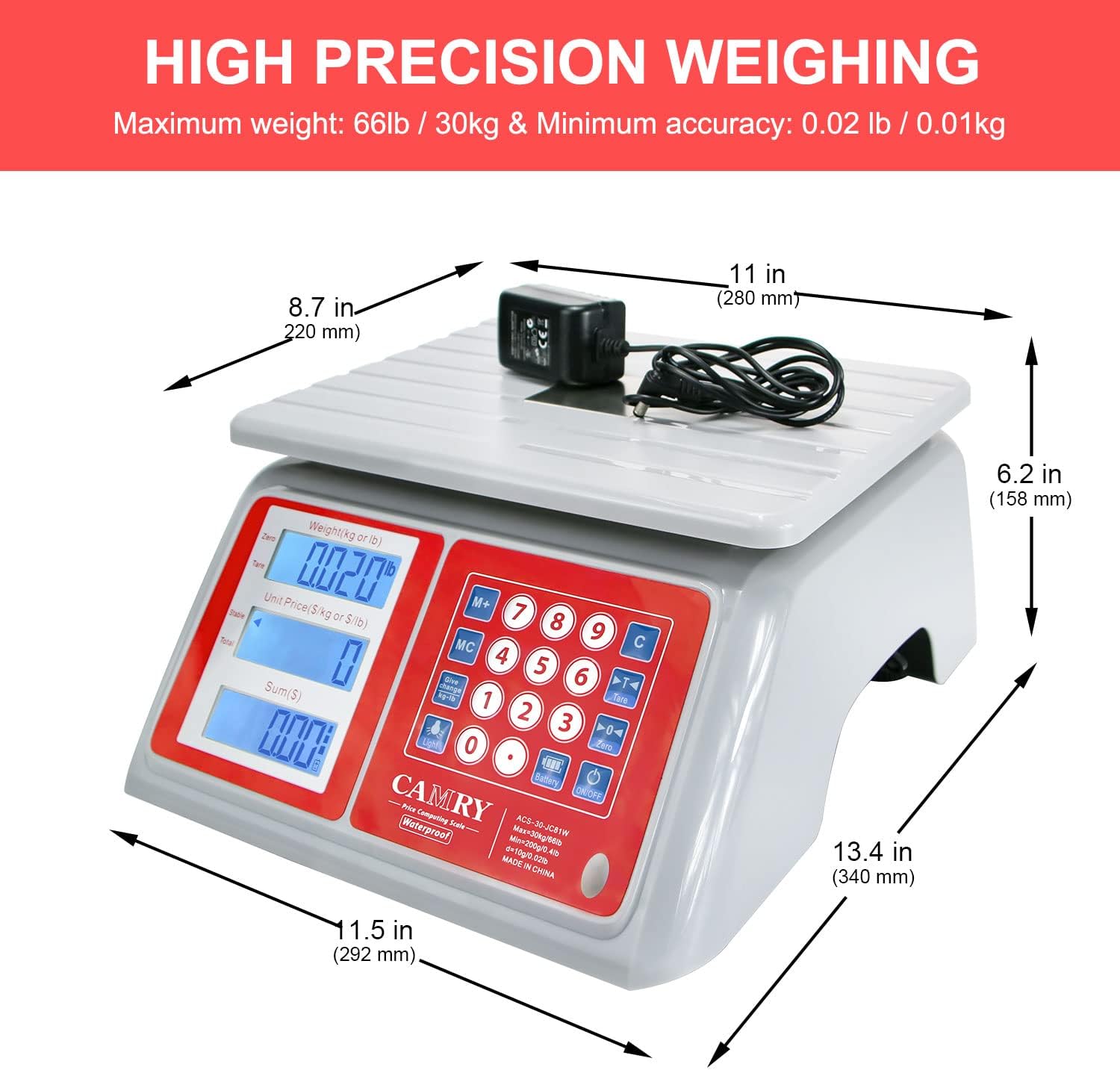
Figure 3.1: Demonstrating the KG/LB unit conversion feature on the scale's control panel.
3.4 Tare Function
The tare function allows you to subtract the weight of a container, so only the net weight of the contents is measured.
- Place an empty container on the weighing platform.
- Press the TARE button. The display will reset to '0.000'.
- Add the items to be weighed into the container. The display will show the net weight of the items.
3.5 Price Computing
This scale can calculate the total price based on weight and unit price.
- Place the item on the weighing platform.
- Enter the unit price using the numeric keypad. The 'Unit Price' display will show the entered value.
- The 'Total Price' display will automatically calculate and show the total cost.
- Use the PLU buttons (P1-P5) to store and recall frequently used unit prices.
- The M+ button can be used for accumulation of multiple items.
3.6 Dual Display
The scale features dual LCD displays, allowing both the operator and the customer to view the weight, unit price, and total price simultaneously.

Figure 3.2: Illustration of the easy-to-read dual display feature for both operator and customer visibility.
4. Maintenance
4.1 Cleaning
Due to its IPX7 waterproof design and stainless steel platform, the scale is easy to clean. Use a damp cloth with mild soap to wipe down the platform and body. Avoid abrasive cleaners or harsh chemicals that could damage the display or finish. Ensure the charging port cover is securely closed before cleaning with water.

Figure 4.1: Cleaning the stainless steel platform of the scale.
4.2 Battery Care
To prolong battery life, charge the scale when the low battery indicator appears. Avoid completely draining the battery frequently. If the scale will not be used for an extended period, charge it fully before storage and recharge every few months.

Figure 4.2: Battery charging and endurance illustration.
5. Troubleshooting
If you encounter issues with your scale, refer to the following common problems and solutions:
- Scale does not turn on:
Ensure the battery is charged. Connect the AC adapter and try again. If using battery power, check if the battery is properly connected (if user-serviceable). - Inaccurate readings:
Verify the scale is on a stable, level surface. Ensure no objects are touching the platform. Perform a tare operation before weighing. Avoid placing items off-center. - Display shows 'OVERLOAD':
The item on the platform exceeds the maximum weight capacity (66lb / 30kg). Remove the item immediately to prevent damage. - Low battery alarm:
The battery indicator will show when the battery is low. Connect the AC adapter to recharge the scale.
6. Specifications
Detailed technical specifications for the CAMRY ACS-30-JC81W scale:
| Feature | Specification |
|---|---|
| Model Number | ACS-30-JC81W |
| Weight Limit | 66 lb / 30 kg |
| Readout Accuracy | 0.02 lb / 10 g |
| Material | Stainless Steel (platform), ABS (body) |
| Display Type | Dual LCD with White Backlight |
| Waterproof Rating | IPX7 |
| Power Source | AC/DC Built-in Rechargeable Battery |
| Product Dimensions | 11.5 x 13.4 x 6.2 inches (292 x 340 x 158 mm) |
| Item Weight | 6.26 pounds |
| UPC | 607376379275 |

Figure 6.1: Product dimensions of the scale.
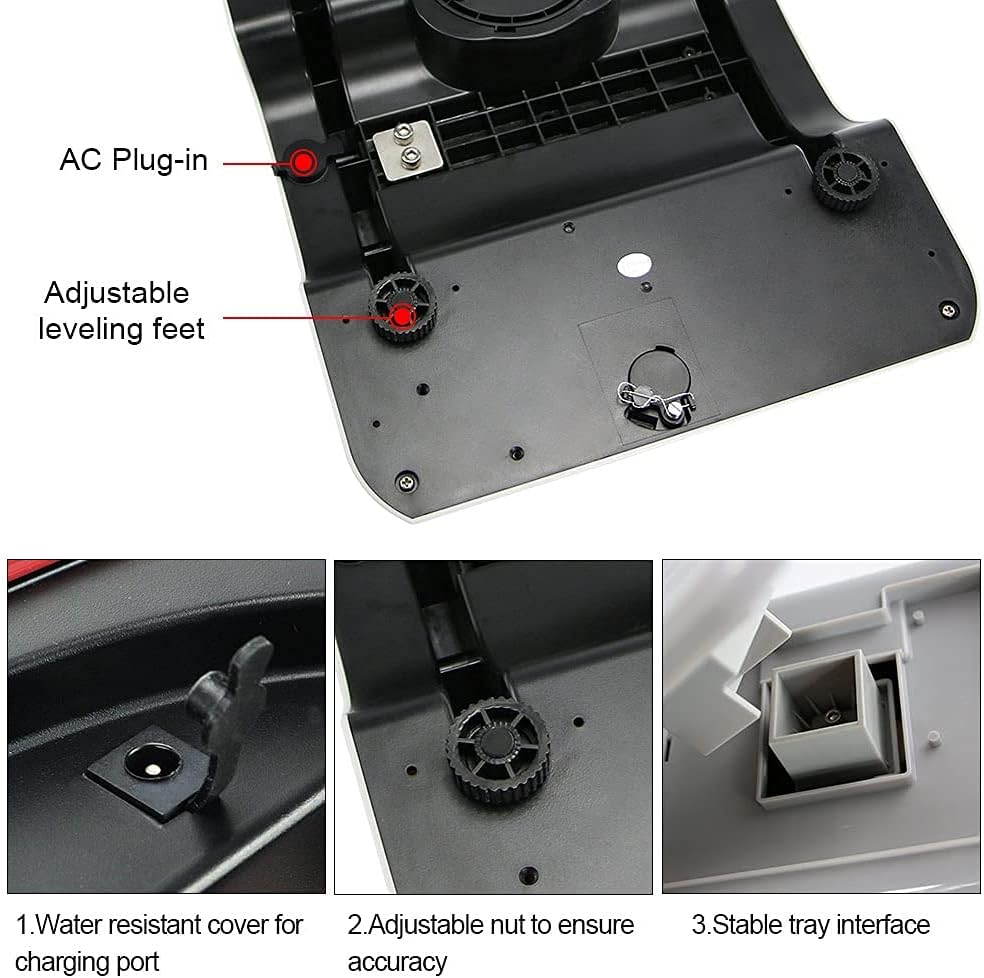
Figure 6.2: Illustration of the durable ABS material used for the scale's body.
7. Warranty and Support
7.1 Warranty Information
This CAMRY product is covered by a manufacturer's warranty against defects in materials and workmanship. Please refer to the warranty card included with your purchase or contact customer support for specific warranty terms and conditions.
7.2 Customer Support
For technical assistance, troubleshooting, or warranty claims, please contact CAMRY customer support. Contact details can typically be found on the product packaging or the official CAMRY website.


