Introduction
This manual provides comprehensive instructions for the HUAYU URC1511 Universal Remote Control. This remote is designed for direct use with Sony, Samsung, and LG LCD/LED Smart TVs, offering a convenient solution to control multiple devices with a single remote. No complex setup is required for these compatible brands.
Setup
1. Battery Installation
The remote control requires two AAA batteries (not included). Follow these steps to install them:
- Locate the battery compartment on the back of the remote control.
- Press down on the tab and slide the battery cover off.
- Insert two AAA batteries, ensuring the positive (+) and negative (-) terminals match the diagrams inside the compartment.
- Slide the battery cover back on until it clicks into place.
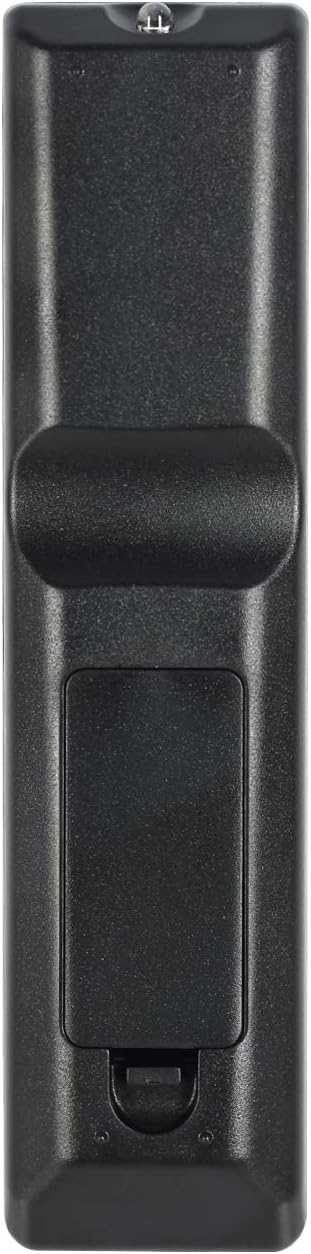
Image: Back of the remote control with battery compartment.
2. Initial Use
For SAMSUNG, LG, and SONY brand TVs, the HUAYU URC1511 remote control is ready for use immediately after battery installation. No additional programming or setup is required. Simply point the remote at your TV and begin operating it.
Operating Instructions
Remote Control Layout and Functions
The HUAYU URC1511 remote control features a standard layout with dedicated buttons for various TV functions. Refer to the image below for a visual guide to the button layout.
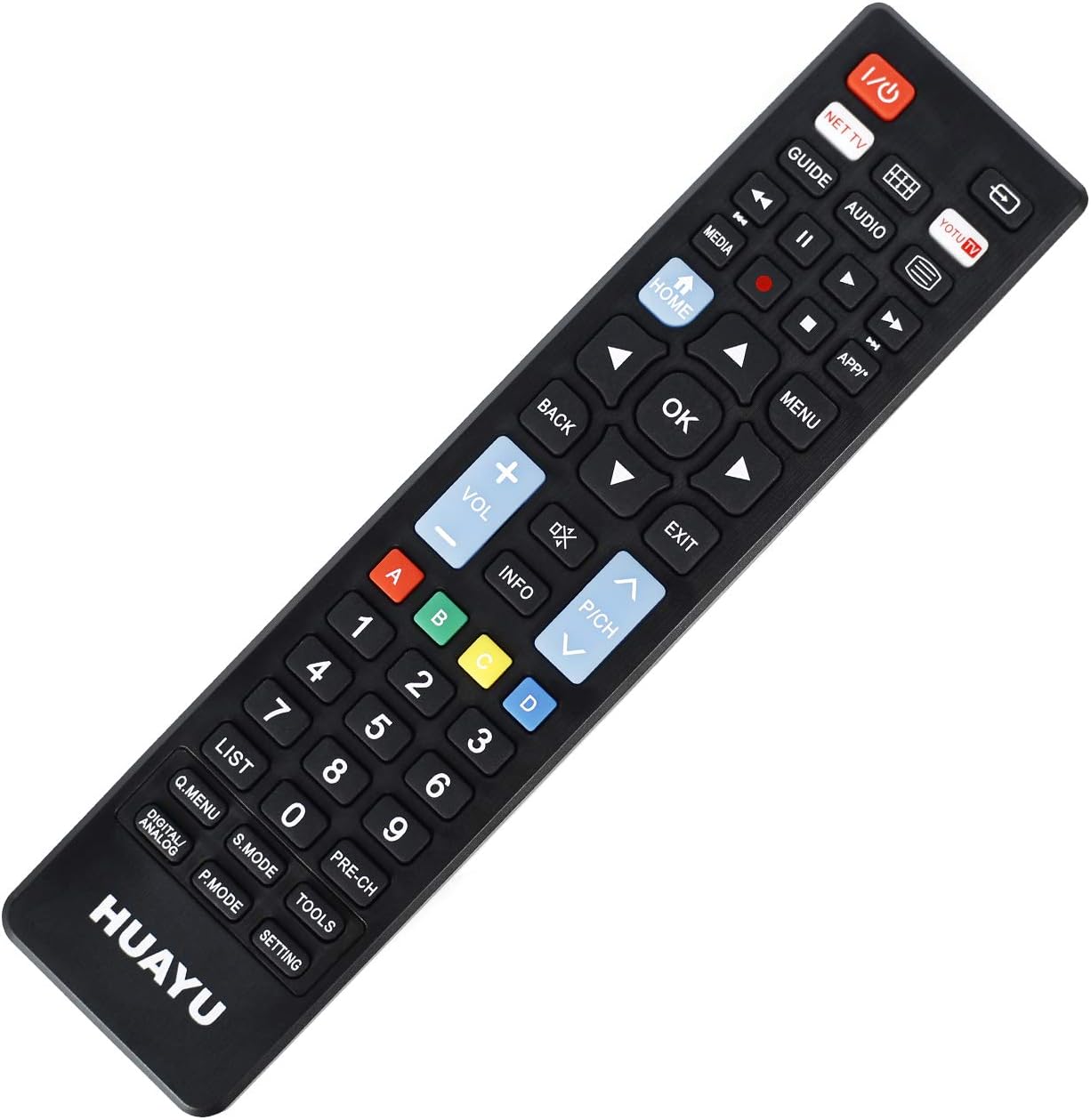
Image: Front view of the remote control with button layout.
Key Functions:
- Power (Red Button): Turns the TV on or off.
- NET TV / YOTU TV: Dedicated buttons for accessing smart TV applications or specific streaming services.
- Guide: Displays the electronic program guide.
- Media: Accesses media playback functions.
- Home: Returns to the TV's main home screen or smart hub.
- Back: Navigates back in menus or applications.
- OK (Center Button): Confirms selections.
- Directional Arrows (Up, Down, Left, Right): Navigates through menus and options.
- Volume Up/Down (+/-): Adjusts the TV volume.
- Channel Up/Down (P/CH +/-): Changes TV channels.
- Mute: Mutes or unmutes the TV audio.
- Menu: Opens the TV's main menu.
- Exit: Exits current menu or application.
- Number Pad (0-9): Direct channel input.
- Colored Buttons (A, B, C, D): Often used for specific functions within smart TV apps or teletext.
- List: Displays a list of channels or recordings.
- Q.MENU / DIGITAL ANALOG: Quick menu access or toggling between digital/analog inputs.
- S.MODE: Sound mode selection.
- P.MODE: Picture mode selection.
- TOOLS: Accesses TV tools or settings.
- PRE-CH: Returns to the previously viewed channel.
- SETTING: Opens TV settings.
Compatibility
Compatible TV Brands
This universal remote control is designed for direct compatibility with the following television brands:
- SAMSUNG
- LG
- SONY
No setup is required for these brands; simply insert batteries and begin use.
Specifications
Product Specifications
| Feature | Detail |
|---|---|
| Model Number | URC1511 |
| Operable Distance | More than 8 meters |
| Power Requirements | DC 3V |
| Battery Type | Two AAA batteries (not included) |
| Compatible Devices | Television |
| Max Number of Supported Devices | 3 (for specific brands) |
| Color | Black |
| Manufacturer | HUAYU |
Care and Maintenance
- Keep the remote control dry. Avoid exposure to water or high humidity.
- Do not drop or subject the remote to strong impacts.
- Clean the remote control with a soft, dry cloth. Do not use abrasive cleaners or solvents.
- If the remote control will not be used for an extended period, remove the batteries to prevent leakage.
- Avoid exposing the remote control to direct sunlight or extreme temperatures.
Troubleshooting
Remote Control Not Responding:
- Check Batteries: Ensure batteries are inserted correctly with the correct polarity (+/-). Replace old or depleted batteries with new ones.
- Line of Sight: Make sure there is a clear line of sight between the remote control and the TV's infrared receiver. Obstructions can block the signal.
- Distance: Ensure you are within the operable distance (typically within 8 meters).
- TV Compatibility: Confirm your TV is one of the directly supported brands (SAMSUNG, LG, SONY).
Buttons Not Working Correctly:
- Clean Remote: Dust or debris under buttons can cause issues. Gently clean around the buttons.
- Battery Check: Low batteries can sometimes cause intermittent button functionality. Replace batteries.
Warranty and Customer Support
For warranty information or technical support regarding your HUAYU URC1511 Universal Remote Control, please refer to the documentation provided at the point of purchase or contact your retailer. Specific warranty terms may vary.


