
1. Introduction
This manual provides comprehensive instructions for the installation, operation, and maintenance of your BAFANG P850C E-Bike Display Unit. The P850C is designed to enhance your electric bicycle riding experience by providing essential data and control functions.
Important Compatibility Note:
The BAFANG P850C display unit is specifically designed to work with BAFANG series motors that utilize the UART Protocol (versions 5.0-5.8). It is also compatible with the Bus system RS 232. This display will not function with motors lacking UART protocol. If you are unsure about your motor's protocol, please consult the seller of your motor before attempting installation.
Furthermore, these displays are primarily suitable for mid-drive and hub motors purchased directly from our store. Compatibility with motors of the same brand purchased from other retailers cannot be guaranteed. We highly recommend contacting us via email to confirm motor compatibility before placing an order.
2. Safety Information
- Always ensure the display is securely mounted before riding.
- Do not attempt to open or modify the display unit. Unauthorized modifications can void the warranty and pose safety risks.
- The display is protected against contact and ingress of water and dirt, complying with IP65 protection class. However, avoid submerging the unit in water.
- The unit is suitable for low temperatures, down to -20℃ (-4℉).
- Keep the screen clean and free from obstructions to ensure clear visibility of information while riding.
- If the display surface appears scratched upon receipt, it is likely a protective film. Gently peel off this film for a clear view.
3. Product Overview
The BAFANG P850C display unit provides a clear, colorful interface for monitoring your e-bike's performance and status. It features a touchscreen interface for intuitive control.
3.1 Key Features
- UART Protocol Compatibility: Designed for BAFANG motors with UART 5.0-5.8 protocol and Bus system RS 232.
- Durable Design: IP65 rated for protection against dust and water splashes. Operates effectively in temperatures as low as -20℃.
- Comprehensive Data Display: Shows average speed, maximum speed, real-time speed, battery power indicator, riding time, and clock.
- Customizable Settings: Allows users to adjust various parameters including KM/Mile selection, brightness, and auto-off timer.
- Automatic Backlight: Ensures visibility in varying light conditions.
- USB Charging Port: Conveniently located for charging mobile devices.
- Easy Installation: Designed for quick and straightforward mounting and connection.
3.2 Components
The BAFANG P850C display unit package typically includes the following components:
- P850C Display Unit
- Handlebar Mounting Bracket
- Control Button Pad
- Connection Cables
- Mounting Screws and Nuts
- User Manual (this document)

Figure 3.1: BAFANG P850C E-Bike Display Unit with control pad and cable.

Figure 3.2: Included components of the BAFANG P850C display package, showing the display, control pad, mounting rings, and fasteners.
4. Setup and Installation
Installation of the P850C display unit is designed to be straightforward. Please follow these steps carefully.
4.1 Pre-Installation Check
- Verify that your e-bike motor uses the UART protocol (5.0-5.8) for compatibility.
- Ensure you have all components listed in Section 3.2.
- Turn off your e-bike's power system before beginning installation.
4.2 Mounting the Display
- Select a suitable position on your handlebar for the display unit. Ensure it does not obstruct your view or interfere with braking/shifting. The display is designed for handlebar mounting.
- Attach the mounting bracket to the handlebar using the provided screws and rings. Tighten securely, but do not overtighten.
- Slide the P850C display unit onto the mounting bracket until it clicks into place.
- Mount the separate control button pad next to the display in an easily accessible position.

Figure 4.1: The P850C display unit and control pad mounted on an e-bike handlebar.
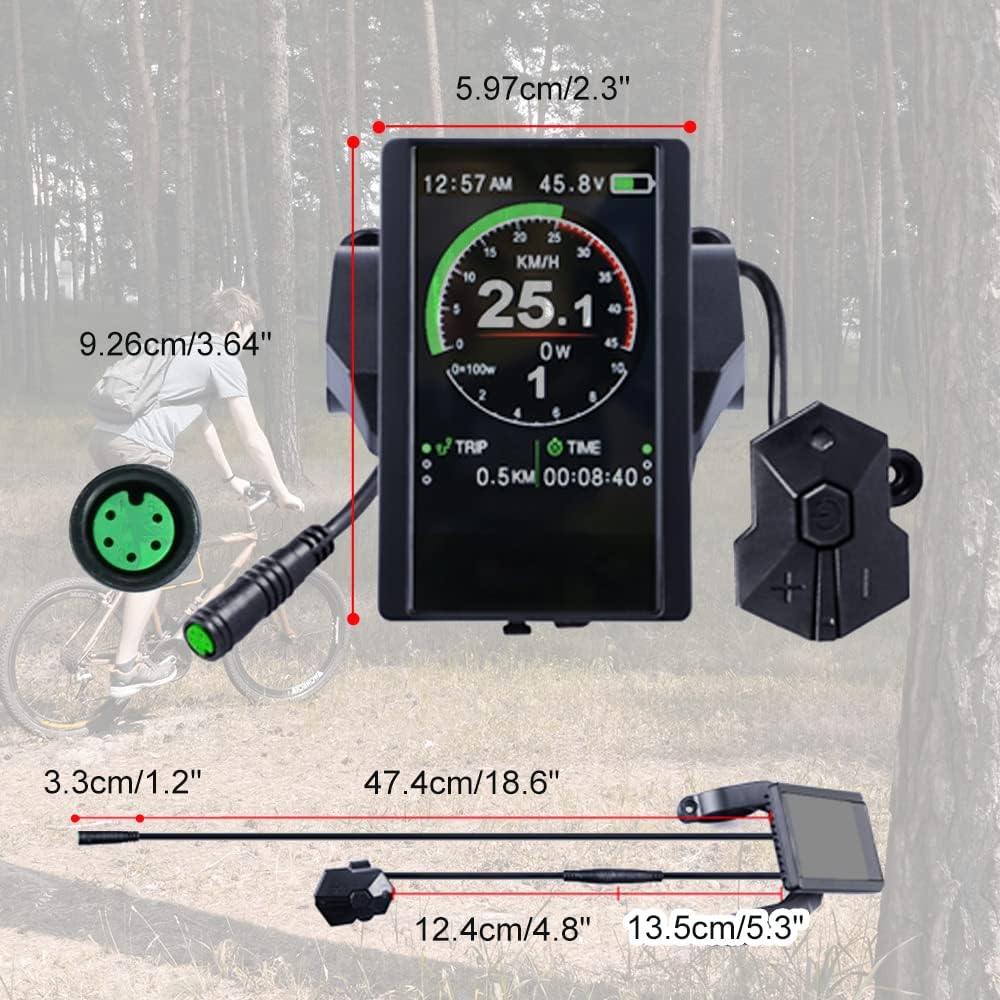
Figure 4.2: Dimensions of the BAFANG P850C display unit and its components for installation planning.
4.3 Connecting the Cables
- Locate the main cable from the display unit.
- Connect the display cable to the corresponding port on your e-bike's motor or controller. Ensure the connectors are aligned correctly and push firmly until they click into place.
- Connect the control button pad cable to the designated port on the display unit or main wiring harness.
- Route all cables neatly and secure them with zip ties or cable clips to prevent snagging or damage during riding.
5. Operating Instructions
The P850C display offers intuitive control and clear information display.
5.1 Power On/Off
- To power on the display, press and hold the power button on the control pad for a few seconds.
- To power off, press and hold the power button again until the display shuts down.
5.2 Displayed Information
The P850C provides a wealth of real-time riding data:
- Current Speed: Displays your real-time riding speed.
- Average Speed: Shows the average speed of your current trip.
- Maximum Speed: Records the highest speed achieved during your current trip.
- Battery Level: An indicator showing the remaining battery charge.
- Riding Time: Tracks the duration of your current ride.
- Trip Distance: Displays the distance covered in your current trip.
- Total Mileage: Accumulates the total distance ridden.
- Clock: Shows the current time.
- Power Output: Indicates the motor's current power output (in Watts).
5.3 Navigating Settings
Use the control pad buttons to navigate through menus and adjust settings. The P850C features a touchscreen for direct interaction.
- KM/Mile Selection: Switch between kilometers and miles for speed and distance units.
- Brightness: Adjust the screen backlight intensity. The display also features automatic backlight adjustment.
- Auto OFF: Set the time after which the display automatically turns off when inactive.
- Brake Tips: May provide indications related to brake lever activation.
- Charging Port: The integrated USB port allows for convenient charging of external devices like smartphones.

Figure 5.1: Detail of the integrated USB charging port on the BAFANG P850C display unit.
6. Maintenance
Proper maintenance ensures the longevity and optimal performance of your P850C display unit.
- Cleaning: Use a soft, damp cloth to wipe the screen and casing. Avoid abrasive cleaners or solvents that could damage the display or finish.
- Protective Film: If a protective film is present on the screen upon unboxing, gently peel it off to reveal the clear display.
- Connections: Periodically check all cable connections to ensure they are secure and free from corrosion or damage.
- Storage: When not in use for extended periods, store the e-bike and display in a dry, temperate environment.
7. Troubleshooting
This section addresses common issues you might encounter with your P850C display.
| Problem | Possible Cause | Solution |
|---|---|---|
| Display does not power on. |
|
|
| Screen appears scratched or blurry. | Protective film still on the screen. | Gently peel off the protective film from the display surface. |
| Inaccurate speed or distance readings. | Speed sensor issue or incorrect wheel circumference setting. | Check the speed sensor for proper alignment and cleanliness. Consult your e-bike motor manual for instructions on setting wheel circumference on the display. |
| Display loses configuration settings. | Potential internal battery issue or prolonged disuse. | Reconfigure settings as needed. If this occurs frequently, contact customer support. |
For issues not covered here, or if troubleshooting steps do not resolve the problem, please contact BAFANG customer support.
8. Specifications
| Attribute | Detail |
|---|---|
| Brand | BAFANG |
| Model | P850C (Compatible with C961, 800S, 500C, 750C, 850C, P860ML, DPC18, T1 displays with UART protocol) |
| Part Number | HMI |
| Display Type | LCD, Colorful |
| Human Interface Input | Touchscreen |
| Sensor Type | Speed Sensor, Cadence Sensor |
| Battery Cell Composition | Lithium Ion |
| International Protection Rating | IP65 |
| Mounting Type | Handlebar Mount |
| Compatible Protocols | UART 5.0-5.8, Bus system RS 232 |
| Item Package Dimensions (L x W x H) | 4.72 x 3.86 x 3.54 inches (12 x 9.8 x 9 cm) |
| Package Weight | 0.2 Kilograms (0.44 lbs) |
| UPC | 700828333389 |
9. Warranty and Support
For specific warranty terms and conditions, please refer to the documentation provided at the time of purchase or contact your retailer. BAFANG stands behind its products and offers support for technical inquiries.
If you require assistance with settings, troubleshooting, or any other aspect of your P850C display, please do not hesitate to contact BAFANG customer support. Providing details about your motor and the issue will help expedite the support process.
You can typically find contact information on the official BAFANG website or through your product's point of purchase.


