
1. Introduction
This manual provides essential information for the safe and efficient installation, operation, and maintenance of your STELPRO SORB2002MW Sorb Series Orléans High-End Bathroom Fan Heater. Please read all instructions carefully before use and retain this manual for future reference.

Figure 1: Front view of the STELPRO SORB2002MW Sorb Series Orléans Bathroom Fan Heater.
2. Safety Information
Always follow basic safety precautions to reduce the risk of fire, electric shock, and injury to persons. This heater is designed for indoor use only. Do not install in areas where it may be exposed to water or excessive humidity. Ensure proper grounding and wiring according to local electrical codes.
- Electrical Safety: This unit operates at 240/208V and requires a hardwired connection. Installation must be performed by a qualified electrician.
- Clearance: Maintain adequate clearance from combustible materials. Refer to installation instructions for specific distances.
- Supervision: Close supervision is necessary when any appliance is used by or near children or invalids.
- Maintenance: Do not attempt to repair or replace any part of the heater unless specifically recommended in this manual. All other servicing should be referred to a qualified service technician.
3. Product Features
- Powerful Heating: Provides adjustable heating options, delivering up to 2000W of power for rapid warmth.
- Smart Connected Control: Built-in Smart Thermostat with Zigbee Connectivity allows remote temperature control through your Zigbee or Smart Home Hub App.
- Quiet Operation: Known as one of the quietest fan heaters in its category, ideal for maintaining a peaceful environment.
- Durable Construction: Constructed with a high-performance polymer cabinet and satin-finish steel front for lasting quality and rust resistance.
- Thermal Protection: Includes thermal protection with automatic reset for enhanced safety and reliability.

Figure 2: Key features of the STELPRO Sorb Series Orléans heater.
4. Installation
The STELPRO SORB2002MW is designed for wall-mounted installation. Ensure the mounting surface is firm and free from combustible materials. A suitable 240V electrical outlet or hardwired connection point must be available nearby.
4.1 Dimensions
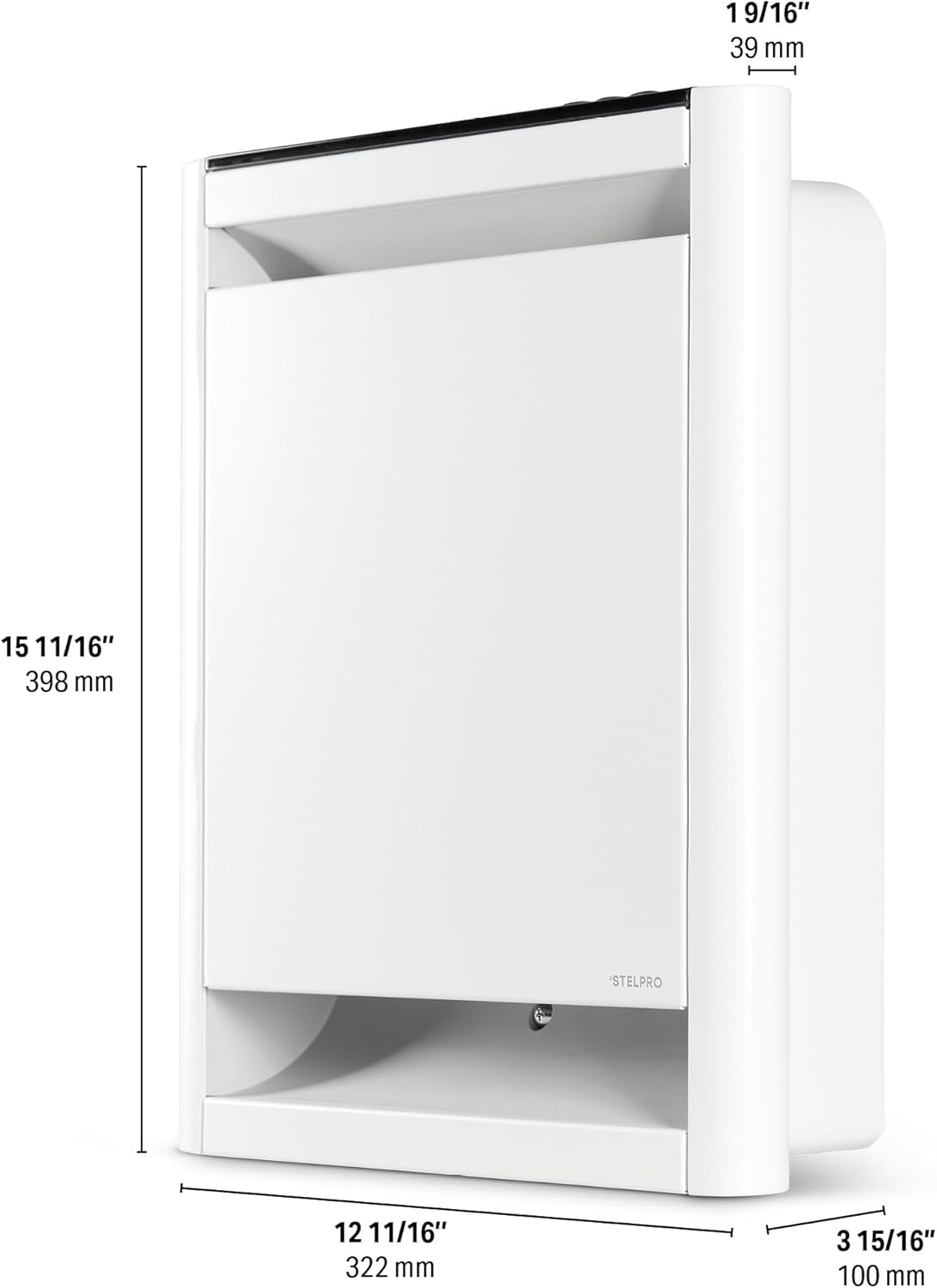
Figure 3: Product dimensions for installation planning.
4.2 Electrical Connection
This heater requires a 240V hardwired connection. Consult a qualified electrician for proper wiring to ensure safety and compliance with local electrical codes.

Figure 4: Hardwired connection diagram.
4.3 Installation Steps (General Overview)
- Prepare the Wall: Select a suitable wall location, ensuring it is a firm surface and there are no obstructions.
- Mark Drilling Points: Use a template (if provided) or measure carefully to mark the positions for wall anchors.
- Drill Holes: Drill holes at the marked positions. For drywall, use appropriate wall anchors.
- Mount the Heater: Secure the top anchors first, then hang the heater and secure the bottom anchors.
- Connect Wiring: Connect the electrical wiring as per the electrical diagram and local codes.
- Attach Front Panel: Securely attach the front panel to the heater.
4.4 Installation Video
Video 1: Installation overview for a Stelpro wall heater (Stelpro SOA Wall Heater, 0:30).
Video 2: Mirage heater details, showing design and features (Stelpro Mirage, 0:30).
5. Operating Instructions
The STELPRO SORB2002MW features a built-in smart thermostat for precise temperature control and various operating modes.
5.1 Control Panel

Figure 5: Digital control panel for temperature and mode selection.
5.2 Smart Boost Mode
Activate the Smart "Boost Mode" for a rapid temperature rise when quick heating is desired. This feature quickly brings the room to your desired comfort level.

Figure 6: The heater is designed for quiet operation.
5.3 Smart Home Integration
The built-in smart thermostat with Zigbee connectivity allows you to control the heater remotely via your smart home hub app. This enables seamless integration with other smart devices and remote management of your heating.

Figure 7: Remote control via smartphone app using Zigbee.

Figure 8: Compatibility with SmartThings and Amazon Alexa for enhanced control.
6. Maintenance
Regular maintenance ensures optimal performance and longevity of your heater.
- Cleaning: Ensure the heater is turned off and disconnected from power before cleaning. Use a soft, damp cloth to wipe the exterior. Do not use abrasive cleaners or solvents.
- Air Intake/Outlet: Periodically check and clean the air intake and outlet grilles to prevent dust buildup, which can impede airflow and reduce efficiency.
- No User Serviceable Parts: The internal components are not user-serviceable. Do not open the unit.
7. Troubleshooting
If your heater is not operating correctly, refer to the following common issues before contacting customer support.
- Heater Not Turning On: Check the circuit breaker and ensure the unit is properly connected to the power supply. Verify the thermostat settings.
- No Heat Output: Confirm the heater is in heating mode and the temperature setting is above the ambient room temperature.
- Unusual Noises: Ensure the unit is securely mounted and free from obstructions. If unusual noises persist, discontinue use and contact customer support.
- Smart Control Issues: Verify your Zigbee hub is properly configured and connected to the internet. Check the heater's connection status in your smart home app.
8. Specifications
| Feature | Detail |
|---|---|
| Brand | Stelpro |
| Model Number | SORB2002MW |
| Power Output | 2000W / 1500W |
| Voltage | 240V / 208V |
| Color | White |
| Dimensions (D x W x H) | 10.4D x 30.5W x 40.2H Centimetres |
| Item Weight | 4.26 kg |
| Special Features | Digital Display, Electronic Thermostat, Energy Efficient, Fast Heating, Noiseless |
| Mounting Type | Wall Mount |
| Heating Method | Forced Air |
| Indoor/Outdoor Usage | Indoor |
9. Warranty and Support
The STELPRO SORB2002MW heater comes with a 5-year warranty, including 3 years on electronic components. This warranty covers defects in materials and workmanship under normal use. For warranty claims or technical support, please contact Stelpro customer service directly. Keep your proof of purchase for warranty validation.
For further assistance, visit the official Stelpro website or contact their customer support.