
Mackie DRM12A
Contents
Mackie DRM12A 2000W 12-Inch Active Array Speaker User Manual
Model: DRM12A | Brand: Mackie
Product Overview
The Mackie DRM12A 2000W 12-inch Arrayable Powered Loudspeaker is engineered for professional audio applications, delivering powerful and clear sound. It features an ultra-efficient Class-D amplifier with advanced protection and power factor correction. The integrated Impulse DSP provides precise acoustic correction for optimal sound quality. Users can easily control settings via the DRM Control Dashboard, which includes a full-color display for EQ and voicing modes. Its robust 18mm plywood cabinet houses a high-sensitivity 12-inch woofer and three 1-inch compression drivers, ensuring reliable performance in various environments.

Front view of the Mackie DRM12A 2000W 12-Inch Active Array Speaker, showcasing its robust grille and integrated handles.
What's in the Box
- Power Cord
- Quick Start Guide
Setup
Proper setup is crucial for optimal performance and safety. Ensure the speaker is placed on a stable surface or mounted securely using appropriate rigging hardware. The DRM12A is designed for arrayable configurations, allowing multiple units to be linked for larger sound systems.
Power Connection
- Locate the AC input on the rear panel of the speaker.
- Connect the provided power cord to the AC input and then to a grounded electrical outlet.
- Ensure the power switch is in the 'OFF' position before connecting to power.
Audio Connections
The DRM12A features XLR input and output connections for professional audio integration.
- Connect your audio source (mixer, console, etc.) to the XLR input on the speaker's rear panel.
- If linking multiple speakers, use an XLR cable to connect the 'THRU' output of one speaker to the input of the next.

Rear panel of the Mackie DRM12A, showing the power input, XLR input/output, and the DRM Control Dashboard.
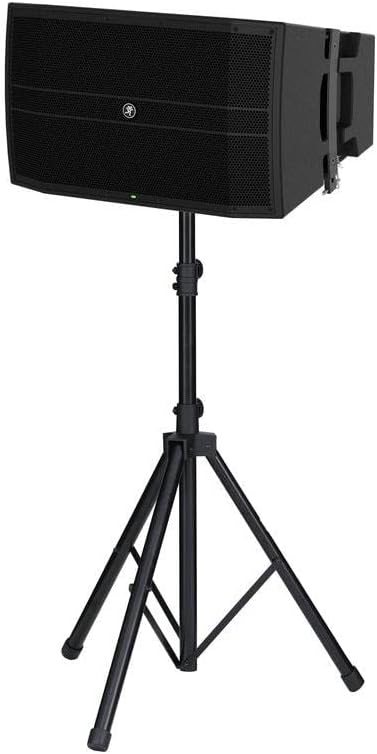
The Mackie DRM12A speaker securely mounted on a tripod stand, demonstrating a typical setup for elevated sound projection.
Operating
Once connected, the DRM12A is ready for operation. The DRM Control Dashboard provides intuitive access to various settings.
Powering On/Off
- After all connections are made, flip the power switch to the 'ON' position. The power indicator LED will illuminate.
- To power off, flip the switch to the 'OFF' position.
DRM Control Dashboard
The full-color display on the rear panel allows for comprehensive control:
- EQ Settings: Adjust equalization to tailor the sound to your environment.
- Voicing Modes: Select from various preset voicing modes optimized for different applications (e.g., Live, Club, Monitor).
- System Protection: Monitor system status and protection limits.
- Input/Output Levels: Adjust input gain and monitor output levels.
Array Configuration
The DRM12A is designed for vertical array configurations. Consult the official user manual for detailed instructions on safe rigging and array setup, including splay angles and weight distribution.

Two Mackie DRM12A speakers shown stacked, illustrating their arrayable design for scalable sound systems.
Maintenance
Regular maintenance ensures the longevity and optimal performance of your Mackie DRM12A speaker.
- Cleaning: Use a soft, dry cloth to wipe down the exterior of the speaker. Avoid using abrasive cleaners or solvents. For the grille, a soft brush can remove dust and debris.
- Storage: When not in use, store the speaker in a dry, temperature-controlled environment, away from direct sunlight and excessive moisture.
- Inspection: Periodically check all cables and connections for signs of wear or damage. Ensure all mounting hardware is secure if the speaker is permanently installed.
Troubleshooting
If you encounter issues with your DRM12A speaker, refer to the following common troubleshooting steps:
- No Power:
- Check if the power cord is securely connected to both the speaker and the power outlet.
- Verify that the power outlet is functional.
- Check the circuit breaker on the rear panel of the speaker. If tripped, reset it.
- No Sound:
- Ensure the audio source is active and sending a signal.
- Check all XLR cables for proper connection and integrity.
- Verify the input gain settings on the DRM Control Dashboard are not set too low.
- Confirm that the correct input is selected on the dashboard, if applicable.
- Distorted Sound:
- Reduce the input level from your audio source or the speaker's input gain to prevent clipping.
- Check for damaged cables.
- Ensure the speaker is not overdriven. Monitor the signal indicators on the DRM Control Dashboard.
- Intermittent Sound:
- Inspect all connections for looseness or damage.
- Test with different cables to rule out cable issues.
For persistent issues, consult the full user manual or contact Mackie customer support.
Specifications
| Feature | Detail |
|---|---|
| Model Name | DRM12A |
| Speaker Type | Professional Active Array Speaker |
| Output Wattage | 2000 Watts |
| Speaker Size | 12 Inches (Woofer) |
| High-Frequency Drivers | Triple 1" Titanium-diaphragm Compression Driver Array |
| Connectivity Technology | XLR |
| Control Method | DRM Control Dashboard (Digital) |
| Product Dimensions (D x W x H) | 18"D x 24.7"W x 15.2"H |
| Item Weight | 59.1 Pounds |
| Included Components | Power Cord, Quick Start Guide |
| UPC | 663961056341 |

Dimensions of the Mackie DRM12A speaker, indicating its depth, width, and height.
Warranty Information
The Mackie DRM12A 2000W 12-Inch Active Array Speaker comes with a Limited Warranty. For detailed information regarding warranty coverage, terms, and conditions, please refer to the official user manual or contact Mackie customer support. Retain your proof of purchase for warranty claims.
Support
For further assistance, technical support, or to access the complete user manual, please visit the official Mackie website or refer to the provided PDF user guide:
- Official Mackie Store: Mackie Store on Amazon
- User Manual (PDF): Download User Manual
Documents and downloads
Ask a question about this manual
Ask about setup, troubleshooting, compatibility, parts, safety, or missing instructions. Manuals+ will review the question and use this page’s manual context to help answer it.