
1. Introduction
This manual provides detailed instructions for the installation, operation, and maintenance of the Mean Well RSP-2400-12 2000W Single Output Power Supply. The RSP-2400-12 is a high-efficiency power supply featuring a built-in active Power Factor Correction (PFC) function, forced air cooling, and remote control capabilities for voltage trimming and ON/OFF functions. Please read this manual thoroughly before use to ensure safe and optimal performance.
2. Safety Instructions
- Installation and servicing must be performed by qualified personnel only.
- Ensure proper grounding of the unit to prevent electrical shock.
- Do not operate the power supply in environments with excessive moisture, dust, or extreme temperatures outside the specified range.
- Ensure adequate ventilation around the unit. Do not block the air intake or exhaust vents.
- Before any installation or maintenance, disconnect the AC input power.
- Avoid touching internal components when the unit is powered on or recently powered off, as high voltages may still be present.
3. Product Overview
The Mean Well RSP-2400-12 is a robust 2000W power supply designed for various industrial and commercial applications. It features a compact design with clearly labeled input and output terminals.

Figure 3.1: Front-side view of the Mean Well RSP-2400-12 power supply, showing the casing, ventilation grilles, and product label.
3.1 Mechanical Specifications and Connections
Refer to the diagram below for mechanical dimensions, AC input terminal assignments, control pin assignments, and the internal block diagram.
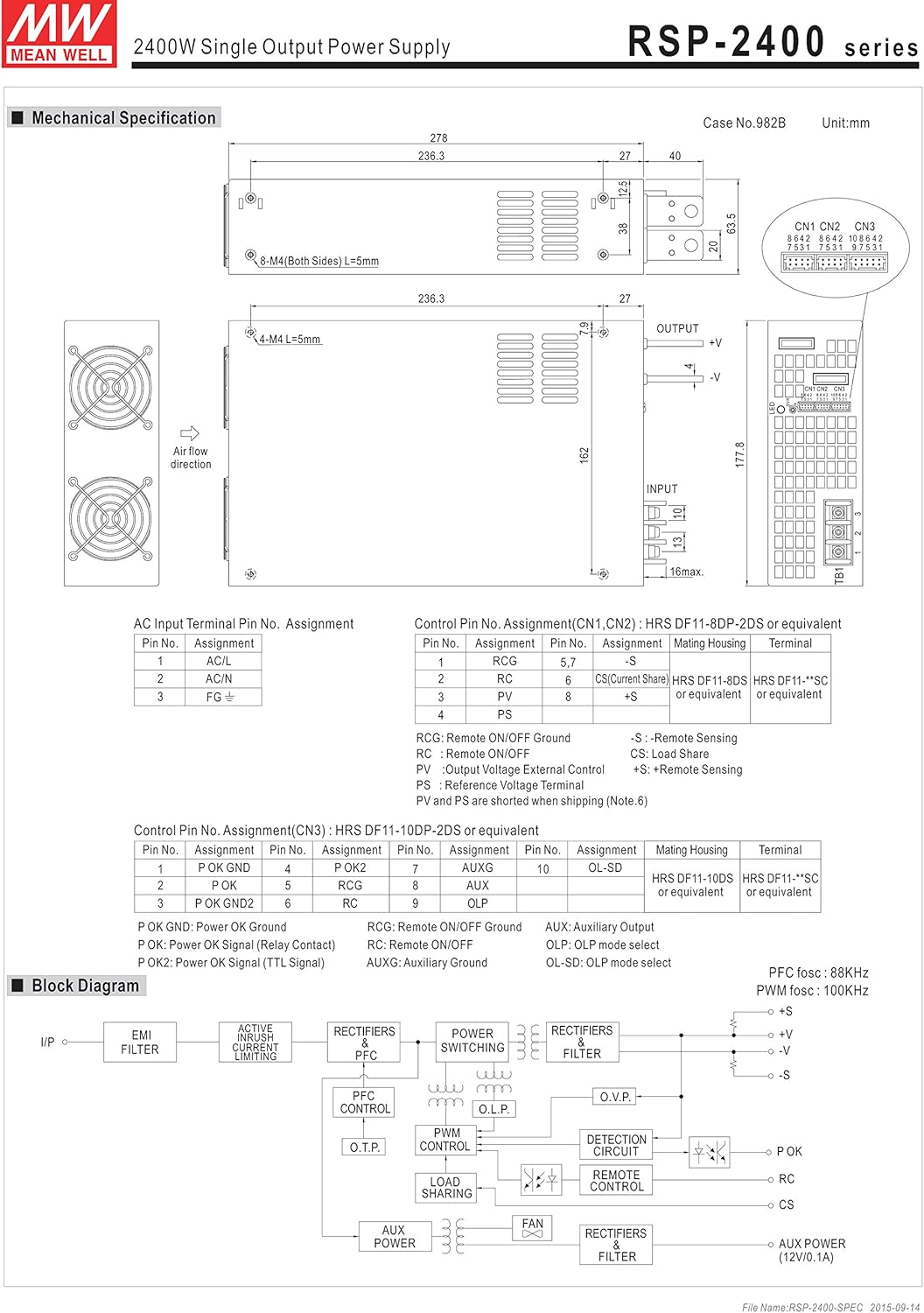
Figure 3.2: Detailed diagram showing the mechanical dimensions, AC input terminal assignments, control pin assignments (CN1, CN2, CN3), and a block diagram of the power supply's internal components.
AC Input Terminal Pin Assignment:
| Pin No. | Assignment |
|---|---|
| 1 | AC/L |
| 2 | AC/N |
| 3 | FG (Frame Ground) |
Control Pin Assignment (CN1, CN2):
These pins are used for remote sensing and remote ON/OFF functions. Refer to Figure 3.2 for pin locations.
Control Pin Assignment (CN3):
These pins are used for remote ON/OFF, power OK signal, and auxiliary output. Refer to Figure 3.2 for pin locations.
Block Diagram:
The internal block diagram illustrates the power supply's architecture, including the EMI filter, active current sharing, PFC control, PWM control, detection circuit, and fan control. This design ensures stable and efficient power delivery.
4. Setup and Installation
4.1 Mounting
Mount the power supply in a location that allows for proper airflow and heat dissipation. The unit utilizes forced air cooling via a built-in DC fan. Ensure the airflow direction (indicated in Figure 3.2) is not obstructed. The dimensions are 10.94 x 7 x 2.5 inches (L x W x H).
4.2 AC Input Connection
- Connect the AC Live (L) wire to Pin 1 (AC/L).
- Connect the AC Neutral (N) wire to Pin 2 (AC/N).
- Connect the Frame Ground (FG) wire to Pin 3 (FG).
Ensure all connections are secure and comply with local electrical codes. Use appropriate wire gauges for the expected current.
4.3 DC Output Connection
Connect your load to the DC output terminals. Observe correct polarity (+V and -V). For optimal performance and to minimize voltage drop, use thick, short cables for the DC output.
4.4 Grounding
Proper grounding is essential for safety and to minimize electromagnetic interference. Connect the FG terminal to a reliable earth ground.
5. Operating Instructions
5.1 Powering On/Off
Once all connections are made and verified, apply AC input power. The unit will power on. To power off, disconnect the AC input power or use the remote ON/OFF function.
5.2 Output Voltage Trimming
The output voltage (Vo) can be trimmed by an external control signal. Refer to the product datasheet for specific instructions on connecting the external control signal to the designated control pins (CN1/CN2/CN3) to adjust the output voltage within its specified range.
5.3 Remote ON/OFF Function
The RSP-2400-12 supports remote ON/OFF control. This function allows the power supply to be turned on or off remotely using an external signal. Refer to the diagram below for connection examples.

Figure 5.1: Graphs illustrating the power supply's derating curve based on ambient temperature and static characteristics based on input voltage. Also includes detailed diagrams and tables for implementing the remote ON/OFF function using external voltage sources or auxiliary outputs.
Remote ON/OFF Connection Methods:
The remote ON/OFF control is available via applying voltage in CN1 & CN2 & CN3. The table below summarizes the connection methods:
| Connection Method | SW Logic | Fig. 1.2(A) | Fig. 1.2(B) | Fig. 1.2(C) |
|---|---|---|---|---|
| Remote ON/OFF | Output on | SW Open | SW Close | SW Close |
| Output off | SW Close | SW Open | SW Open |
Figure 5.1 illustrates examples of connecting remote ON/OFF using an external voltage source (A) and using the internal 12V auxiliary output (B and C).
5.4 Load Considerations
The power supply's performance is affected by ambient temperature and input voltage. Refer to the Derating Curve and Static Characteristics graphs in Figure 5.1 to understand the maximum permissible load under different operating conditions. Ensure the load does not exceed the power supply's rated capacity, especially at higher ambient temperatures.
6. Maintenance
The RSP-2400-12 is designed for reliable operation with minimal maintenance. However, periodic checks can extend its lifespan and ensure optimal performance.
- Cleaning: Keep the power supply free from dust and debris. Use a soft, dry cloth or compressed air to clean the vents and casing. Ensure the unit is powered off and disconnected from AC input before cleaning.
- Fan Inspection: Periodically check the cooling fan for proper operation and ensure it is free from obstructions. A malfunctioning fan can lead to overheating and reduced lifespan.
- Environmental Conditions: Ensure the operating environment remains within the specified temperature and humidity ranges to prevent premature failure.
7. Troubleshooting
If you encounter issues with your RSP-2400-12 power supply, consider the following common troubleshooting steps:
- No Output Voltage:
- Check if the AC input power is connected and active.
- Verify that the remote ON/OFF function is not engaged (i.e., the unit is commanded to be ON).
- Inspect input and output wiring for loose connections or damage.
- Overload Protection:
- If the power supply shuts down or cycles, it may be due to an overload. Reduce the load connected to the output.
- Check for short circuits in the load.
- Over-Temperature Protection:
- If the unit is hot and shuts down, it may be due to over-temperature. Ensure adequate ventilation and that the fan is operating correctly.
- Reduce ambient temperature if possible.
If the problem persists after performing these checks, contact customer support.
8. Specifications
Below are the key technical specifications for the Mean Well RSP-2400-12 power supply:
| Specification | Value |
|---|---|
| Product Dimensions | 10.94 x 7 x 2.5 inches |
| ASIN | B07M6CSV79 |
| Item Model Number | LI series RSP-2400-12 |
| Date First Available | December 30, 2018 |
| Manufacturer | Mean Well |
| Brand (Seller) | EverSale |
| Compatible Devices | Personal Computer |
| Output Wattage | 2000 Watts |
| Wattage | 2000 watts |
| Cooling Method | Air (Forced air cooling by built-in DC fan) |
| Fan Count | 1 |
| Minimum Input Voltage | 12 Volts |
| UPC | 888777027662 |
| PFC Function | Built-in active PFC function |
| Auxiliary Power | Built-in auxiliary power |
| Voltage Trim | Vo can be trimmed by external control signal |
9. Warranty and Support
The Mean Well RSP-2400-12 power supply comes with a 5-year warranty from the manufacturer. This warranty covers defects in materials and workmanship under normal use.
For warranty claims, technical support, or further assistance, please contact your authorized Mean Well distributor or the seller (EverSale) directly. Ensure you have your product model number (RSP-2400-12) and proof of purchase available when contacting support.


