
1. Introduction
The Optrel Crystal 2.0 Auto-Darkening Welding Helmet is engineered to provide welders with an unparalleled view of their work. Featuring a shade 2.0 light state, it offers exceptional color and clarity, allowing for a clear perception of the welding process before, during, and after the arc. This helmet integrates advanced technologies such as automatic shade adjustment, a unique twilight feature, and true color perception to enhance user comfort and precision.
Designed for professional use, the Crystal 2.0 ensures optimal eye protection and reduces eye strain, making it a reliable tool for various welding applications.
2. Key Features
- Crystal Lens Technology (Shade 2.0 Light State): Experience an almost unclouded and clear view of your working environment. The lens provides realistic color perception in both light and dark states, offering a detailed and high-contrast view of the welding pool.
- Autopilot Function: Automatically adjusts the shade level (from 4 to 12) based on the brightness of the arc or flame, adapting to changing light conditions during the welding process.
- Twilight Feature: Gradually lightens the lens when transitioning from dark (welding) to light state, significantly reducing eye fatigue and improving comfort.
- Adjustable Sensitivity: Allows the operator to fine-tune the lens switching sensitivity to accommodate varying ambient light conditions, including outdoor welding in sunlight.
- Grind Mode: Easily switch between weld mode and a shade 2.0 grind mode using external controls, eliminating the need to remove the helmet for grinding tasks.
- Heat Reflecting Paint: The helmet's exterior features heat-reflecting paint to help keep the welder cooler during extended use.
- Patented Sensor Slide: Enables the detection angle to be reduced from 120° to 60°, preventing the auto-darkening filter (ADF) from reacting to welding activities nearby.
- Patented Exciter Headband: Designed to perfectly center the welding helmet when in the open position, enhancing comfort, balance, and reducing neck fatigue.
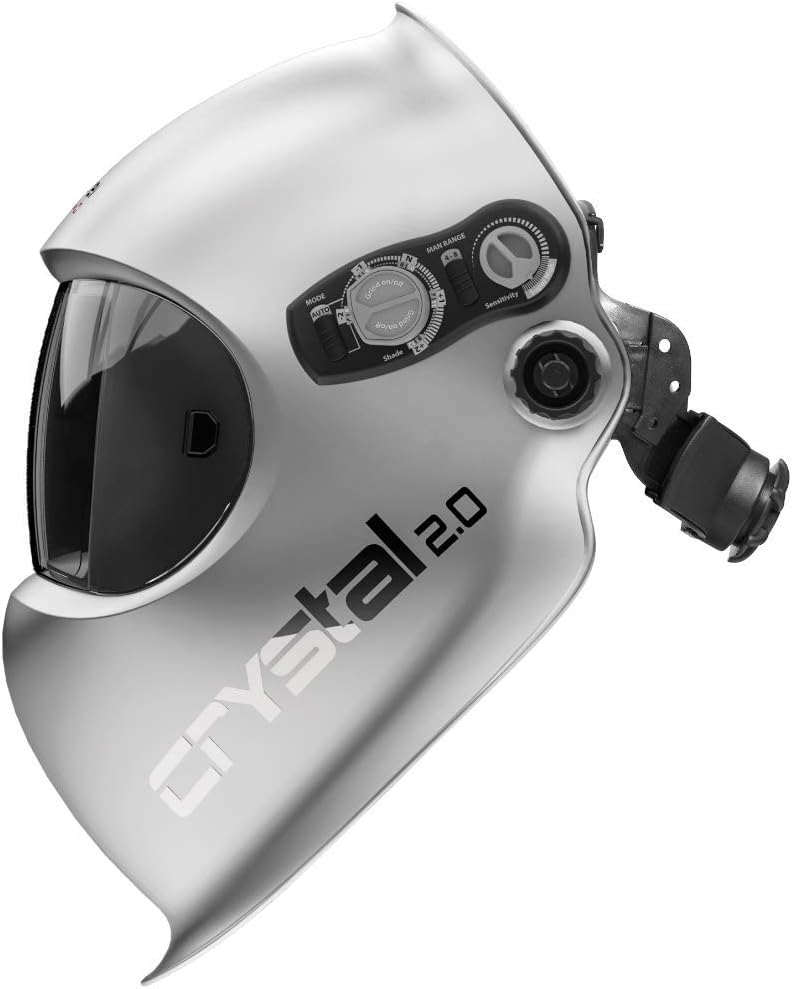
Figure 2.1: Side view of the Optrel Crystal 2.0 helmet, highlighting the external controls for shade, delay, and sensitivity adjustments.

Figure 2.2: Front view illustrating the clarity of the Crystal 2.0 lens in both light (left) and dark (right) states, showcasing the true color perception.
3. Setup and Adjustment
3.1 Headband Adjustment
The comfort headband is designed for quick and easy adjustment to ensure a secure and comfortable fit. Adjust the size, forward position, and top position using the knobs and straps on the headband. A properly adjusted headband will balance the helmet on your head, reducing neck fatigue.
3.2 Battery Installation
The Optrel Crystal 2.0 helmet requires 2 CR2 batteries, which are included. Ensure batteries are correctly installed according to the polarity indicators within the battery compartment. While the helmet is largely solar-powered, the batteries provide power for the auto-darkening function in low light conditions and for initial activation.
3.3 Sensor Slide Adjustment
To optimize the auto-darkening filter's response, adjust the patented sensor slide. This feature allows you to reduce the detection angle from 120° to 60°, which is particularly useful in environments where other welding arcs might inadvertently trigger the ADF. Adjust the slide to prevent unwanted darkening from peripheral light sources.
4. Operating Instructions
4.1 Auto-Darkening Function (Autopilot)
In Autopilot mode, the helmet automatically detects the arc brightness and adjusts the shade level between 4 and 12. This feature continuously adapts to the changing light conditions of the welding process, providing optimal protection and visibility without manual intervention.
4.2 Manual Mode
For specific applications or personal preference, the auto-darkening lens can also be operated in a fully manual mode. Use the external controls to infinitely adjust the shade level between shades 4 and 12, allowing for a custom view of the arc.
4.3 Grind Mode
To switch to grind mode, use the external controls on the helmet. This mode sets the lens to a light shade 2.0, allowing you to perform grinding tasks without removing the helmet. Remember to switch back to weld mode before initiating any welding activity.
4.4 Sensitivity and Delay Adjustment
External knobs allow for precise control over sensitivity and delay settings:
- Sensitivity: Adjusts how readily the lens reacts to light. Increase sensitivity for low amperage welding or when working in low ambient light. Decrease sensitivity to prevent false triggering from bright lights or other welders.
- Delay: Controls the time it takes for the lens to return from the dark state to the light state after the arc extinguishes. The Twilight feature works in conjunction with the delay setting to gradually lighten the lens, reducing eye strain.
Video 4.1: Demonstration of the Optrel Crystal 2.0's auto-darkening feature during TIG welding, showcasing the clear view of the arc and surrounding area.
Video 4.2: Demonstration of the Optrel Crystal 2.0's auto-darkening feature during MIG welding, highlighting the true color perception and clarity of the weld pool.
5. Maintenance
Proper maintenance ensures the longevity and optimal performance of your Optrel Crystal 2.0 welding helmet.
- Cleaning the Lens: Regularly clean the outer and inner protective lenses with a soft, lint-free cloth. For stubborn dirt, use a mild soap solution or a specialized lens cleaner. Avoid abrasive materials or harsh chemicals that could scratch or damage the lens.
- Battery Check: Although the helmet is largely solar-powered, periodically check the CR2 batteries. Replace them if the auto-darkening function becomes inconsistent or fails to activate promptly.
- Storage: Store the helmet in a clean, dry place away from direct sunlight and extreme temperatures when not in use.
- Inspection: Before each use, inspect the helmet for any signs of damage, including cracks in the shell, scratches on the lens, or wear on the headband. Replace any damaged parts immediately.
6. Troubleshooting
If you encounter issues with your Optrel Crystal 2.0 welding helmet, refer to the following common troubleshooting steps:
| Problem | Possible Cause | Solution |
|---|---|---|
| Lens does not darken or flashes |
|
|
| Poor visibility through lens |
|
|
| Lens remains dark after welding | Delay setting is too high. | Decrease the delay setting. |
7. Technical Specifications
| Specification | Detail |
|---|---|
| Manufacturer | Optrel |
| Part Number | 1006.900 |
| Item Weight | 1.72 pounds |
| Product Dimensions | 10.3 x 9.2 x 10.7 inches |
| Country of Origin | Switzerland |
| Item Model Number | 1006.900 |
| Batteries | 2 CR2 batteries required (included) |
| Color | Silver |
| Material | Plastic |
| Optical Class Rating | 1/1/1/1 (Optical Class, Scattered Light, Homogeneity, Angular Dependence) |
| Light State Shade | 2.0 |
| Dark State Shade Range | 4-12 (Automatic and Manual) |
8. Warranty and Support
The Optrel Crystal 2.0 welding helmet typically comes with a manufacturer's warranty. Please refer to the warranty card or documentation included with your product for specific terms, conditions, and duration. For technical support, spare parts, or service inquiries, please contact Optrel customer service or visit the official Optrel website.
For more information, you may visit the Optrel Store on Amazon.


