User Manual
3500mAh Replacement Battery for IBM 44V4145, IBM 74Y5667
Brand: Cameron Sino
1. Introduction
This manual provides essential information for the safe and effective use of your Cameron Sino 3500mAh Replacement Battery. This battery is designed to be a compatible replacement for IBM 44V4145 and IBM 74Y5667 original battery part numbers, fitting models such as IBM 5679, IBM 57B7, and IBM AS/400. Please read this manual thoroughly before installation and use.
2. Important Safety Information
WARNING: To reduce the risk of fire or burns, read instructions in operating guide before using the battery.
- DO NOT attempt to disassemble, open, or service the battery pack.
- REPLACE ONLY with the battery pack designated for this product.
- DO NOT crush, puncture, short external contacts, or dispose of in fire or water.
- DO NOT store above 60°C (140°F).
- New battery pack must be fully charged before use.

Figure 1: Front view of the Cameron Sino replacement battery, showing model number, part numbers, rating, and critical safety warnings. A QR code is visible, linking to 4894128139171.
3. Product Overview
The Cameron Sino replacement battery is a high-quality Lithium-Ion battery designed for specific IBM devices. It provides reliable power with a capacity of 3500mAh.
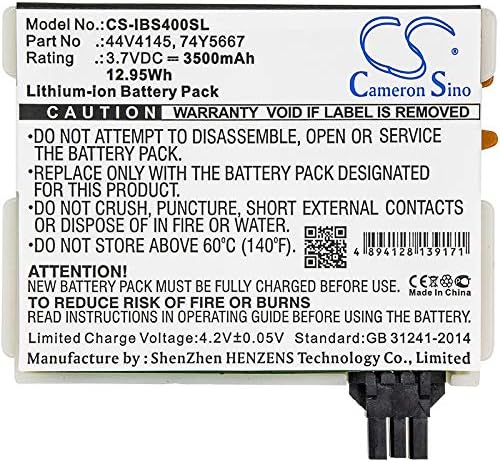
Figure 2: Top view of the battery, showing its compact design and connector.

Figure 3: Angled view of the battery, highlighting its dimensions and form factor.

Figure 4: A different angled view, providing a comprehensive look at the battery's casing.
4. Setup and Installation
Before installing the new battery, ensure your device is completely powered off and disconnected from any power source. Refer to your device's original user manual for specific battery replacement procedures.
- Power Off Device: Completely shut down your device and unplug it from the AC adapter.
- Locate Battery Compartment: Identify the battery compartment on your device. This is typically on the underside or accessible via a panel.
- Remove Old Battery: Carefully unlatch or unscrew the old battery. Gently pull it out of its compartment.
- Insert New Battery: Align the Cameron Sino replacement battery with the compartment. Ensure the connectors are properly aligned. Gently push the battery into place until it clicks or is securely seated.
- Secure Battery: If applicable, re-latch or screw the battery into place.
- Initial Charge: Connect your device to its AC adapter and fully charge the new battery before its first use.
5. Operating Instructions
For optimal performance and longevity, follow these operating guidelines:
- First Use: Fully charge the battery before its initial use. This helps calibrate the battery's charge indicator.
- Regular Charging: Charge the battery when the device indicates low power. Avoid letting the battery completely drain to 0% frequently, as this can reduce its lifespan.
- Temperature: Operate your device within normal room temperatures. Extreme cold or heat can affect battery performance and lifespan.
- Discharge Cycles: Lithium-Ion batteries benefit from regular use. Avoid keeping the device constantly plugged in if the battery is already fully charged.
6. Maintenance and Storage
Proper maintenance and storage can significantly extend the life of your battery:
- Cleaning: Keep the battery contacts clean. Use a dry, soft cloth to wipe away any dust or debris.
- Long-Term Storage: If storing the battery for an extended period (more than a month), charge it to approximately 50-60% before storage. Store it in a cool, dry place, away from direct sunlight and extreme temperatures.
- Avoid Full Discharge: Do not store the battery in a fully discharged state, as this can lead to irreversible damage.
- Regular Check: If stored for a long time, check the battery every few months and charge it back to 50-60% if needed.
7. Troubleshooting
If you encounter issues with your battery, consider the following common solutions:
- Battery Not Charging:
- Ensure the AC adapter is properly connected to both the device and a working power outlet.
- Verify that the battery is correctly seated in its compartment.
- Try restarting your device.
- Check if the charging port or battery contacts are clean and free of debris.
- Short Battery Runtime:
- Ensure the battery has been fully charged.
- Check your device's power settings; high performance modes or excessive background applications can drain the battery faster.
- Verify that the battery capacity (3500mAh) meets your usage requirements.
- Device Not Recognizing Battery:
- Remove and re-insert the battery to ensure proper connection.
- Ensure the battery model and part number are compatible with your device.
If problems persist, please refer to the Warranty and Support section for further assistance.
8. Specifications
| Feature | Specification |
|---|---|
| Product Type | Lithium-Ion |
| Voltage | 3.7V |
| Capacity | 3500mAh |
| Energy | 12.95Wh |
| Dimensions | 78.32 x 70.10 x 15.24mm (3.08 x 2.76 x 0.6 inches) |
| Weight | 130.0g (4.6 ounces) |
| Certifications | FCC, CE, CB, ISO9001, RoHS |
| Compatible IBM Part Numbers | 44V4145, 74Y5667 |
| Compatible IBM Models | 5679, 57B7, AS/400 |
9. Warranty and Support
Your Cameron Sino replacement battery comes with a 14-Day Money Back Guarantee and a 12-Month Warranty from the date of purchase.
This warranty covers manufacturing defects and issues arising from normal use. It does not cover damage caused by misuse, accident, unauthorized modification, or improper installation.
For warranty claims, technical support, or any questions regarding your battery, please contact your retailer or the Cameron Sino customer service through the official channels provided at the point of purchase. Please have your purchase receipt and battery model information ready when contacting support.


