Introduction
This manual provides essential instructions for the safe and efficient operation of your Monoprice Sous Vide Immersion Cooker 1100W. Please read all instructions carefully before use and retain this manual for future reference.

Image: Monoprice Sous Vide Immersion Cooker 1100W, showing its sleek black and silver design with a digital display.
Product Overview
The Monoprice Sous Vide Immersion Cooker is designed for precision cooking, heating and circulating water to maintain a consistent temperature for perfectly cooked food. Key features include:
- Quiet Long-Lasting Motor: The brushless motor ensures durability and longevity.
- Powerful 1100W Heating: Reaches ideal cooking temperatures faster, reducing prep time.
- Simple Controls: Easy-to-use touch controls for setting temperature and timers.
- Adjustable Clamp: Securely fits to any standard-sized cooking pot.

Image: Close-up view of the internal heating coils and water circulation vents at the bottom of the immersion cooker.
Safety Information
- Always ensure the immersion cooker is securely clamped to a pot before filling with water.
- Do not immerse the top electronic portion of the device in water. Observe the MIN and MAX water level markings on the stainless steel sleeve.
- Use a heat-resistant container for the water bath.
- Keep out of reach of children and pets.
- Unplug the device from the power outlet before cleaning or when not in use.
- Do not operate if the power cord or plug is damaged.
Setup
- Attach to Pot: Securely attach the adjustable clamp of the immersion cooker to the side of a heat-safe pot or container. Ensure the device is stable.
- Fill with Water: Fill the pot with water, ensuring the water level is between the 'MIN' and 'MAX' markings on the stainless steel sleeve of the immersion cooker.
- Plug In: Plug the power cord into a standard electrical outlet. The display will illuminate.
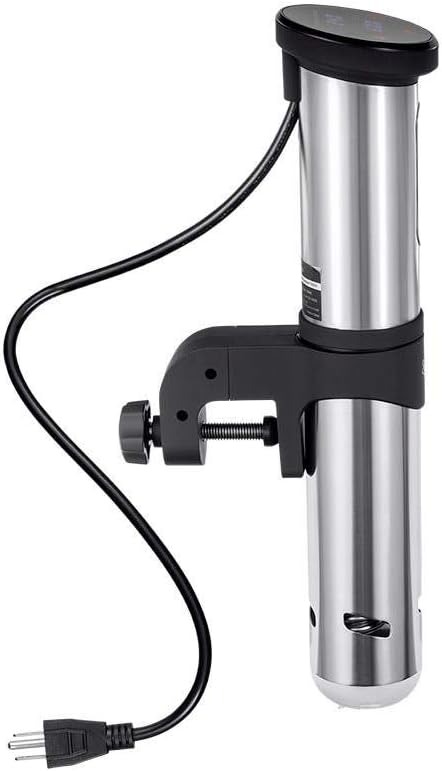
Image: Close-up of the adjustable clamp mechanism, showing how it attaches to the side of a pot.
Operating Instructions
- Set Temperature:
- Press the temperature icon (thermometer symbol) on the display. The set temperature will begin to flash.
- Use the scroll wheel on the side of the device or the '+' and '-' buttons on the display to adjust the desired cooking temperature.
- Press the temperature icon again to confirm the setting.
- Set Timer (Optional):
- Press the timer icon (clock symbol) on the display. The timer setting will flash.
- Use the scroll wheel or '+' and '-' buttons to set the desired cooking time (hours and minutes).
- Press the timer icon again to confirm.
- Start Cooking:
- Press the 'Play/Pause' button (triangle symbol) to begin heating and circulating the water. The device will start heating to the set temperature.
- Once the target temperature is reached, an audible alert may sound, and the timer (if set) will begin counting down.
- Add Food: Place your vacuum-sealed food into the water bath once the desired temperature is reached.
- Stop Cooking: Press the 'Play/Pause' button again to stop the heating and circulation. Unplug the device from the outlet.

Image: Digital display of the immersion cooker showing current and set temperatures, along with touch controls for temperature and timer settings.

Image: The immersion cooker operating in a pot of water, with a sealed bag of food submerged for cooking.
Maintenance and Cleaning
- Daily Cleaning: After each use, unplug the device and allow it to cool completely. Wipe the stainless steel sleeve with a soft, damp cloth.
- Mineral Buildup: If mineral deposits accumulate on the heating element, fill a pot with water to the 'MAX' line and add 1 cup of white vinegar. Run the device at 140°F (60°C) for 30 minutes. Rinse thoroughly.
- Do not use abrasive cleaners or scrubbers on any part of the device.
- Store the immersion cooker in a dry place.
Troubleshooting
- Device Not Starting: Check if the device is properly plugged in. Ensure the water level is between the 'MIN' and 'MAX' markings.
- Temperature Inaccuracy: If you suspect the temperature is inaccurate, use a calibrated thermometer to verify. Refer to the product manual for calibration instructions if available.
- Unusual Noise: A quiet hum is normal during operation. If loud or unusual noises occur, discontinue use and contact customer support.
Specifications
- Model Number: 135380
- Wattage: 1100 watts
- Voltage: 120 Volts
- Capacity: Up to 4 Gallons
- Item Weight: 3.66 pounds
- Product Dimensions: 16.5 x 8.1 x 4.5 inches
- Material: Metal
- Color: Black/Silver
- Control Method: Touch
- Upper Temperature Rating: 194 Degrees Fahrenheit
Warranty and Support
For warranty information and customer support, please refer to the official Monoprice website or contact their customer service directly. Keep your purchase receipt for warranty claims.