
1. Introduction
This manual provides essential instructions for the safe and effective operation, maintenance, and troubleshooting of your Mugast 220V Electro-Thermal Manual Hot Cutting Machine. Please read this manual thoroughly before using the device to ensure proper function and to prevent injury or damage.
1.1 Intended Use
The Mugast Electro-Thermal Manual Hot Cutting Machine is designed for cutting various materials such as cloth, elastic bands, buckles, lace, and for bonding trademarks, ribbon materials, and zippers. It is widely used in the apparel, clothing, and luggage bag industries.

Figure 1: The hot cutting machine in operation, demonstrating its use for cutting various textile materials.
2. Important Safety Information
WARNING: Failure to follow these safety instructions may result in fire, electric shock, burns, or other serious injury.
- Ensure the machine is connected to a 220V power supply. Using an incorrect voltage can damage the machine and pose a safety risk.
- Do not use the machine with a regular household extension cord if it does not provide sufficient power. Plug directly into a wall outlet or use a heavy-duty extension cord if necessary to ensure proper heating.
- The blade heats up to approximately 2000°C (3632°F) within one minute. Avoid direct contact with the hot blade to prevent severe burns.
- Always turn off and unplug the machine before cleaning, maintenance, or when replacing the blade.
- Keep the machine out of reach of children and pets.
- Operate the machine in a well-ventilated area to dissipate any fumes from cutting materials.
- Do not immerse the machine in water or any other liquid.
- If the power cord is damaged, it must be replaced by the manufacturer, its service agent, or similarly qualified persons to avoid a hazard.
- Do not touch the copper conductors at both ends of the blade or the screw hole portion during blade replacement to avoid affecting current conduction.
3. Package Contents
Verify that all items are present and in good condition upon opening the package:
- 1 x Hot Cutting Machine
- 1 x Power Plug (US Plug, 220V)
4. Product Specifications
| Feature | Specification |
|---|---|
| Brand | Mugast |
| Model | B07LG4NGGN |
| Voltage | 220V |
| Material | Metal |
| Product Dimensions (L x W x H) | 6.3" x 6.3" x 3.15" (16cm x 15cm x 8cm) |
| Weight | Approx. 1.64 lbs (754g) |
| Warm-up Time | 1 minute |
| Maximum Temperature | Up to 2000°C (3632°F) |

Figure 2: Dimensions of the Mugast Hot Cutting Machine.
5. Setup
Before first use, ensure the machine is placed on a stable, heat-resistant surface in a well-ventilated area.
- Unpack: Carefully remove the hot cutting machine and all accessories from the packaging.
- Inspect: Check the machine for any visible damage. Do not use if damaged.
- Power Connection: Connect the power plug to a compatible 220V wall outlet. Ensure the outlet can provide sufficient power.
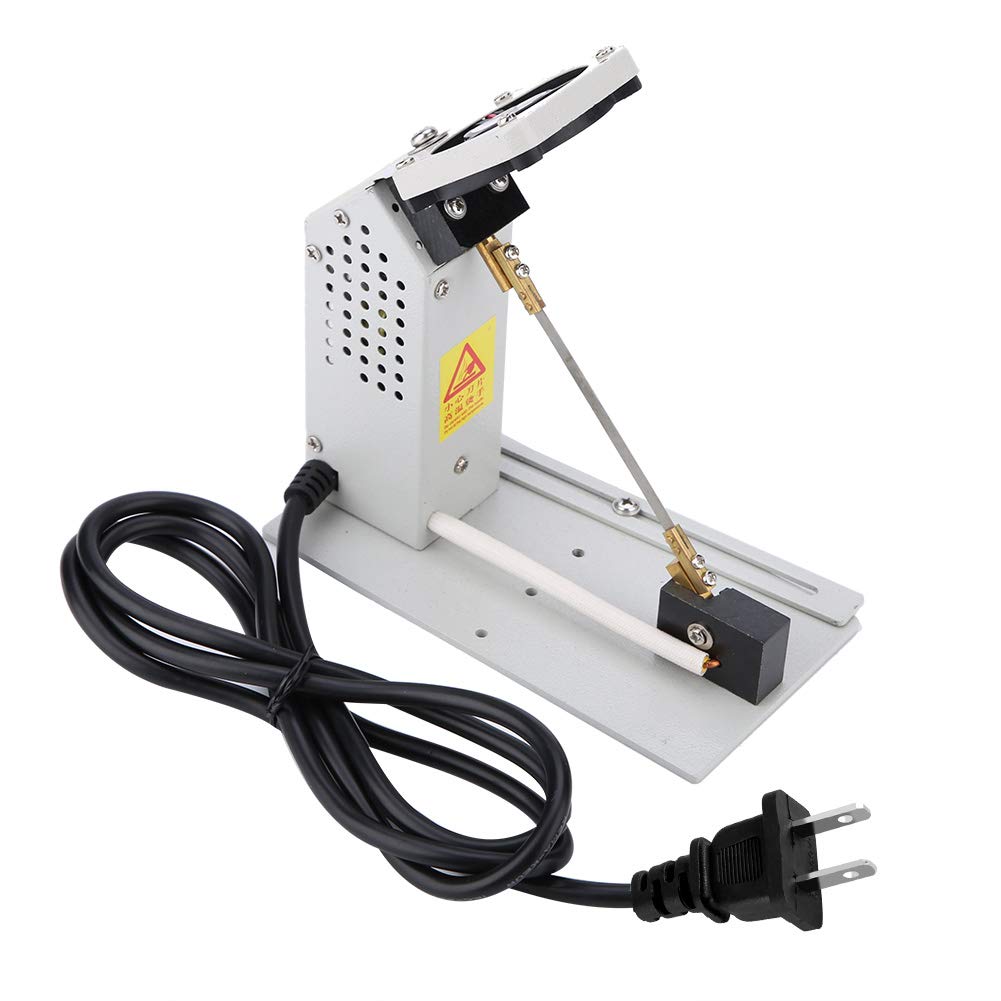
Figure 3: The hot cutting machine with its power cord and US plug.
6. Operating Instructions
Follow these steps for safe and effective operation of your hot cutting machine:
- Power On: Flip the ON/OFF switch to the "ON" position. The exhaust cooling fan will start running.
- Adjust Temperature: Use the temperature adjustment knob to set the desired heat level. The blade will heat up quickly, reaching maximum temperature in approximately one minute.
- Prepare Material: Place the material to be cut on a heat-resistant surface. Ensure it is stable and positioned correctly for the desired cut.
- Perform Cut: Carefully lower the hot blade onto the material. Apply gentle, consistent pressure to make a clean cut. The cutting speed should be suitable for the material type.
- Power Off: After use, flip the ON/OFF switch to the "OFF" position. Allow the blade to cool completely before handling or storing the machine.

Figure 4: The machine features a temperature adjustment knob and an ON/OFF switch for easy control.
7. Blade Replacement
CAUTION: Always ensure the machine is unplugged and the blade is completely cool before attempting replacement.
- Power Off and Unplug: Turn off the machine and disconnect it from the power source.
- Loosen Fan Screw: Turn the screw counterclockwise to loosen the lower fan.
- Remove Old Blade: Remove the four fastening screws on the blade. Carefully detach the old blade.
- Clean Area: Ensure there are no foreign bodies in the blade portion or screw holes on the machine. Clean thoroughly before installing the new blade.
- Install New Blade: Position the new blade and secure it with the four fastening screws. Rotate the screws clockwise until the blade is straightened. Ensure the blade is of the specified size to avoid affecting machine life or causing damage.
- Avoid Contact: Try not to touch the copper conductors at both ends of the blade and the screw hole portion during installation to prevent issues with current conduction.

Figure 5: The durable blade of the hot cutting machine, designed for long service life.
8. Maintenance
Regular maintenance ensures the longevity and optimal performance of your hot cutting machine.
- Cleaning: After each use, ensure the machine is cool and unplugged. Gently wipe the exterior with a dry cloth. Remove any material residue from the blade area.
- Storage: Store the machine in a dry, clean place, away from direct sunlight and moisture.
- Blade Inspection: Periodically inspect the blade for wear or damage. Replace the blade if it becomes dull or bent.
9. Troubleshooting
If you encounter issues with your hot cutting machine, refer to the following common problems and solutions:
| Problem | Possible Cause | Solution |
|---|---|---|
| Machine does not heat up. |
|
|
| Blade heats up slowly or inconsistently. |
|
|
| Exhaust fan not running. |
|
|
10. Warranty and Support
For warranty information or technical support, please contact Mugast customer service through your purchase platform or visit the official Mugast store page.
Mugast Store: Visit the Mugast Store on Amazon