1. Introduction
This manual provides detailed instructions for setting up and operating your CHUNGHOP K-108ES Universal A/C Remote Control. This remote is designed to control a wide range of air conditioner brands, offering convenient and comprehensive control over your unit.
Key features include time on/off functions, automatic and manual code search capabilities, and a permanent memory function that retains settings even after battery replacement.
2. Product Features
- Universal Compatibility: Controls over 1000 different world-famous brands of air conditioners.
- Code Search Options: Offers both manual and automatic searching methods to find the correct code for your air conditioner.
- Timer Functions: Includes Time ON and Time OFF functions for scheduled operation.
- Permanent Memory: Settings are retained permanently, eliminating the need to reset after battery replacement or power failure.
- User-Friendly Design: Features a comfortable hand feeling and simple operation.
- LED Light: Equipped with an LED light for convenience.
3. Package Contents
- 1 x CHUNGHOP K-108ES Universal A/C Remote Control
- Note: 2 x AA batteries are required and not included.
4. Setup
4.1 Battery Installation
- Open the battery compartment cover on the back of the remote control.
- Insert two (2) AA batteries, ensuring correct polarity (+ and -).
- Close the battery compartment cover.
 Figure 1: Angled view of the remote control, illustrating its ergonomic design and button placement.
4.2 Code Setting for Your Air Conditioner
The remote control needs to be programmed with the correct code for your specific air conditioner brand. There are two methods: Manual Input and Automatic Search.
4.2.1 Manual Code Input
This method involves entering a specific code for your air conditioner brand. Refer to the code list (usually provided with the physical product, not available in this digital manual) for your brand's code.
- Ensure your air conditioner is plugged in but powered OFF.
- Point the remote control towards the air conditioner.
- Press and hold the SET button for approximately three seconds until the code number on the remote's display starts flashing.
- Use the TEMP+ (up arrow) or TEMP- (down arrow) buttons to cycle through the codes. As you cycle, the air conditioner may turn on when a correct code is found.
- Once your air conditioner responds (turns on), press the OK button to confirm and save the code. The code number will stop flashing.
- Test the remote control's functions (ON/OFF, Mode, Temperature). If it does not work effectively, repeat steps 3-5.
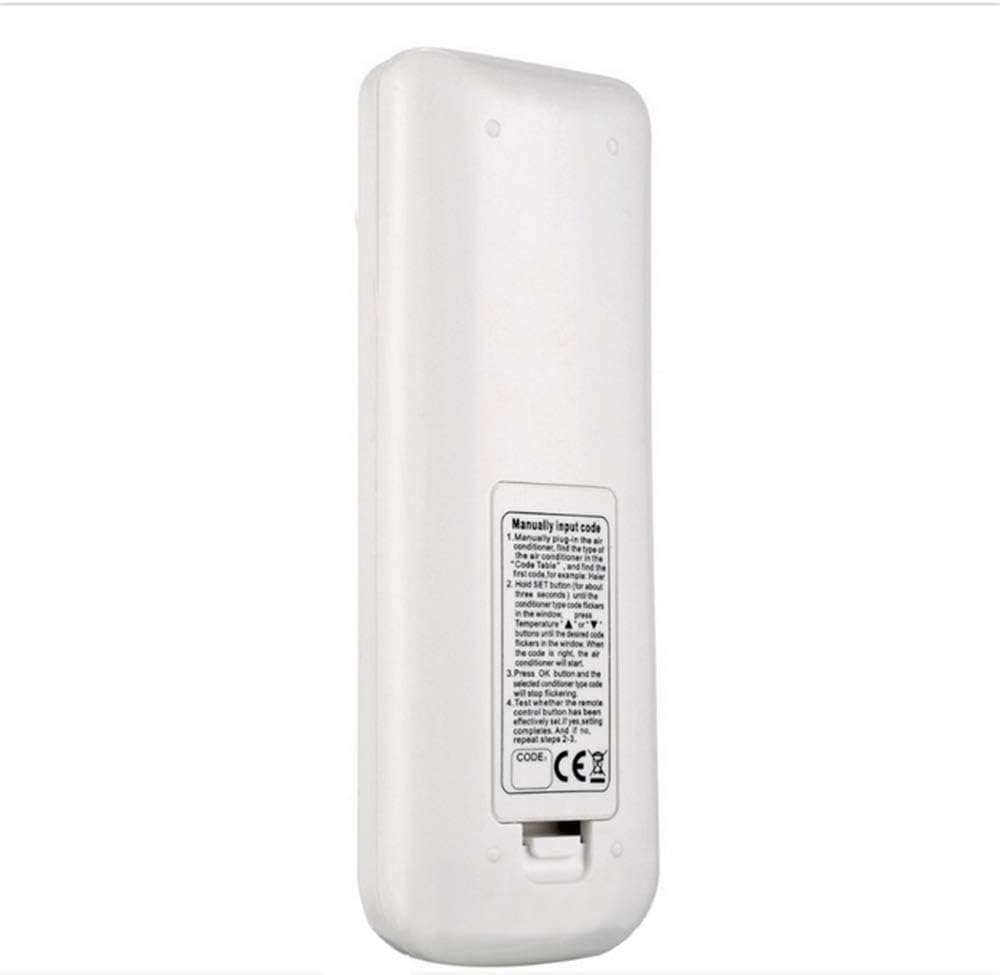 Figure 2: Rear view of the remote control, showing the battery compartment and a label with manual code input instructions.
4.2.2 Automatic Code Search
This method allows the remote to automatically search for a compatible code.
- Ensure your air conditioner is plugged in but powered OFF.
- Point the remote control towards the air conditioner.
- Press and hold the SET button for approximately six seconds. The code number on the display will start flashing and automatically increment.
- Observe your air conditioner. When it turns on, immediately press the OK button to stop the automatic search and save the code.
- Test the remote control's functions. If it does not work effectively, repeat the automatic search process.
5. Operating Instructions
Once the remote is programmed, you can use its various functions to control your air conditioner.
 Figure 3: Front view of the remote control, highlighting the LCD display and button layout.
- ON/OFF (U button): Press to turn the air conditioner ON or OFF.
- MODE: Press to cycle through operating modes (e.g., Cool, Heat, Fan, Dry, Auto).
- TEMP (▲ / ▼ buttons): Press to adjust the desired temperature.
- FAN Speed (Fan icon button): Press to adjust the fan speed (e.g., Low, Medium, High, Auto).
- SWING (Swing icon button): Press to activate or adjust the air swing function.
- CLOCK: Press to set the current time. (Specific setting steps may vary by AC unit, refer to AC manual).
- TIME ON: Press to set a timer for the air conditioner to turn ON automatically.
- TIME OFF: Press to set a timer for the air conditioner to turn OFF automatically.
- SET: Used for code setting (as described in Section 4.2) and potentially for other advanced settings depending on the AC unit.
- OK: Used to confirm selections, especially during code setting.
6. Maintenance
6.1 Battery Replacement
When the remote control's display becomes dim or its response time slows, it's time to replace the batteries.
- Open the battery compartment cover.
- Remove the old AA batteries.
- Insert two new AA batteries, observing correct polarity.
- Close the battery compartment cover.
Note: Due to the permanent memory function, you will not need to re-enter the code after replacing batteries.
6.2 Cleaning
Wipe the remote control with a soft, dry cloth. Do not use liquid cleaners or abrasive materials, as they may damage the remote.
7. Troubleshooting
| Problem | Possible Cause | Solution |
|---|---|---|
| Remote does not power on or display is blank. | Batteries are dead or incorrectly inserted. | Replace batteries with new AA batteries, ensuring correct polarity. |
| Remote does not control the air conditioner. | Incorrect code set, or remote is not pointed at the AC unit. | Ensure the remote is pointed directly at the AC unit. Re-perform the code setting procedure (Manual or Automatic Search) as described in Section 4.2. |
| Only some functions work (e.g., ON/OFF works, but temperature adjustment doesn't). | The set code is partially compatible but not fully. | Re-perform the code setting procedure. Try the Automatic Search method or cycle through more codes during Manual Input to find a fully compatible code. |
| Air conditioner does not respond to timer settings. | Timer not set correctly or AC unit does not fully support the timer function via remote. | Ensure the current time is set on the remote. Re-check timer settings. Consult your air conditioner's original manual for specific timer compatibility. |
8. Specifications
- Model: K-108ES
- Brand: CHUNGHOP
- Compatibility: Over 1000 brands of air conditioners
- Power: 2 x AA Batteries (not included)
- Material: ABS
- Color: White
9. Warranty and Support
Information regarding specific warranty terms and customer support contacts for the CHUNGHOP K-108ES remote control was not provided in the product details. Please refer to the packaging or contact your retailer for warranty details and support inquiries.
For general information about CHUNGHOP products, you may visit the CHUNGHOP Store on Amazon.


