
Introduction
The DETECH Chaser VLF 14 kHz Metal Detector is an advanced device designed for efficient and stable metal detection across various terrains. Utilizing Very Low Frequency (VLF) technology at 14 kHz, it offers excellent depth and sensitivity, making it suitable for detecting relics, coins, jewelry, artifacts, gold nuggets, and other metals. This manual provides essential information for assembling, operating, maintaining, and troubleshooting your DETECH Chaser metal detector.

Figure 1: The DETECH Chaser VLF 14 kHz Metal Detector with its Ultimate Coil.
Setup and Assembly
Follow these steps to assemble your DETECH Chaser metal detector:
- Attach the Search Coil: Securely attach the 9-inch Ultimate search coil to the lower stem using the provided non-metallic bolt and washers. Ensure it is firmly in place but do not overtighten.
- Assemble the Shaft: Connect the lower, middle, and upper sections of the telescopic shaft. The middle and upper rods are made of 100% carbon for lightweight strength. Adjust the length to a comfortable operating position.
- Mount the Control Box: Slide the control box onto the upper shaft. Ensure it clicks into place or is secured with the locking mechanism.
- Connect the Coil Cable: Carefully wrap the search coil cable around the shaft, ensuring it is not too tight or loose, and plug the connector into the designated port on the control box. Tighten the collar to secure the connection.
- Install Batteries: The detector uses 4 AA batteries. Open the battery compartment on the control box and insert the batteries, observing the correct polarity. Close the compartment securely. The detector provides over 20 hours of continuous operation with fresh batteries.
- Adjust Armrest: Position the armrest for comfortable use, ensuring your forearm is supported.
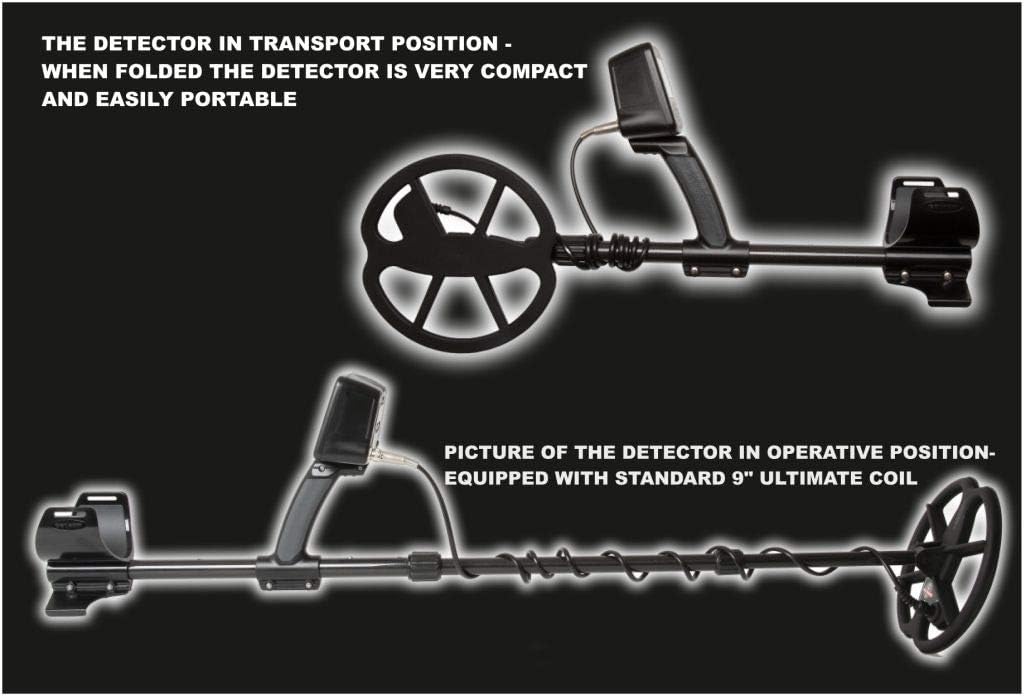
Figure 2: The detector shown in its compact transport position (top) and fully extended operative position with the standard 9-inch Ultimate coil (bottom).
Operating Instructions
The DETECH Chaser is designed for intuitive operation. Familiarize yourself with the control panel and its functions.
Control Panel Overview

Figure 3: Close-up of the control unit, showing the LCD display and control buttons for programs, discrimination, volume, and ground balance.
The control unit features an LCD display and several buttons for navigation and settings adjustment:
- PROGRAMS: Cycles through predefined detection programs.
- MENU: Accesses the main menu for advanced settings.
- +/- Buttons: Adjust values or navigate menu options.
- PINPOINT/DETECT: Activates pinpoint mode for precise target location.
- GROUND BALANCE: Initiates automatic or manual ground balancing.
- ONE TONE/MIXED: Selects audio tone mode.
Initial Power-On and Language Selection
- Press the power button to turn on the detector.
- Upon first use, you may be prompted to select a language. The menu supports English, French, Russian, Spanish, and Turkish. Use the +/- buttons to select and confirm.
- An integrated help function is available in each language to assist new users.
Ground Balancing
The Chaser features both automatic and manual ground balance. Proper ground balancing is crucial for stable operation and optimal depth, especially in mineralized soils.
- Automatic Ground Balance: In most conditions, the automatic ground balance function will suffice. Refer to the on-screen instructions or the help menu for activation.
- Manual Ground Balance: For highly mineralized or challenging ground, manual ground balance may offer better performance. Consult the help menu for detailed steps.
Discrimination and Programs
The detector offers excellent discrimination capabilities with a precise 180-unit VDI scale. The display shows the conductivity of different targets and the selected discrimination level.
- Adjustable Discrimination: Easily adjust discrimination levels to ignore unwanted targets (e.g., iron).
- Predefined Programs: The Chaser includes four preset discrimination programs: DISC ZERO (all metal), RELIC, COINS, and BEACH. Select the program best suited for your search environment.
- Two-Tone Identification: The detector provides a low tone for ferrous targets and a high tone for non-ferrous targets, aiding in target identification.
Sensitivity, Gain, and Volume
- Sensitivity (SENS): Adjust sensitivity to optimize detection depth and stability. Higher sensitivity increases depth but may also increase ground noise.
- Gain (GAIN): Controls the signal amplification. Adjust in conjunction with sensitivity for best performance.
- Volume (VOLUME): Adjust the audio output level. The detector provides a 6.35mm stereo headphone jack for private listening.

Figure 4: The detector's display showing current settings for discrimination, mode, volume, sensitivity, gain, and the active program (e.g., RELICS).
Maintenance
Proper maintenance ensures the longevity and optimal performance of your DETECH Chaser metal detector.
- Cleaning: After each use, wipe down the search coil and shaft with a damp cloth to remove dirt, dust, and debris. Avoid using harsh chemicals or abrasive cleaners. The control box should be kept dry and clean.
- Battery Care: Always remove batteries if the detector will not be used for an extended period to prevent leakage. Use high-quality AA batteries.
- Storage: Store the detector in a cool, dry place, away from direct sunlight and extreme temperatures. If storing for a long time, consider disassembling the shaft for compact storage.
- Cable Inspection: Periodically check the coil cable for any signs of wear, cuts, or damage. Ensure all connections are clean and secure.

Figure 5: View of the control box, highlighting the built-in LED indicators for illuminating the search coil and the terrain in front of the operator.
Troubleshooting
If you encounter issues with your DETECH Chaser, refer to the following common problems and solutions:
| Problem | Possible Cause | Solution |
|---|---|---|
| No power or detector does not turn on. | Dead or incorrectly installed batteries. | Check battery polarity. Replace with fresh AA batteries. |
| Excessive false signals or chatter. | High sensitivity, improper ground balance, electromagnetic interference. | Reduce sensitivity. Perform ground balance. Move away from power lines or other electronic devices. |
| Poor depth detection. | Incorrect ground balance, low sensitivity, heavily mineralized soil. | Re-ground balance. Increase sensitivity. Sweep slower and closer to the ground. |
| Inaccurate target identification (VDI). | Target is too deep, multiple targets, or target is partially masked. | Sweep from different angles. Use pinpoint mode. Adjust discrimination settings. |
| No audio from headphones. | Headphones not plugged in correctly, faulty headphones, or low volume. | Ensure headphones are fully plugged into the 6.35mm jack. Check headphone functionality with another device. Increase volume. |
If the problem persists after trying these solutions, please contact customer support.
Specifications
| Feature | Specification |
|---|---|
| Model Number | D00160 |
| Type | Very Low Frequency (VLF) Metal Detector |
| Operating Frequency | 14 kHz |
| Technology | Extreme Depth and Sensitivity (EDS) |
| Search Coil | 9-inch (22.9 cm) Ultimate Coil |
| Weight (with batteries) | 1.5 kg (3.3 lbs) |
| Power Source | 4 x AA Batteries |
| Battery Life | Over 20 hours (continuous operation) |
| Display Type | LCD |
| Discrimination Scale | 180 VDI units |
| Predefined Programs | 4 (DISC ZERO, RELIC, COINS, BEACH) |
| Headphone Jack | 6.35 mm Stereo |
| Adjustable Length | Yes, up to 60 inches (150 cm) extended length |
| Shaft Material | 100% Carbon (middle and upper rods) |
| Product Dimensions (L x W x H) | 150 x 40 x 15 cm (approximate, fully extended) |
Warranty
The DETECH Chaser VLF 14 kHz Metal Detector comes with a 2-year warranty from the date of purchase. This warranty covers manufacturing defects and ensures the product is free from defects in materials and workmanship under normal use. Please retain your proof of purchase for warranty claims. The warranty does not cover damage caused by misuse, accidents, unauthorized modifications, or normal wear and tear.
Support
For further assistance, technical support, or warranty inquiries, please contact your authorized DETECH dealer or visit the official DETECH website. Ensure you have your model number (D00160) and proof of purchase available when seeking support.

