
HomeSpot HS3-NS001-RB-V2
Contents
HomeSpot Bluetooth Audio Adapter User Manual
Model: HS3-NS001-RB-V2
Brand: HomeSpot
Introduction
The HomeSpot Bluetooth Audio Adapter is designed to enhance your gaming experience on the Nintendo Switch family of consoles, as well as PS4, PS5, and PC. This adapter allows for wireless audio transmission to Bluetooth headphones, supporting advanced codecs like aptX Low Latency for minimal audio delay. It also features a built-in microphone for in-game voice chat and supports dual headphone streaming.
Safety Information
- Keep the device dry. Do not expose to moisture or extreme temperatures.
- Avoid dropping or subjecting the device to strong impacts.
- Do not attempt to disassemble or repair the device yourself. Refer to qualified service personnel.
- Keep out of reach of children.
- Ensure proper ventilation when in use.
Package Contents
- HomeSpot Bluetooth Audio Adapter (Blue & Red)
- USB-A Adapter (for docked mode or PC/PS4/PS5)
- Travel Pouch
- User Manual (this document)
Product Overview
The HomeSpot Bluetooth Audio Adapter is a compact device designed to seamlessly integrate with your gaming console. It features two primary buttons and LED indicators for easy operation and status monitoring.
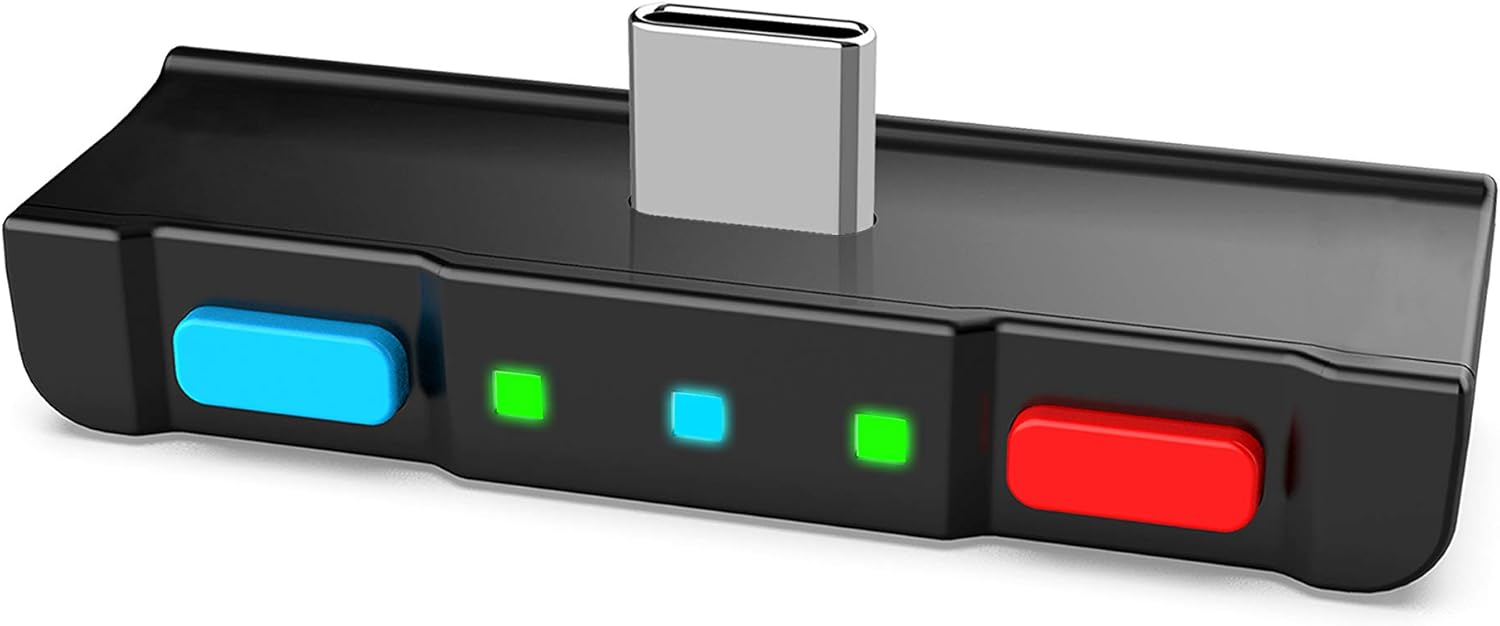
Image: The HomeSpot Bluetooth Audio Adapter, featuring a USB-C connector, blue and red buttons, and LED indicators.

Image: Detailed view of the adapter's controls and indicators. It shows the P1 Button (blue), P1 LED, Codec LED, P2 LED, P2 Button (red), and USB-C Plug. The P1 and P2 buttons are used to connect or toggle the internal mic/hold to pair. LEDs indicate connection status and audio codec.
Key Features:
- USB-C Connectivity: Directly plugs into the Nintendo Switch, PS5, PS4, or PC.
- Dual Headphone Streaming: Connects up to two Bluetooth headphones simultaneously.
- Built-in Digital Mic: Supports in-game voice chat.
- aptX Low Latency: Minimizes audio delay for a synchronized experience.
- LED Indicators: Displays active audio codec and headphone usage.

Image: A circular diagram highlighting key features: Simple two-button operation, Dual aptX Low Latency, Internal Mic, Codec indicator, Bluetooth 5.0, Low profile design, and No battery needed.
Setup
Initial Connection to Console:
- Ensure your Nintendo Switch (or other compatible device) is powered on.
- Plug the HomeSpot Bluetooth Audio Adapter into the USB-C port of your console. For Nintendo Switch, this is located at the bottom of the console in handheld mode, or use the USB-A adapter for the dock.
- The adapter's LEDs will illuminate, indicating it is powered on and ready for pairing.

Image: The HomeSpot Bluetooth Audio Adapter plugged into the USB-C port of a Nintendo Switch in handheld mode, demonstrating its low-profile design.
Pairing Bluetooth Headphones:
- Put your Bluetooth headphones into pairing mode (refer to your headphone's manual for specific instructions).
- On the HomeSpot adapter, press and hold either the P1 (blue) or P2 (red) button for 3 seconds until the corresponding LED flashes rapidly. This indicates pairing mode.
- Place your headphones close to the adapter. The adapter will automatically detect and pair with your headphones.
- Once paired, the corresponding P1 or P2 LED will turn solid green, and the Codec LED will indicate the active audio codec (Off for SBC, Blue for aptX, Amber for aptX Low Latency).
Video: This video demonstrates the AirPods pairing procedure with the HomeSpot Bluetooth Audio Adapter. It shows how to put AirPods into pairing mode and then connect them to the adapter by holding the P1 or P2 button.
Dual Headphone Connection:
To connect a second pair of headphones, repeat the pairing process using the other button (if P1 was used for the first, use P2 for the second, and vice-versa). Both P1 and P2 LEDs will be solid green when two headphones are connected.

Image: Two children playing Nintendo Switch in docked mode, both wearing headphones connected via the HomeSpot Bluetooth Audio Adapter (shown with USB-A adapter plugged into the dock).
Operating Instructions
In-Game Voice Chat:
The adapter supports in-game voice chat through its built-in microphone or, in beta mode, through your headphones' microphone (HFP mode).
- Built-in Mic: The built-in mic can be toggled On/Off by pressing the P1 button when the adapter is paired with headphones. P1 LED Solid Amber indicates the built-in mic is On, P1 LED Solid Green indicates the built-in mic is Off. The built-in mic has an effective operating range of 4 ft or less, primarily for handheld mode.
- Headphones Mic (HFP Mode - Beta):
- Turn on the Switch and go to the Home menu.
- Press and hold the right button (P2) while inserting the adapter into the Switch.
- Keep holding the right button until the LEDs light up after inserting the adapter.
- Connect with headphones as normal.
- You can still press P1 to toggle the built-in mic (P1 LED Solid Amber for On, Solid Green for Off).
- Alternatively, you can press the Play/Pause button on the headphones to toggle the headphones mic (P1 LED Flashing Amber for On, Solid Green for Off).

Image: A diagram illustrating in-game voice chat functionality, showing the adapter connected to a Nintendo Switch and audio flowing to two users with headphones, with the internal mic enabling communication.
Maintenance
- Clean the adapter regularly with a soft, dry cloth.
- Avoid using harsh chemicals or abrasive cleaners.
- Store the adapter in its travel pouch when not in use to protect it from dust and scratches.
- Ensure the USB-C port on your console and the adapter are free of debris before connecting.
Troubleshooting
| Problem | Possible Cause / Solution |
|---|---|
| No audio / Adapter not recognized |
|
| Headphones not pairing |
|
| Audio latency/delay |
|
| Mic not working (HFP mode) |
|


Specifications
| Feature | Detail |
|---|---|
| Model Number | HS3-NS001-RB-V2 |
| Dimensions (L x W x H) | 4.9 x 3.25 x 1 inches |
| Item Weight | 0.16 ounces |
| Compatible Devices | Nintendo Switch, PS4, PS5, PC, Headphones, Speakers |
| Connector Type | USB Type C |
| Audio Codec Support | SBC, aptX, aptX Low Latency (aptX LL) |
| Bluetooth Version | Bluetooth 5.0 |
| Dual Headphone Support | Yes |
| Built-in Microphone | Yes (for in-game voice chat) |

Image: A comparison table showing the advantages of the HomeSpot Bluetooth Adapter over Nintendo Switch Native Bluetooth, including better audio codec support (aptX, aptX LL), lower latency, dual headphone connection, auto reconnect, more controllers, built-in mic, headphones mic support (HFP), and in-game voice chat.
Warranty and Support
HomeSpot offers a 6-month warranty for this product. For warranty claims, technical support, or further inquiries, please visit the official HomeSpot website or contact their customer service directly. Keep your purchase receipt as proof of purchase.
Official HomeSpot Store: HomeSpot Amazon Store
Documents and downloads
Ask a question about this manual
Ask about setup, troubleshooting, compatibility, parts, safety, or missing instructions. Manuals+ will review the question and use this page’s manual context to help answer it.