
Sensor Switch NPODM DX WH
Instruction Manual
Sensor Switch Nlight Wallpod, Push-Button
Model: NPO DM DX WH
Product Overview
The Sensor Switch NPO DM DX WH is a white, single-channel wallpod designed for integration with Sensor Switch nLight control systems. This device provides intuitive push-button control for lighting applications, enabling both on/off functionality and dimming adjustments.
- Communicates with the nLight network for seamless system integration.
- Remotely configurable and upgradeable for enhanced flexibility.
- Features soft-click push-buttons for reliable operation.
- Offers 1-channel On/Off control.
- Provides 1-channel Raise/Lower DX Dimming Control to adjust nLight dimming output.

Figure 1: Angled view of the NPO DM DX WH Wallpod. This image displays the device's white finish and the layout of its three primary control buttons: ON/OFF, Raise, and Lower.
Installation and Setup
Installation of the NPO DM DX WH wallpod requires electrical wiring and connection to an nLight network. It is strongly recommended that installation be performed by a qualified electrician or trained professional to ensure safety and proper functionality.
Safety Precautions:
- Always disconnect power at the circuit breaker before beginning any electrical work.
- Ensure all local electrical codes and regulations are followed.
- Do not install in wet or damp locations.
Connection Steps:
- Power Disconnection: Turn off the main power supply to the installation area at the circuit breaker. Verify power is off using a voltage tester.
- Mounting: Securely mount the wallpod into a standard electrical wall box.
- Wiring: Connect the wallpod's wiring according to the provided wiring diagram (typically included with the product packaging). Ensure all connections are secure.
- nLight Network Connection: Connect the RJ-45 connector to the nLight network port. This establishes communication with the nLight control system.
- Power Restoration: Once all connections are secure and the device is properly mounted, restore power at the circuit breaker.
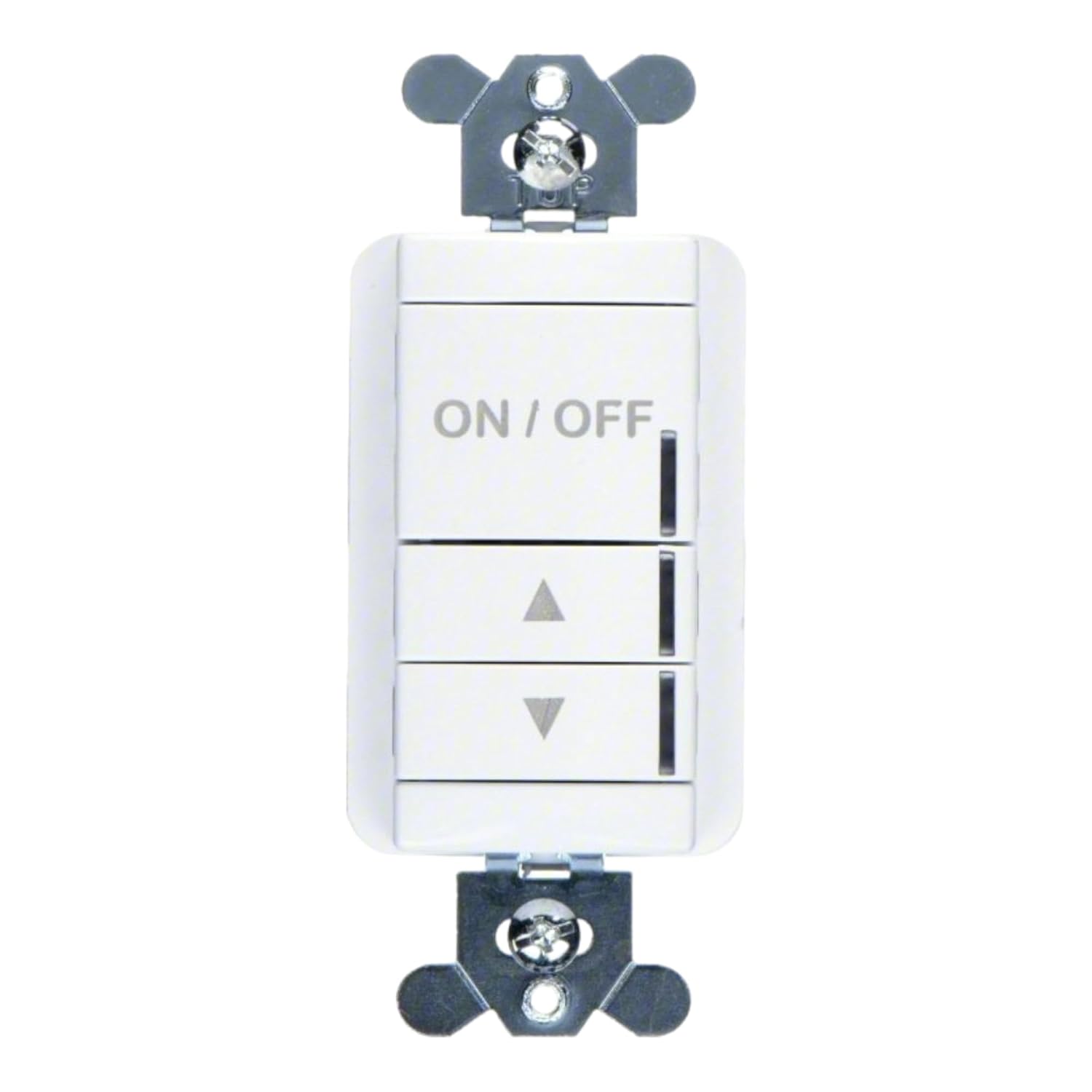
Figure 2: Front view of the NPO DM DX WH Wallpod. This image highlights the device's mounting tabs and the clear labeling of its control buttons, essential for installation and operation.
Operating Instructions
The NPO DM DX WH wallpod provides simple push-button control for connected lighting fixtures within the nLight system.
- ON/OFF Button:
Press the top button labeled "ON/OFF" to toggle the connected lighting circuit between on and off states. A single press will switch the lights on if they are off, or off if they are on.
- Raise (Up Arrow) Button:
Press the middle button with the "Up Arrow" symbol to increase the brightness of the connected dimmable lights. Hold the button down to continuously raise the dimming level until the desired brightness is achieved or the maximum level is reached.
- Lower (Down Arrow) Button:
Press the bottom button with the "Down Arrow" symbol to decrease the brightness of the connected dimmable lights. Hold the button down to continuously lower the dimming level until the desired brightness is achieved or the minimum level is reached.
Maintenance
The NPO DM DX WH wallpod is designed for minimal maintenance. Follow these guidelines to ensure its longevity and proper function:
- Cleaning: To clean the surface of the wallpod, gently wipe it with a soft, dry, or slightly damp cloth. Do not use abrasive cleaners, solvents, or harsh chemicals, as these can damage the finish or internal components.
- No User-Serviceable Parts: The device contains no user-serviceable parts. Do not attempt to open or repair the wallpod yourself. Doing so may void the warranty and could pose an electrical hazard.
- Environmental Conditions: Ensure the wallpod is operated within its specified environmental conditions (e.g., temperature, humidity) to prevent malfunction.
Troubleshooting
If you experience issues with your NPO DM DX WH wallpod, refer to the following common troubleshooting steps:
| Problem | Possible Cause | Solution |
|---|---|---|
| Wallpod is unresponsive. | No power to the device; loose wiring connection; nLight network issue. |
|
| Lights do not dim or dim incorrectly. | Incorrect wiring; incompatible lighting fixtures; nLight system configuration issue. |
|
For complex issues or if the above steps do not resolve the problem, it is recommended to contact Sensor Switch technical support or a certified nLight system integrator.
Specifications
| Model Number | NPODM DX WH |
| Brand | Sensor Switch |
| Manufacturer | PER - Sensor Switch |
| Package Dimensions | 5 x 3.23 x 2.6 inches |
| Item Weight | 4.59 ounces |
| Operation Mode | ON-ON or ON-OFF |
| Connector Type | RJ-45 |
| Actuator Type | Push Button |
| Contact Material | Copper |
| International Protection Rating | IP54 |
| Number of Positions | 2 |
| Controller Type | Push Button |
| Control Method | Touch |
| Connectivity Protocol | Wi-Fi |
Warranty Information
Specific warranty details for the Sensor Switch NPO DM DX WH wallpod are typically provided with the product at the time of purchase or can be obtained directly from the manufacturer. Please refer to the documentation included in your product packaging or visit the official Sensor Switch website for the most current warranty terms and conditions.
Generally, warranties cover defects in materials and workmanship under normal use. Damage resulting from improper installation, misuse, or unauthorized modifications is typically not covered.
Customer Support
For technical assistance, product inquiries, or support regarding your Sensor Switch NPO DM DX WH wallpod, please contact the manufacturer or your authorized reseller.
When contacting support, please have your product model number (NPODM DX WH) and any relevant purchase information readily available to facilitate faster service.
Related documentsNPODM DX WH


Ask a question about this manual
Ask about setup, troubleshooting, compatibility, parts, safety, or missing instructions. Manuals+ will review the question and use this page’s manual context to help answer it.