
Itek ITMC30V201FHD
iTek GGC 30-inch Curved Monitor User Manual
Model: ITMC30V201FHD
Welcome
Thank you for choosing the iTek GGC 30-inch Curved Monitor. This manual provides essential information for setting up, operating, and maintaining your new monitor. Please read it thoroughly before use to ensure optimal performance and safety.
Important Safety Instructions
To prevent damage and ensure safe operation, please observe the following precautions:
- Do not expose the monitor to rain, moisture, or extreme temperatures.
- Ensure proper ventilation around the monitor. Do not block ventilation openings.
- Use only the power adapter supplied with the monitor.
- Avoid placing heavy objects on the power cord.
- Disconnect the power plug from the outlet if the monitor will not be used for a long period.
- Do not attempt to service the monitor yourself. Refer all servicing to qualified personnel.
- Clean the monitor screen and casing with a soft, dry cloth. Avoid using abrasive cleaners or solvents.
Package Contents
Please check the package for the following items:
- iTek GGC 30-inch Curved Monitor
- Monitor Stand (Base and Neck)
- Power Adapter and Cable
- DisplayPort Cable
- HDMI Cable
- User Manual
- Screws for Stand Assembly
Product Overview
The iTek GGC 30-inch Curved Monitor is designed for an immersive viewing experience, ideal for gaming and professional use. It features a WFHD (2560x1080) resolution, a high 200Hz refresh rate, and a rapid 1ms MPRT response time.

Key Performance Highlights
- 200Hz Refresh Rate & AMD FreeSync Technology: Experience ultra-smooth visuals and tear-free gaming with a high refresh rate and adaptive sync technology.

Figure 2: 200Hz Refresh Rate and AMD FreeSync Technology in action. - Flicker-Free & Low Blue Light: Designed to reduce eye strain during prolonged use, providing a more comfortable viewing experience.

Figure 3: Flicker-Free and Low Blue Light features for eye comfort. - 1ms MPRT Response Time: Minimizes motion blur and ghosting, crucial for fast-paced games and action sequences.

Figure 4: Rapid Refresh Rate and Response Time for smooth visuals. - 1800R Curved Display: The immersive curvature brings the edges of the screen closer to your field of view, enhancing depth perception and reducing distortion.

Figure 5: 1800R Curved Display for an immersive experience.
Setup
Assembling the Stand
- Carefully remove the monitor and stand components from the packaging.
- Attach the stand neck to the monitor panel using the provided screws. Ensure it clicks securely into place or is fastened tightly.
- Attach the stand base to the stand neck, securing it with the thumb screw or screws from underneath.
- Place the assembled monitor on a stable, flat surface.
Connecting Your Monitor
The iTek GGC monitor offers multiple connectivity options for various devices:
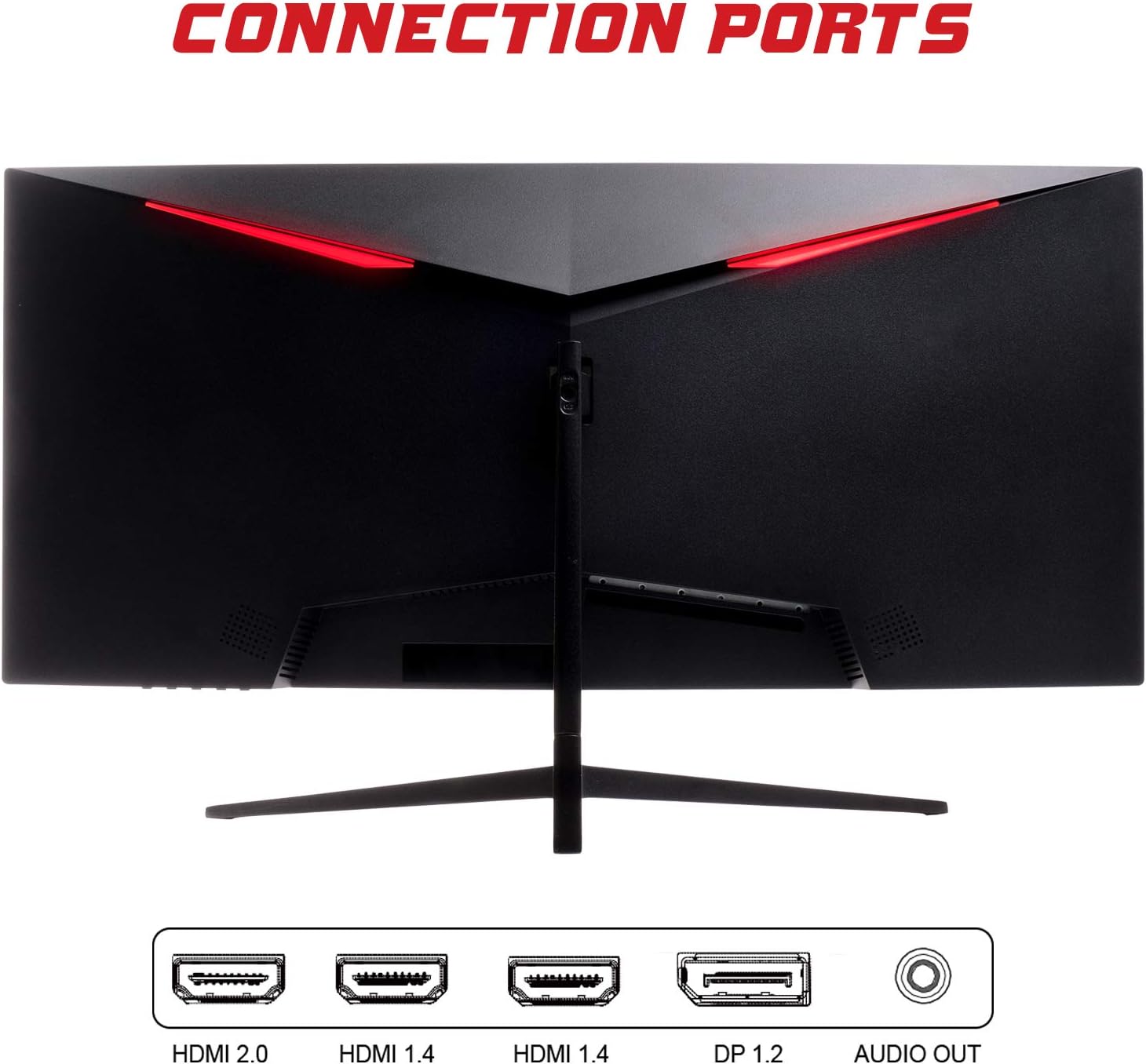
- DisplayPort (DP 1.2): For high-resolution and high-refresh-rate connections to your PC.
- HDMI (HDMI 2.0, HDMI 1.4 x2): Connect to PCs, gaming consoles, and other multimedia devices. HDMI 2.0 supports higher refresh rates at certain resolutions.
- Audio Out: Connect external speakers or headphones.
After connecting the video cable, connect the power adapter to the monitor and then to a power outlet.
Operating the Monitor
Power On/Off
Press the power button, usually located on the bottom or back of the monitor, to turn it on or off. The power indicator light will illuminate when the monitor is on.
On-Screen Display (OSD) Menu
The OSD menu allows you to adjust various monitor settings. Use the buttons on the monitor (typically on the back or bottom right) to navigate the menu.
- Picture Settings: Adjust brightness, contrast, sharpness, and gamma.
- Color Settings: Modify color temperature, hue, and saturation.
- Input Select: Manually switch between DisplayPort and HDMI inputs.
- Audio: Adjust volume for the audio output.
- System Settings: Access language, OSD timeout, and reset options.
- Gaming Features: Enable/disable FreeSync, adjust response time overdrive, and activate crosshair overlays if available.
Maintenance
Proper care ensures the longevity of your monitor:
- Always turn off the monitor and unplug the power cord before cleaning.
- Use a soft, lint-free cloth to gently wipe the screen. For stubborn marks, slightly dampen the cloth with water or a mild, non-abrasive screen cleaner.
- Clean the monitor casing with a soft, dry cloth.
- Avoid spraying liquids directly onto the screen or casing.
- Do not use benzene, thinner, ammonia-based cleaners, or abrasive materials.
Troubleshooting
If you encounter issues with your monitor, please refer to the following table for common problems and solutions:
| Problem | Possible Solution |
|---|---|
| No power | Ensure the power cable is securely connected to the monitor and the power outlet. Check if the power outlet is working. |
| No signal / Blank screen | Verify the video cable (DisplayPort or HDMI) is firmly connected to both the monitor and your computer. Select the correct input source via the OSD menu. Ensure your computer is powered on and not in sleep mode. |
| Image flickering or unstable | Check the video cable connection. Try a different cable or port. Ensure your graphics card drivers are up to date. Adjust the refresh rate in your computer's display settings. |
| Poor image quality (blurry, distorted colors) | Adjust brightness, contrast, and color settings in the OSD menu. Ensure the display resolution on your computer matches the monitor's native resolution (2560x1080). |
| No sound from audio out | Check the audio cable connection to your speakers/headphones. Verify the volume setting in the OSD menu and on your computer. Ensure the correct audio output device is selected in your computer's sound settings. |
Technical Specifications
| Feature | Specification |
|---|---|
| Brand | Itek |
| Model | ITMC30V201FHD |
| Screen Size | 30 Inches |
| Panel Type | VA |
| Curvature | R1800 |
| Resolution | 2560 x 1080 (WFHD) |
| Aspect Ratio | 21:9 |
| Refresh Rate | 200 Hz |
| Response Time | 1ms MPRT |
| Brightness | 350 cd/m² |
| Contrast Ratio | 3000:1 |
| Viewing Angle | 178° (Horizontal/Vertical) |
| Connectivity | 1x DisplayPort 1.2, 1x HDMI 2.0, 2x HDMI 1.4, Audio Out |
| Special Features | HDR Ready, FreeSync, Low Blue Light, Flicker Free, VESA Mountable |
| Product Dimensions (with stand) | 70.68 x 40.89 x 18.48 cm |
| Weight | 6.9 kg |
Energy Efficiency

For detailed energy consumption information and product registration, please refer to the official EPREL database:
Warranty and Support
Your iTek GGC monitor is backed by a manufacturer's warranty. Please retain your proof of purchase for warranty claims.
- Guaranteed Product Support: This product is guaranteed to have support available until at least January 1, 2031.
- For technical support, warranty inquiries, or service requests, please contact iTek customer service through their official website or the contact information provided with your purchase.
Related documentsITMC30V201FHD


Ask a question about this manual
Ask about setup, troubleshooting, compatibility, parts, safety, or missing instructions. Manuals+ will review the question and use this page’s manual context to help answer it.