
Introduction
Thank you for purchasing the 2BOOM Journey BX510R Bluetooth Wireless Boombox Stereo Speaker. This manual provides essential information for setting up, operating, and maintaining your device. Please read these instructions carefully before use to ensure proper function and to maximize your listening experience.
Product Features
- Bluetooth Wireless Connectivity
- Integrated FM Radio
- Dual 4-inch Sub-Woofers for enhanced bass
- Rechargeable Battery for portable use
- Splash-proof design for outdoor durability
- Durable metal grill and rubberized exterior
- Multiple input options: USB, TF (Micro SD) card, AUX In
- Convenient carry handle
Product Overview
Familiarize yourself with the various components and controls of your 2BOOM Journey BX510R speaker.

Figure 1: Overall view of the 2BOOM Journey BX510R speaker highlighting key features like splash-proof design and durable metal grill.

Figure 2: Top panel controls and physical features. This image shows the layout of the control buttons: Previous, Play/Pause, Next, Volume -/+, and Mode. It also indicates the rubberized exterior, metal grills, and the carry handle.
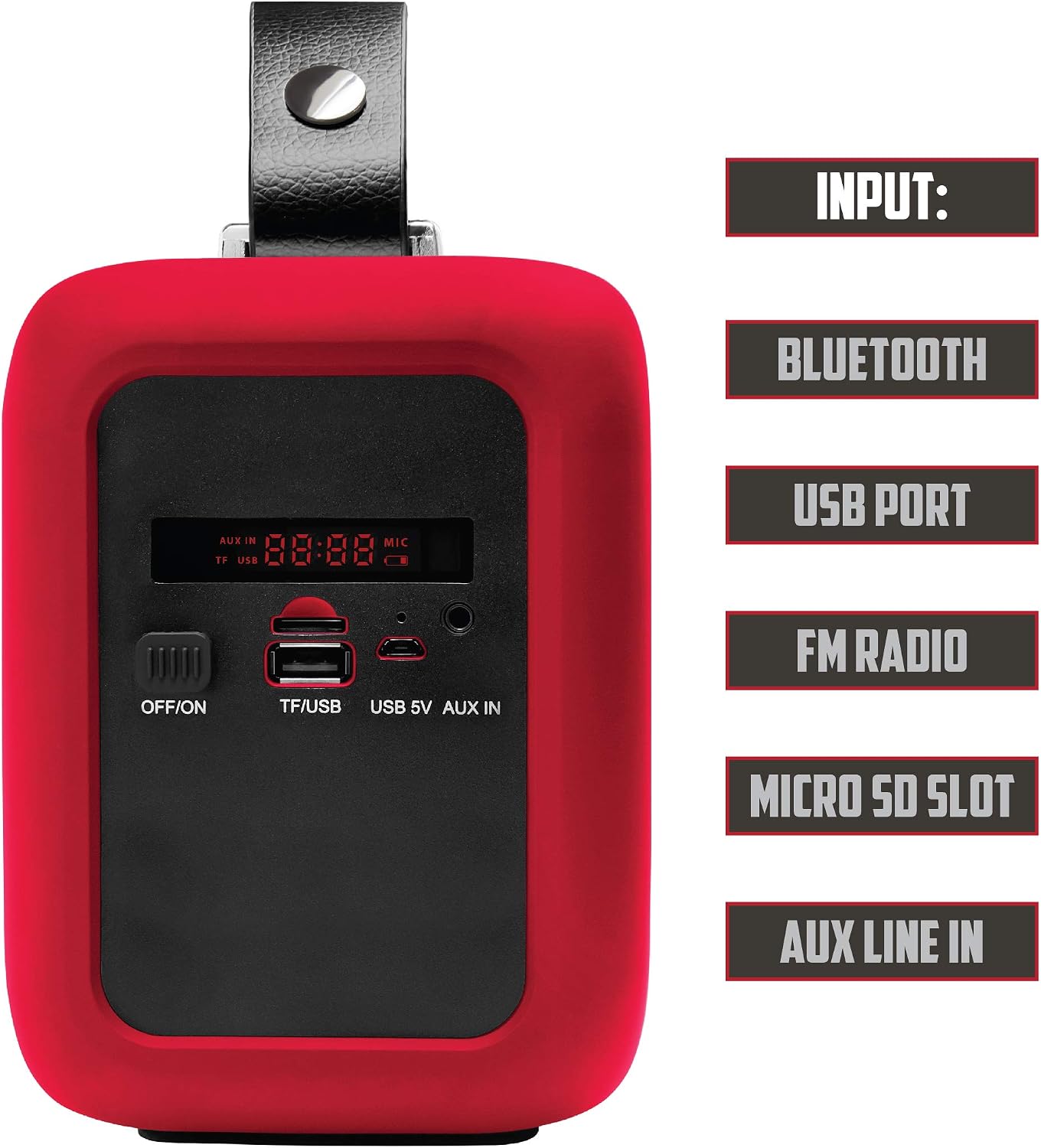
Figure 3: Side panel inputs. This image details the various input ports: OFF/ON switch, TF/USB slot for Micro SD cards and USB drives, USB 5V charging port, and AUX IN port. The digital display is also visible.
Setup
1. Charging the Speaker
- Locate the USB 5V charging port on the side panel (refer to Figure 3).
- Connect the provided USB charging cable to the speaker's USB 5V port.
- Plug the other end of the USB cable into a compatible USB power adapter (not included) or a computer's USB port.
- The charging indicator (if available) will illuminate during charging and turn off or change color when fully charged.
- For optimal battery life, fully charge the speaker before first use.
2. Powering On/Off
- To power on, slide the OFF/ON switch (refer to Figure 3) to the 'ON' position. The speaker will emit an audible tone and the display will light up.
- To power off, slide the OFF/ON switch to the 'OFF' position.
Operating Instructions
1. Bluetooth Mode
- Power on the speaker. It will automatically enter Bluetooth pairing mode, indicated by a flashing Bluetooth icon on the display or an audible prompt.
- On your mobile device (smartphone, tablet, etc.), enable Bluetooth and search for available devices.
- Select "2BOOM Journey" from the list of devices.
- Once paired, the speaker will confirm with an audible tone, and the Bluetooth icon on the display will stop flashing.
- You can now play audio from your device through the speaker.
- Use the Play/Pause button (Figure 2) to control playback.
- Use the Previous/Next buttons (Figure 2) to skip tracks.
2. FM Radio Mode
- Press the 'MODE' button (Figure 2) repeatedly until "FM" appears on the display.
- To auto-scan and save available FM stations, press and hold the 'Play/Pause' button. The speaker will scan and store stations automatically.
- Use the 'Previous' and 'Next' buttons (Figure 2) to navigate between saved stations.
3. USB/TF Card Playback
- Insert a USB flash drive or a TF (Micro SD) card into the respective port on the side panel (Figure 3).
- The speaker will automatically switch to USB or TF card mode and begin playing audio files. If not, press the 'MODE' button to select the correct input.
- Use the Play/Pause button (Figure 2) to control playback.
- Use the Previous/Next buttons (Figure 2) to skip tracks.
4. AUX Input Mode
- Connect one end of a 3.5mm audio cable (not included) to the AUX IN port on the speaker (Figure 3).
- Connect the other end of the audio cable to the headphone jack or audio output of your external device.
- Press the 'MODE' button (Figure 2) repeatedly until "AUX" appears on the display.
- Audio will now play from your external device through the speaker. Control playback from your external device.
5. Volume Control
- Press the 'Volume -' button (Figure 2) to decrease the volume.
- Press the 'Volume +' button (Figure 2) to increase the volume.
Maintenance
- Cleaning: Use a soft, dry cloth to clean the speaker's exterior. Do not use abrasive cleaners or solvents.
- Storage: Store the speaker in a cool, dry place away from direct sunlight and extreme temperatures when not in use for extended periods.
- Battery Care: To prolong battery life, avoid fully discharging the battery frequently. Recharge the speaker regularly, even if not in constant use.
- Water Exposure: While the speaker is splash-proof, do not submerge it in water or expose it to heavy rain. Ensure all port covers (if present) are securely closed when near water.
Troubleshooting
| Problem | Solution |
|---|---|
| Speaker does not power on. | Ensure the battery is charged. Connect the speaker to a power source using the USB charging cable. Check the ON/OFF switch position. |
| No sound. | Increase the volume on both the speaker and your connected device. Ensure the correct input mode (Bluetooth, FM, USB, AUX) is selected. Check cable connections for AUX mode. |
| Cannot pair via Bluetooth. | Ensure the speaker is in Bluetooth pairing mode (flashing indicator). Make sure Bluetooth is enabled on your device and it's within 32.8ft (10m) range. Try unpairing and re-pairing. Turn off and on both devices. |
| FM radio reception is poor. | Move the speaker to a location with better signal reception. Extend any external antenna if available (not explicitly mentioned for this model, but a general tip). |
| USB/TF card not playing. | Ensure the card/drive is inserted correctly. Check that the audio files are in a compatible format (e.g., MP3). Press the 'MODE' button to select the correct input. |
Specifications

Figure 4: Visual representation of the speaker's technical specifications.
| Feature | Detail |
|---|---|
| Model | BX510R |
| Bluetooth Version | V2.1 |
| Frequency Range | 90Hz - 20KHz |
| Bluetooth Distance | Up to 32.8 ft (10 meters) |
| Driver Unit | 2 x 3-inch |
| Subwoofer Diameter | 4 Inches |
| Battery Capacity | 1200mAh |
| Voltage | AC 100-240V / DC 5V 1.3A |
| Speaker Output | 2 x 3.5W (RMS) |
| Max Speaker Output Power | 120 Watts (Peak) |
| Connectivity Technology | Bluetooth, USB |
| Power Source | Battery |
Safety Information
- Do not expose the speaker to extreme temperatures, direct sunlight, or high humidity.
- Avoid dropping or subjecting the speaker to strong impacts.
- Do not attempt to disassemble or modify the speaker. This will void the warranty and may cause damage or injury.
- Keep the speaker away from medical devices, as it may interfere with their operation.
- Dispose of the battery according to local regulations. Do not dispose of batteries in fire.
- Use only the specified charging voltage (DC 5V 1.3A).
Warranty and Support
Specific warranty information for the 2BOOM Journey BX510R is not provided in this manual. Please refer to the product packaging or the retailer where you purchased the device for warranty details.
For technical support or further assistance, please contact 2BOOM customer service through their official website or the contact information provided with your purchase.


