
1. Introduction and Overview
The Makita XWT13ZB 18V LXT Sub-Compact 1/2" Impact Wrench is designed for efficient fastening and loosening tasks, particularly in confined spaces. This tool leverages Makita's 18V LXT Lithium-Ion battery system, offering a balance of compact size and robust performance. It features a brushless motor for extended runtime and durability, variable speed control, and a convenient 1/2" square drive for quick socket changes.
This manual provides essential information for the safe and effective operation, maintenance, and troubleshooting of your Makita XWT13ZB Impact Wrench.
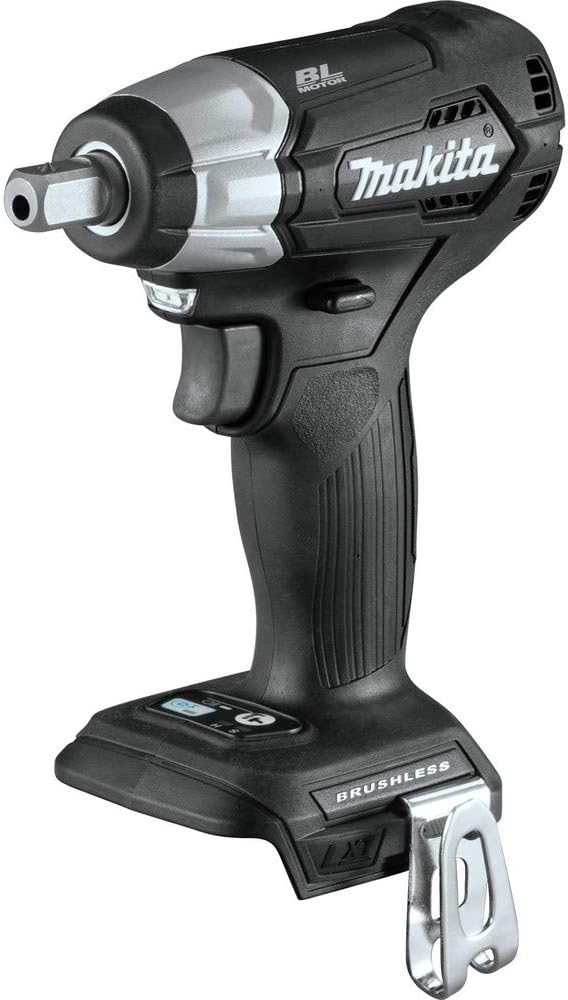
Figure 1.1: Makita XWT13ZB 18V LXT Sub-Compact 1/2" Impact Wrench.
2. Safety Information
Always observe basic safety precautions when using power tools to reduce the risk of fire, electric shock, and personal injury.
General Power Tool Safety Warnings:
- Work Area Safety: Keep your work area clean and well-lit. Cluttered or dark areas invite accidents. Do not operate power tools in explosive atmospheres, such as in the presence of flammable liquids, gases, or dust.
- Electrical Safety: Power tool plugs must match the outlet. Never modify the plug in any way. Do not abuse the cord. Keep cord away from heat, oil, sharp edges, or moving parts.
- Personal Safety: Always wear eye protection. Use hearing protection when operating impact tools. Wear appropriate clothing; avoid loose clothing or jewelry. Secure long hair.
- Tool Use and Care: Do not force the power tool. Use the correct power tool for your application. Disconnect the plug from the power source and/or remove the battery pack before making any adjustments, changing accessories, or storing power tools.
Specific Warnings for Impact Wrenches:
- Always use impact-rated sockets and accessories. Non-impact sockets can shatter and cause injury.
- Ensure the workpiece is stable and secured before applying torque.
- Be aware of reaction torque, especially when working with high torque settings.
Battery Safety:
Use only genuine Makita 18V LXT Lithium-Ion batteries and chargers. The use of non-genuine ("knock-off") Makita Lithium-Ion batteries may cause fires, personal injuries, or property damage. Makita 18V LXT batteries feature Star Protection Computer Controls™ for protection against overloading, over-discharging, and overheating.
WARNING: This product can expose you to chemicals including lead, which is known to the State of California to cause cancer and birth defects or other reproductive harm. For more information go to www.P65Warnings.ca.gov.
3. Components and Features
The Makita XWT13ZB is engineered with advanced features for optimal performance and user convenience.
- Brushless Motor (BL™): Provides up to 50% longer run time, increased power, and speed, and a longer tool life compared to brushed motors.
- 1/2" Square Drive: Standard drive size for compatibility with a wide range of impact sockets.
- Variable 2-Speed: Offers control over RPM (0-1,300/0-2,400) and IPM (0-2,000/0-3,600) for various applications.
- Reverse Rotation Auto-Stop Mode: Automatically stops rotation and impact when the fastener is adequately loosened, preventing over-loosening or dropping of fasteners.
- Ultra-Compact and Ergonomic Design: At only 5-15/16" in length and weighing 2.7 lbs (tool only), it reduces operator fatigue, especially in overhead or tight-space applications.
- Built-in L.E.D. Lights: Illuminates the work area for improved visibility.
- Extreme Protection Technology (XPT™): A protective seal engineered to improve operation in harsh conditions by channeling water and dust from key internal components.

Figure 3.1: Built-in LED light for illuminating the work area.
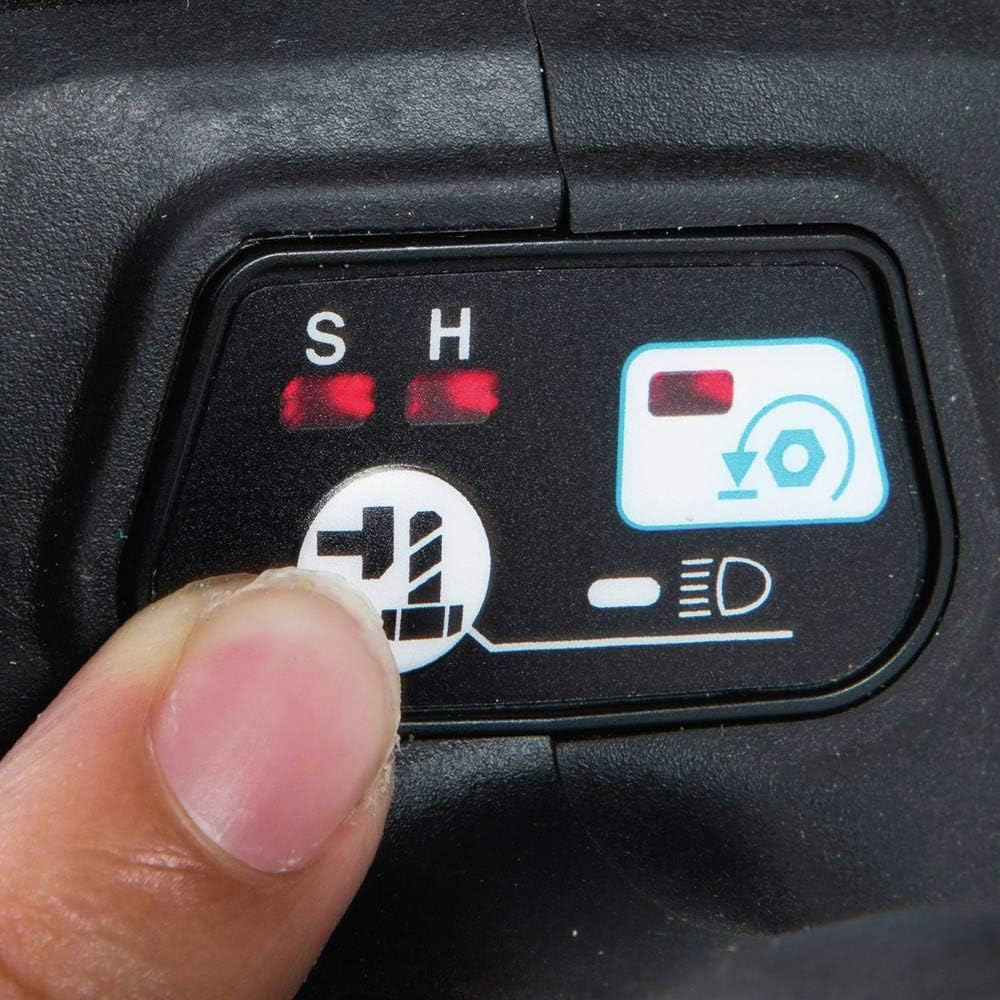
Figure 3.2: Control panel for adjusting speed and activating auto-stop mode.
4. Setup
Before operating the impact wrench, ensure proper setup for safe and effective use.
4.1 Battery Installation
- Ensure the tool's power switch is in the OFF position.
- Align the battery pack with the battery port on the tool.
- Slide the battery pack into the tool until it clicks securely into place. Do not force the battery.
- To remove, press the release button on the battery pack and slide it out.
4.2 Socket Attachment
- Select the appropriate 1/2" impact-rated socket for your fastener.
- Push the socket firmly onto the 1/2" square drive anvil until it locks into place.
- To remove, pull the socket off the anvil.
5. Operating Instructions
Follow these steps for effective operation of your impact wrench.
5.1 Powering On/Off and Speed Control
- The tool is activated by pressing the variable speed trigger. The further the trigger is depressed, the higher the speed.
- Release the trigger to turn the tool off.
- Use the speed selector switch (typically located near the trigger) to toggle between the two available speed settings (Low and High) to match the application requirements.
5.2 Forward/Reverse Rotation
- To rotate forward (tighten), push the rotation switch to the left.
- To rotate in reverse (loosen), push the rotation switch to the right.
- Ensure the switch is in the neutral (center) position when not in use to prevent accidental startup.
5.3 Reverse Rotation Auto-Stop Mode
This feature is designed to stop the tool automatically when a fastener is sufficiently loosened, preventing it from falling off. Activate this mode using the control panel button (refer to Figure 3.2).
5.4 Application Examples

Figure 5.1: Using the impact wrench for automotive tasks, such as removing lug nuts.

Figure 5.2: The compact design allows access to tight spaces, such as an engine bay.
6. Maintenance
Regular maintenance ensures the longevity and optimal performance of your tool.
6.1 Cleaning
- Always disconnect the battery pack before cleaning.
- Wipe the tool with a clean, damp cloth. Do not use harsh chemicals or abrasive cleaners.
- Keep the ventilation openings clear of dust and debris to prevent overheating.
6.2 Storage
- Store the tool and battery in a cool, dry place, away from direct sunlight and moisture.
- Ensure the battery is partially charged (not fully depleted or fully charged) for long-term storage.
6.3 Inspection
- Periodically inspect the tool for any signs of damage, such as cracked housings, damaged cords, or loose fasteners.
- If any damage is found, discontinue use and have the tool serviced by a qualified technician.
7. Troubleshooting
This section addresses common issues you might encounter with your impact wrench.
| Problem | Possible Cause | Solution |
|---|---|---|
| Tool does not start. | Battery not inserted correctly or depleted. | Ensure battery is fully inserted. Charge battery if depleted. |
| Reduced power or torque. | Low battery charge; incorrect speed setting; worn socket. | Charge battery. Select higher speed setting. Use a new or appropriate impact socket. |
| Tool overheats. | Continuous heavy use; blocked ventilation. | Allow tool to cool down. Clear ventilation openings. Reduce load. |
| Socket does not stay on anvil. | Anvil worn or damaged; incorrect socket type. | Ensure you are using impact-rated sockets. If anvil is damaged, seek professional service. |
If the problem persists after attempting these solutions, contact Makita customer support or an authorized service center.
8. Specifications
Key technical specifications for the Makita XWT13ZB 18V LXT Sub-Compact 1/2" Impact Wrench.
| Specification | Value |
|---|---|
| Model Number | XWT13ZB |
| Drive Size | 1/2" Square |
| Voltage | 18V DC |
| Max Torque | 155 ft.Lbs. (1860 in.Lbs.) |
| No-Load Speed (RPM) | 0-1,300 (Low) / 0-2,400 (High) |
| Impacts Per Minute (IPM) | 0-2,000 (Low) / 0-3,600 (High) |
| Tool Weight (without battery) | 2.4 lbs |
| Power Source | Battery-powered (Lithium-Ion) |
| Dimensions (Length) | 5-15/16" (approx. 151 mm) |
9. Warranty and Support
Makita stands behind its products with a comprehensive warranty and dedicated customer support.
9.1 Warranty Information
The Makita XWT13ZB Impact Wrench comes with a 3-year limited warranty from the date of original purchase. This warranty covers defects in materials and workmanship. For full details regarding warranty terms, conditions, and exclusions, please refer to the official warranty statement included with your product or visit the Makita official website.
9.2 Customer Support
For technical assistance, service, or to inquire about replacement parts, please contact Makita customer support. You can find contact information, including phone numbers and service center locations, on the official Makita website or in the documentation provided with your tool.
An official User Guide PDF is also available for download: Makita XWT13ZB User Guide (PDF)


