
NEEWER NW625
Neewer NW625 GN54 Speedlite Flash User Manual
Model: NW625 | Brand: NEEWER
Product Overview
The Neewer NW625 GN54 Speedlite Flash is a versatile external flash unit designed for various DSLR and mirrorless cameras. It offers powerful illumination and multiple flash modes to enhance your photography in diverse lighting conditions.

Figure 1: Neewer NW625 Speedlite Flash mounted on a camera.
Key Features
- High Guide Number: Features a powerful guide number of 54 (ISO 100, 180mm) for effective illumination.
- Multiple Flash Modes: Supports Manual (M), Multi (MULTI), Slave 1 (S1), and Slave 2 (S2) flash modes. Note: This flash does not support TTL (Through-The-Lens) metering or direct camera menu settings for flash control.
- Manual Zoom: Adjustable zoom range from 18mm to 180mm to match lens focal length.
- Fast Recycle Time: Approximately 3.5 seconds recycle time for quick consecutive shots.
- Flexible Output Control: Offers 8 levels of output control (1/128 to 1/1) with 0.3EV step length, totaling 22 fine-tuning stalls.
- Wide Rotation Angles: Vertical rotation from -7 to 90 degrees and horizontal rotation from -90 to 180 degrees for bounce flash and creative lighting.
- Additional Functions: Includes PC synchronous port, power saving mode, and over-temperature protection.

Figure 2: Flash head rotation for flexible lighting.
Setup Guide
1. Battery Installation
The NW625 Speedlite Flash requires 4 AA alkaline or Ni-MH batteries (not included). Ensure correct polarity when inserting batteries.
- Locate the battery compartment on the side of the flash unit.
- Slide the battery compartment cover open.
- Insert 4 AA batteries according to the polarity indicators (+/-) inside the compartment.
- Close the battery compartment cover securely until it clicks into place.

Figure 3: Battery compartment and other components.
2. Mounting the Flash on Your Camera
The NW625 is compatible with most DSLR and mirrorless cameras featuring a standard hot shoe mount.
- Ensure both the camera and the flash are powered off.
- Slide the flash's hot shoe foot into your camera's hot shoe slot.
- Rotate the locking knob on the flash unit clockwise until it is securely tightened. Do not overtighten.
- Power on your camera, then power on the flash unit.
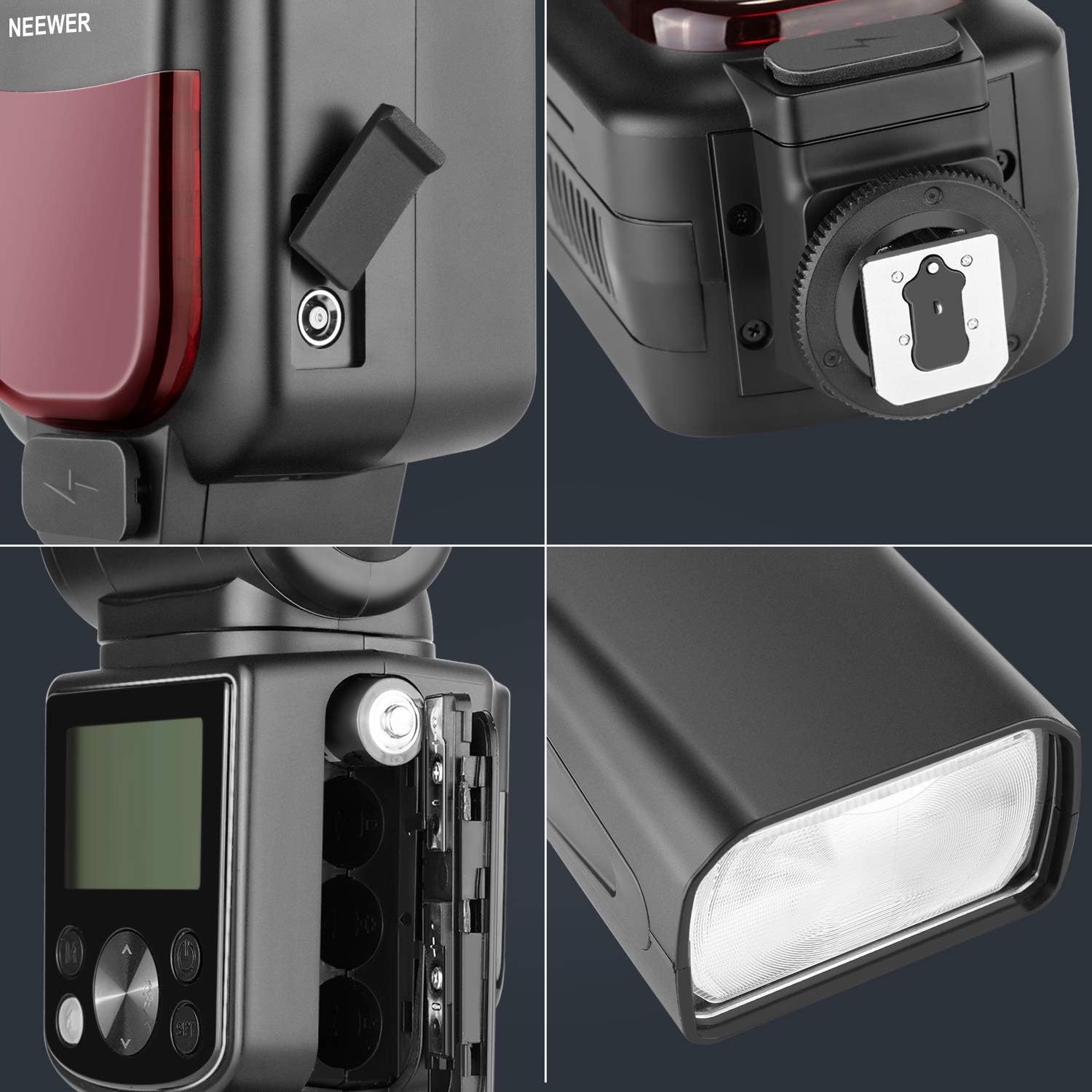
Figure 4: Flash securely mounted on a camera.
Operating Instructions
Familiarize yourself with the LCD panel and control buttons for optimal use.

Figure 5: Flash components and controls diagram.
1. Power On/Off and Display Backlight
- To power on, press and hold the Power Switch button.
- To power off, press and hold the Power Switch button again.
- Press the Power Switch button briefly to toggle the display backlight on/off.
2. Selecting Flash Modes
Press the MODE button to cycle through the available flash modes: M (Manual), MULTI (Stroboscopic), S1 (Slave 1), and S2 (Slave 2).
- Manual (M) Mode: Allows you to manually set the flash output power.
- Multi (MULTI) Mode: Fires a series of rapid flashes to capture multiple images of a moving subject in a single frame.
- Slave 1 (S1) Mode: The flash will fire in sync with the first flash detected from a master flash.
- Slave 2 (S2) Mode: The flash will fire in sync with the second flash detected from a master flash, ignoring the pre-flash.
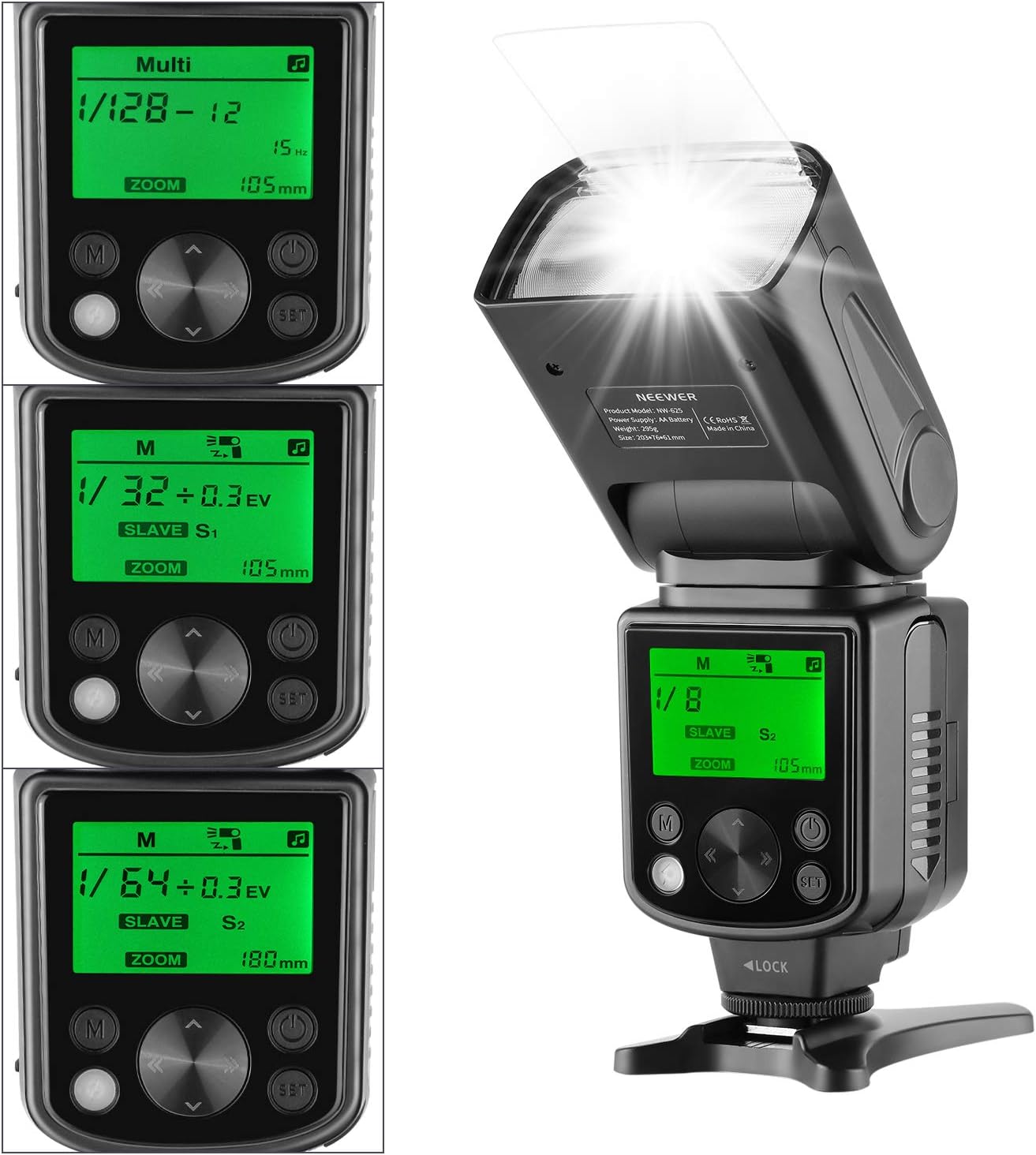
Figure 6: Different flash mode displays on the LCD screen.
3. Adjusting Flash Output (M Mode)
In Manual (M) mode, use the directional buttons to adjust the flash output from 1/128 to 1/1 power. Press the SET button to confirm changes.
4. Adjusting Zoom
The flash head's zoom can be manually adjusted from 18mm to 180mm to match the focal length of your lens. Use the zoom control buttons on the flash to set the desired coverage.

Figure 7: Manual zoom adjustment and flash head angles.
5. Flash Head Rotation
The flash head can be rotated vertically from -7 to 90 degrees and horizontally from -90 to 180 degrees. This allows for bounce flash photography, directing light off ceilings or walls for softer, more natural illumination.
6. PC Synchronous Port
The flash includes a PC synchronous port for wired connection to cameras or triggers that support this interface.
7. Power Saving Mode
The flash unit features a power saving mode to conserve battery life when not in active use. It will automatically enter standby after a period of inactivity.
Maintenance
Proper maintenance ensures the longevity and optimal performance of your Neewer NW625 Speedlite Flash.
- Cleaning: Use a soft, dry cloth to clean the flash body and LCD screen. For stubborn dirt, a slightly damp cloth can be used, followed by a dry one. Do not use strong detergents or solvents.
- Battery Care: Remove batteries from the flash unit if it will not be used for an extended period to prevent leakage and damage.
- Storage: Store the flash in a cool, dry place away from direct sunlight and extreme temperatures.
- Handling: Avoid dropping or subjecting the flash to strong impacts, as this can damage internal components.
Troubleshooting
This section addresses common issues you might encounter with your NW625 Speedlite Flash.
Flash Not Firing or Inconsistent Exposure
- Check Batteries: Ensure batteries are correctly inserted and have sufficient charge. Replace if necessary.
- Secure Mounting: Verify the flash is securely mounted on the camera's hot shoe and the locking knob is tightened.
- Camera Settings: Confirm your camera's flash settings are appropriate. Remember, this flash does not support TTL or direct camera menu control.
- Shutter Speed Limitation: The flash supports a maximum shutter speed of 1/320s. Using a shutter speed faster than 1/320s may result in inconsistent exposure or a black shadow appearing in the picture. Adjust your camera's shutter speed accordingly.
- Sony Camera Compatibility: For Sony cameras with Mi Hot Shoe (e.g., a9, a7, a7II, a7III, a7R III, a7RII, a7SII, a6000, a6300, a6500), ensure that if you are using an audio jack cable for sync, the "silent shoot" option is disabled in your camera settings.
Flash Overheating
- The flash has built-in over-temperature protection. If it overheats from rapid, continuous firing, it may temporarily stop firing to cool down. Allow the unit to rest for a few minutes before resuming use.
Specifications
| Attribute | Detail |
|---|---|
| Brand | NEEWER |
| Model Number | 10094625 |
| Guide Number | GN54 (ISO 100, 180mm) |
| Flash Modes | M, MULTI, S1, S2 |
| Zoom Range | 18-180mm (Manual) |
| Recycle Time | Approx. 3.5 seconds |
| Flash Control | 8 levels (1/128-1/1), 0.3EV step, 22 fine-tuning stalls |
| Vertical Rotation Angle | -7 to 90 degrees |
| Horizontal Rotation Angle | -90 to 180 degrees |
| Max Shutter Speed Sync | 1/320s |
| Power Source | 4 x AA batteries (Alkaline or Ni-MH) |
| Dimensions | 9.7 x 7.9 x 23 cm |
| Weight | 0.28 g (without batteries) |
| Compatible Mountings | Canon, Fujifilm, Pentax, Sony Alpha (Standard Hot Shoe) |
| Included Components | Mini Stand, Hard Diffuser |
Warranty and Support
For detailed warranty information and technical support, please refer to the documentation included with your product or visit the official NEEWER website. Keep your purchase receipt as proof of purchase for warranty claims.
Official NEEWER Website: www.neewer.com
Related Documents - NW625
 |
NEEWER RF1-S TTL Speedlite Flash User Manual and Guide Comprehensive user manual for the NEEWER RF1-S TTL Speedlite Flash, covering installation, operation, flash modes (TTL, Manual, Stroboscopic), safety precautions, troubleshooting, and specifications for Sony cameras. |
 |
Neewer QPro-F Flash Trigger User Manual and Guide Comprehensive guide to the Neewer QPro-F Flash Trigger, covering product overview, package contents, diagrams, setup, usage, trigger settings, compatible models, and troubleshooting. |
 |
Neewer Z1-N Speedlite Flash for Nikon - User Manual & Technical Specifications Comprehensive guide to the Neewer Z1-N Speedlite flash, detailing i-TTL, 2.4GHz wireless, manual modes, HSS, FEC, and compatibility with Nikon cameras. Includes setup, operation, and custom function settings. |
 |
Neewer Z2-C Speedlite Flash User Manual | Canon EOS Cameras User manual for the Neewer Z2-C Speedlite Flash, detailing its features, specifications, and operation for Canon EOS cameras. Includes setup, TTL, Manual, and Strobe modes. |
 |
Neewer FR1-N i-TTL Speedlite Ring Flash User Manual and Guide Comprehensive user manual for the Neewer FR1-N i-TTL speedlite ring flash, covering product overview, safety information, installation instructions, flash modes (i-TTL, Manual, Stroboscopic), other applications, firmware upgrades, troubleshooting, and detailed specifications. |
 |
Manuale NEEWER Z2-F Speedlite TTL per Fotocamere FUJIFILM Guida completa al NEEWER Z2-F, un flash Speedlite TTL progettato per fotocamere FUJIFILM, che copre installazione, modalità operative, funzioni wireless e risoluzione dei problemi. |
Ask a question about this manual
Ask about setup, troubleshooting, compatibility, parts, safety, or missing instructions. Manuals+ will review the question and use this page’s manual context to help answer it.