
1. Introduction
This manual provides essential instructions for the setup, operation, and maintenance of your Easytry123 Replacement Remote Control. This remote is designed to function as a replacement for various JMB LCD HDTV TV models. Please review this manual thoroughly to ensure proper use and to maximize the functionality of your replacement remote.
Important Note: While this replacement remote is designed for compatibility, some advanced or specific functions of your original TV remote may not be fully supported. Refer to your TV's original manual for comprehensive details on all TV-specific features.
2. Product Overview
The Easytry123 Replacement Remote Control is an infrared device designed to operate compatible JMB LCD HDTV televisions. It features a standard layout of buttons for common TV functions.
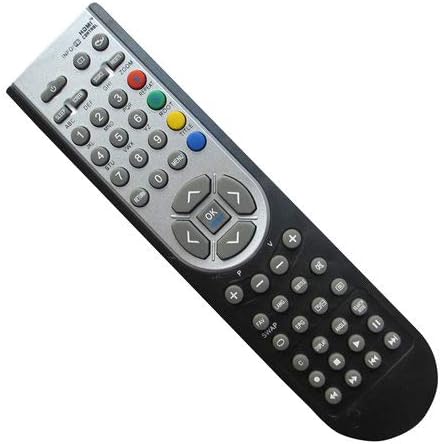
Figure 2.1: Front View of the Remote Control. This image displays the front of the Easytry123 replacement remote control, showing the various buttons for power, channel, volume, number input, and navigation.
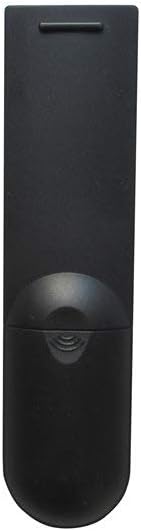
Figure 2.2: Back View of the Remote Control. This image shows the back of the Easytry123 replacement remote control, highlighting the battery compartment cover.
3. Setup
3.1 Battery Installation
- Locate the battery compartment on the back of the remote control.
- Slide the battery compartment cover downwards or outwards to open it.
- Insert two (2) AAA batteries, ensuring the positive (+) and negative (-) terminals align correctly with the markings inside the compartment.
- Replace the battery compartment cover by sliding it back into position until it clicks securely.
Note: Batteries are not included with the remote control and must be purchased separately.
4. Operating Instructions
Once batteries are installed, the remote control is ready for use with compatible JMB LCD HDTV TV models. Point the remote directly at the TV's infrared receiver.
4.1 Basic Functions
- Power Button: Turns the TV on or off.
- Number Buttons (0-9): Directly input channel numbers.
- Channel Up/Down (CH+/CH-): Changes the TV channel sequentially.
- Volume Up/Down (VOL+/VOL-): Adjusts the TV's audio volume.
- Mute Button: Silences or restores the TV's audio.
- Navigation Buttons (Up, Down, Left, Right, OK): Used to navigate menus and confirm selections on the TV screen.
- Input/Source Button: Cycles through available input sources (e.g., HDMI, AV).
For specific advanced functions or menu navigation, refer to your JMB TV's original user manual.
5. Maintenance
5.1 Cleaning
To clean the remote control, gently wipe its surface with a soft, dry cloth. For stubborn dirt, slightly dampen the cloth with water or a mild, non-abrasive cleaner. Avoid using harsh chemicals or excessive moisture, as these can damage the remote's electronics.
5.2 Battery Care
- Replace batteries when the remote's performance diminishes.
- Remove batteries if the remote will not be used for an extended period to prevent leakage.
- Dispose of used batteries responsibly according to local regulations.
6. Troubleshooting
- Remote not responding:
- Ensure batteries are inserted correctly with the correct polarity.
- Replace old batteries with new ones.
- Check for any obstructions between the remote and the TV's infrared sensor.
- Ensure you are within the effective range and pointing the remote directly at the TV.
- Some functions do not work:
- This replacement remote may not support all advanced features of your original TV remote. Verify if the function is a basic TV operation.
- Ensure the TV model is listed as compatible in the introduction.
7. Specifications
| Feature | Specification |
|---|---|
| Brand | Easytry123 |
| Model Number | Easytry4942 |
| Connectivity Technology | Infrared |
| Compatible Devices | JMB LCD HDTV Televisions (Specific models listed in Introduction) |
| Battery Type | 2 x AAA batteries (not included) |
8. Warranty and Support
For information regarding warranty coverage or technical support, please refer to the retailer or manufacturer's official website where the product was purchased. Keep your purchase receipt as proof of purchase.