
Easytry123 Easytry4957
Instruction Manual
Easytry123 Remote Control for Medion MD20272ES/PTA MD20057 RC-1900 LCD HDTV TV
Product Overview
This document provides essential information for the Easytry123 Replacement Remote Control, model Easytry4957, designed for Medion MD20272ES/PTA, MD20057, and RC-1900 LCD HDTV TVs. This remote is a replacement unit and may not offer all functions of the original remote. Please ensure your TV model is listed as compatible before use.
Key features include:
- Ergonomic design for comfortable handling.
- Infrared (IR) connectivity for reliable operation.
- Button control interface for straightforward navigation.
- Designed for use with compatible television models.
Product Images
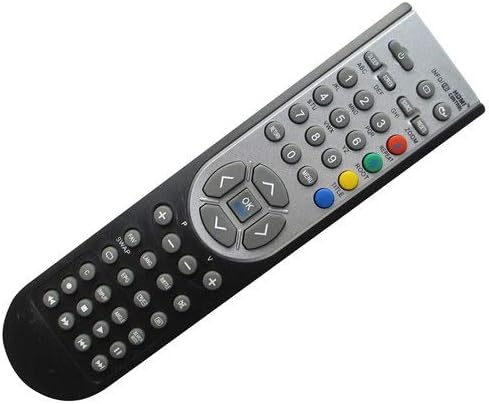
Figure 1: Front view of the remote control, displaying the button layout including numerical keys, navigation pad, volume, channel, and media controls.

Figure 2: Back view of the remote control, highlighting its ergonomic curve and solid black casing.

Figure 3: Back view of the remote control with the battery cover removed, showing the battery compartment designed for two AAA batteries.
Setup Instructions
This remote control does not require complex setup or programming. Its primary setup involves battery installation.
- Battery Installation:
- Locate the battery compartment on the back of the remote control (refer to Figure 3).
- Slide the battery cover downwards or press the latch and lift to open.
- Insert two (2) AAA batteries, ensuring the positive (+) and negative (-) terminals align correctly with the markings inside the compartment.
- Replace the battery cover by sliding it back into place until it clicks securely.
- Initial Use:
Once batteries are installed, the remote is ready for use. Point the remote directly at your Medion LCD HDTV TV and press the power button to test functionality. No pairing or code entry is typically required for this infrared replacement remote.
Note: This product does not come with batteries or a printed manual. The information provided here serves as the complete instruction guide.
Operating Instructions
The Easytry123 replacement remote control operates via infrared signals and is designed for intuitive use with compatible Medion LCD HDTV TVs. Its button layout is standard for television remote controls.
- Power Button: Located at the top, typically red or clearly marked, to turn the TV on or off.
- Number Buttons (0-9): For direct channel selection.
- Channel Up/Down (CH+/CH-): To navigate through channels sequentially.
- Volume Up/Down (VOL+/VOL-): To adjust the audio volume.
- Mute Button: To instantly silence the TV audio.
- Navigation Pad (Arrow Keys and OK/Enter): Used to navigate menus, select options, and confirm choices on the TV screen.
- Input/Source Button: To switch between different video inputs (e.g., HDMI, AV, Component).
- Menu/Settings Button: To access the TV's on-screen menu for picture, sound, and other settings.
- Media Playback Controls: Buttons like Play, Pause, Stop, Rewind, Fast Forward may be present for controlling media playback if your TV supports it.
Important: As a replacement remote, some advanced or specific functions of your original TV remote may not be supported. Functionality is dependent on the TV model's compatibility with standard infrared commands.
Maintenance
Proper maintenance will extend the life of your remote control.
- Cleaning: Use a soft, dry cloth to wipe the remote. For stubborn dirt, slightly dampen the cloth with water or a mild, non-abrasive cleaner. Do not use harsh chemicals or immerse the remote in liquid.
- Battery Care: If the remote will not be used for an extended period (e.g., more than a month), remove the batteries to prevent leakage and potential damage to the remote.
- Storage: Store the remote in a cool, dry place away from direct sunlight, extreme temperatures, and high humidity.
- Handling: Avoid dropping the remote or subjecting it to strong impacts, which can damage internal components.
Troubleshooting
If you encounter issues with your remote control, try the following troubleshooting steps:
- Remote Not Responding:
- Check Batteries: Ensure batteries are inserted correctly with the correct polarity (+/-). Replace old or depleted AAA batteries with new ones.
- Line of Sight: Make sure there is a clear line of sight between the remote's infrared emitter (at the front tip) and the TV's IR receiver. Obstructions can block the signal.
- Distance: Ensure you are within a reasonable operating distance from the TV (typically up to 20 feet).
- Certain Buttons Not Working:
- Compatibility: As a replacement remote, some specific functions or buttons may not be compatible with your particular TV model. Refer to your TV's original manual for its specific remote commands.
- Stuck Buttons: Check if any buttons are physically stuck or jammed. Gently press them to free them.
- Interference:
Strong light sources (like direct sunlight or certain energy-saving lamps) can sometimes interfere with infrared signals. Try operating the remote in different lighting conditions.
If the issue persists after trying these steps, the remote may be faulty, or your TV model might not be fully compatible. Verify your TV model number against the compatible models listed for this remote.
Specifications
| Brand | Easytry123 |
| Model Number | Easytry4957 |
| Compatible Devices | Medion MD20272ES/PTA, MD20057, RC-1900 LCD HDTV TV |
| Connectivity Technology | Infrared (IR) |
| Controller Type | Button Control |
| Special Feature | Ergonomic |
| Batteries Required | 2 x AAA batteries (not included) |
| Date First Available | December 7, 2018 |
Warranty and Support
Specific warranty information for this Easytry123 replacement remote control is not provided in the product details. For any warranty claims, returns, or technical support inquiries, please contact the seller directly through the platform where the purchase was made.
The manufacturer of this product is Easytry123.
Ask a question about this manual
Ask about setup, troubleshooting, compatibility, parts, safety, or missing instructions. Manuals+ will review the question and use this page’s manual context to help answer it.