
Easytry123 Easytry4922
User Manual: Remote Control for Schneider ZITTIHD1900USB EXIA1915DVDPVR EXIA1601PVR RC-1900 EXIA MOONLIT2202FHD LCD HDTV TV
Model: Easytry4922 | Brand: Easytry123
1. Product Overview
This document provides essential information for the operation and maintenance of your Easytry123 replacement remote control, model Easytry4922. This remote is designed as a replacement for various Schneider and EXIA LCD HDTV TV models, including ZITTIHD1900USB, EXIA1915DVDPVR, EXIA1601PVR, RC-1900, and MOONLIT2202FHD.
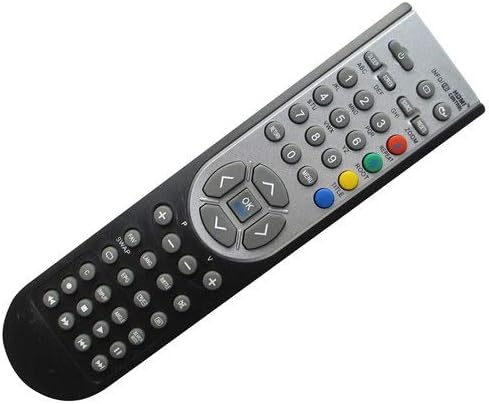
Please note that as a replacement item, this remote control may not support all functions of your original remote. It is crucial to verify that your unit's model number is listed in the product title for compatibility. The images provided are for reference to ensure you receive the correct replacement.
The remote is designed for ease of use and does not come with batteries or a separate manual in its packaging.

2. Setup
2.1. Battery Installation
Your remote control requires two (2) AAA batteries for operation. Batteries are not included with the remote and must be purchased separately.
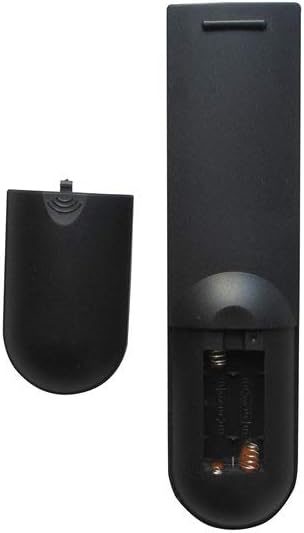
- Locate the battery compartment on the back of the remote control (refer to Figure 2).
- Press down on the tab and slide the battery compartment cover downwards to open it.
- Insert two AAA batteries, ensuring that the positive (+) and negative (-) ends align correctly with the markings inside the compartment. Incorrect insertion can prevent the remote from functioning.
- Slide the battery compartment cover back into place until it clicks securely (refer to Figure 3).
Once batteries are installed, the remote is ready for use with compatible devices. No programming is typically required for this replacement remote.
3. Operating Instructions
This remote control operates using infrared (IR) technology. Ensure there is a clear line of sight between the remote's IR emitter (located at the front tip) and the IR receiver on your television or compatible device.
3.1. Basic Functions
- Power Button: Located at the top, typically red. Press to turn the TV on or off.
- Number Pad (0-9): Used for direct channel input.
- Volume Up/Down (VOL +/-): Adjusts the audio volume.
- Channel Up/Down (CH +/-): Changes the television channel.
- Mute Button: Silences the audio.
- Navigation Buttons (Arrow Keys & OK/Enter): Used to navigate menus and confirm selections.
- Input/Source Button: Switches between different video inputs (e.g., HDMI, AV).
3.2. Advanced Functions
Depending on your specific TV model and its original remote's capabilities, some advanced functions such as Smart TV features, specific menu navigation, or media playback controls (e.g., Play, Pause, Stop, Fast Forward, Rewind) may or may not be fully supported by this replacement remote. Refer to your television's original manual for detailed information on its functions and how they might map to a universal or replacement remote.
4. Maintenance
4.1. Cleaning
To clean your remote control, gently wipe the surface with a soft, dry cloth. For stubborn dirt, slightly dampen the cloth with water or a mild, non-abrasive cleaner. Avoid using harsh chemicals, solvents, or abrasive materials, as these can damage the remote's finish or internal components.
4.2. Battery Replacement
Replace batteries when the remote's performance degrades, such as reduced range or unresponsive buttons. Always replace both batteries at the same time with new AAA batteries. Do not mix old and new batteries, or different types of batteries, as this can lead to leakage or damage.
4.3. Storage
Store the remote control in a cool, dry place away from direct sunlight, extreme temperatures, and high humidity. If the remote will not be used for an extended period, it is advisable to remove the batteries to prevent potential leakage and damage.
5. Troubleshooting
- Remote is not responding:
- Check if the batteries are inserted correctly with the correct polarity (+/-).
- Replace the batteries with fresh AAA batteries.
- Ensure there is a clear line of sight between the remote and the TV's IR receiver. Remove any obstructions.
- Try moving closer to the TV.
- Some functions do not work:
- As a replacement remote, it may not support all functions of your original TV remote. This is common for universal or replacement remotes.
- Verify that your TV model is listed as compatible with this remote.
- Remote range is limited:
- Replace the batteries. Low battery power can reduce the remote's effective range.
- Ensure no strong light sources (like direct sunlight or bright fluorescent lights) are interfering with the IR signal.
6. Specifications
| Feature | Detail |
|---|---|
| Brand | Easytry123 |
| Model Number | Easytry4922 |
| Compatible Devices | Television (Schneider ZITTIHD1900USB, EXIA1915DVDPVR, EXIA1601PVR, RC-1900, EXIA MOONLIT2202FHD LCD HDTV TV) |
| Connectivity Technology | Infrared |
| Controller Type | Button Control |
| Batteries Required | 2 x AAA batteries (not included) |
| Special Feature | Ergonomic |
| Manufacturer | Easytry123 |
| Country of Origin | China |
| ASIN | B07L61L6Q4 |
| Date First Available | December 7, 2018 |
7. Warranty and Support
Specific warranty information for this replacement remote control is not provided in the product details. For details regarding warranty coverage, return policies, or technical support, please contact the seller directly through your purchase platform.
For general inquiries or assistance with your Easytry123 product, please refer to the contact information provided by the retailer or manufacturer at the time of purchase.
Ask a question about this manual
Ask about setup, troubleshooting, compatibility, parts, safety, or missing instructions. Manuals+ will review the question and use this page’s manual context to help answer it.