
Easytry123 Easytry4949
User Manual: Easytry123 Replacement Remote Control
Model: Easytry4949
1. Introduction
Thank you for choosing the Easytry123 Replacement Remote Control. This remote is designed to be a functional replacement for your original Lavis RC-1900 LA-LED191 LCD HDTV TV remote. While it aims to replicate core functionalities, please note that some advanced or specific features of your original remote may not be fully supported by this replacement unit.
This manual provides essential information on setting up, operating, and maintaining your new remote control to ensure a smooth user experience.
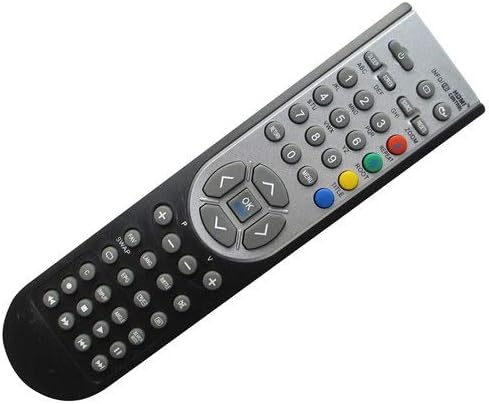
Figure 1: Front view of the Easytry123 Replacement Remote Control.
2. Setup
2.1 Battery Installation
Your Easytry123 Replacement Remote Control requires two (2) AAA batteries (not included). Follow these steps to install them correctly:
- Locate the battery compartment on the back of the remote control.
- Press down on the tab and slide the battery cover downwards to open it.
- Insert two AAA batteries, ensuring that the positive (+) and negative (-) terminals align with the markings inside the compartment. Incorrect insertion can prevent the remote from functioning.
- Slide the battery cover back into place until it clicks securely.

Figure 2: Battery compartment with cover removed.
Note: Always use new batteries and replace both batteries at the same time. Do not mix old and new batteries or different types of batteries.
3. Operating the Remote Control
This section outlines the basic functions of your replacement remote control. Point the remote directly at your TV's infrared receiver for optimal performance.
- Power Button: Located at the top, typically red or clearly marked. Press once to turn the TV on or off.
- Number Buttons (0-9): Used to directly input channel numbers.
- Channel Up/Down (CH+/CH-): Used to navigate through channels sequentially.
- Volume Up/Down (VOL+/VOL-): Used to adjust the sound level.
- Mute Button: Silences the TV audio. Press again to restore sound.
- Navigation Buttons (Arrow Keys & OK/Enter): Used to navigate menus and confirm selections.
- Input/Source Button: Cycles through available input sources (HDMI, AV, etc.).
- Menu Button: Accesses the TV's main menu for settings and adjustments.
Important: As a replacement remote, some advanced functions or specific buttons found on your original TV remote (e.g., smart TV features, specific app buttons) may not be present or fully functional. The primary purpose of this remote is to provide essential TV control.
4. Maintenance
4.1 Cleaning
To keep your remote control in good condition, clean it periodically:
- Use a soft, dry cloth to wipe the surface of the remote.
- For stubborn dirt, slightly dampen the cloth with water or a mild, non-abrasive cleaner. Do not spray cleaner directly onto the remote.
- Avoid using harsh chemicals, solvents, or abrasive cleaning pads, as these can damage the remote's finish or internal components.
4.2 Battery Replacement
Replace the batteries when the remote's response becomes sluggish or it stops working. Refer to Section 2.1 for battery installation instructions. Always dispose of used batteries responsibly according to local regulations.
4.3 Storage
If you plan not to use the remote control for an extended period, it is advisable to remove the batteries to prevent leakage, which could damage the remote.
5. Troubleshooting
If you encounter issues with your Easytry123 Replacement Remote Control, please refer to the following common problems and solutions:
- Remote is not responding:
- Check if the batteries are inserted correctly with the correct polarity (+/-).
- Replace the batteries with new ones.
- Ensure there are no obstructions between the remote and the TV's infrared sensor.
- Make sure you are pointing the remote directly at the TV.
- Only some functions work, or certain buttons do not respond:
- This is a replacement remote. As stated in the product description, it may not work with all functions as the original remote. Core functions like power, volume, and channel control should generally work.
- Verify that your TV model (Lavis RC-1900 LA-LED191) is explicitly listed as compatible.
- Buttons are sticky or unresponsive:
- The remote may need cleaning. Refer to Section 4.1.
- Ensure no liquid has spilled into the remote. If so, discontinue use and allow it to dry completely.
6. Specifications
| Feature | Detail |
|---|---|
| Brand | Easytry123 |
| Model Number | Easytry4949 |
| Compatible Devices | Lavis RC-1900 LA-LED191 LCD HDTV TV |
| Connectivity Technology | Infrared (IR) |
| Controller Type | Button Control |
| Special Feature | Ergonomic |
| Batteries Required | 2 x AAA (not included) |
7. Warranty and Support
Please note that specific warranty information for this replacement remote control is not provided in the product packaging or description. As a replacement item, it is typically sold without an explicit manufacturer's warranty.
For any issues not covered in the troubleshooting section, or for further assistance, please contact the seller or retailer from whom you purchased this product. They may be able to provide additional support or guidance regarding returns or exchanges in accordance with their store policies.
Always retain your proof of purchase for any potential inquiries.
Ask a question about this manual
Ask about setup, troubleshooting, compatibility, parts, safety, or missing instructions. Manuals+ will review the question and use this page’s manual context to help answer it.