
Introduction
This manual provides essential information for the safe and effective use of your BCXY CS-TKA250SL replacement battery. This battery is specifically designed for compatibility with the TDK Life On Record A25 device. Please read these instructions carefully before installation and use to ensure optimal performance and longevity of your battery.
Product Specifications
Battery Details:
- Capacity: 2000mAh
- Type: Ni-MH (Nickel-Metal Hydride)
- Voltage: 3.6V
- Dimensions: 150.00 x 16.60 x 14.60 mm (0.65 x 0.57 x 5.91 inches)
- Weight: Approximately 4.2 ounces
- Certifications: ISO9001, RoHS, CE
- Compatible Model: TDK Life On Record A25
- Model Number: CS-TKA250SL
Product Image:
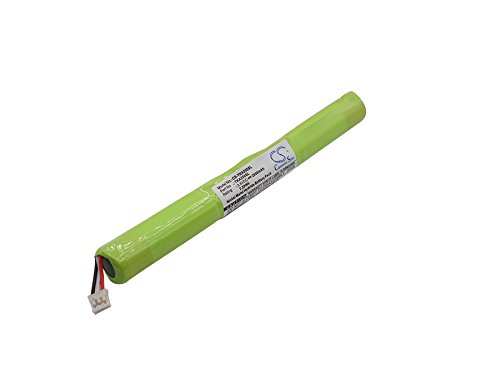
Image of the BCXY CS-TKA250SL Ni-MH replacement battery, showing its cylindrical shape and green casing.
Installation Instructions
Before installing the new battery, ensure your TDK Life On Record A25 device is powered off and disconnected from any power source. Refer to your device's original manual for specific battery compartment access instructions.
- Locate Battery Compartment: Identify and open the battery compartment on your TDK Life On Record A25 device. This may require a small screwdriver.
- Remove Old Battery: Carefully disconnect and remove the old battery. Note the orientation of the connectors.
- Insert New Battery: Align the BCXY CS-TKA250SL replacement battery with the connectors in the compartment. Ensure the polarity is correct. Gently push the battery into place.
- Connect Battery: Securely connect the battery's plug to the device's port. Do not force the connection.
- Close Compartment: Close the battery compartment cover and secure it.
- Initial Charge: It is recommended to fully charge the new battery before its first use.
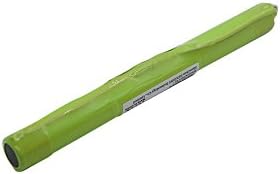
Image showing one end of the BCXY CS-TKA250SL battery with its electrical connector, important for correct installation.
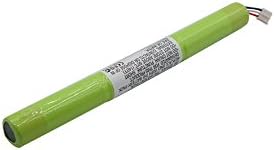
Image of the BCXY CS-TKA250SL battery, highlighting the product label with specifications.
Operating the Battery
The BCXY CS-TKA250SL is a Ni-MH battery. Follow these guidelines for optimal operation:
- Charging: Use only the charger supplied with your TDK Life On Record A25 device or a compatible charger specifically designed for Ni-MH batteries. Avoid overcharging.
- Discharging: For best performance, allow the battery to fully discharge periodically before recharging. This helps to prevent the "memory effect" common in Ni-MH batteries.
- Temperature: Operate the device with the battery within recommended temperature ranges (typically 0°C to 45°C or 32°F to 113°F). Extreme temperatures can affect battery life and performance.
- Storage: If storing the battery for an extended period, ensure it is partially charged (around 40-50%) and stored in a cool, dry place.
Maintenance and Care
Proper maintenance extends the life of your battery:
- Cleaning: Keep battery contacts clean and free of dust or debris. Use a dry, soft cloth for cleaning.
- Avoid Physical Damage: Do not drop, puncture, or disassemble the battery. Physical damage can lead to internal shorts or leakage.
- Disposal: Dispose of old or damaged batteries responsibly according to local regulations. Do not dispose of batteries in household waste or fire.
- Safety: Do not expose the battery to water, fire, or high temperatures. Keep out of reach of children.
Troubleshooting
| Problem | Possible Cause | Solution |
|---|---|---|
| Device does not power on after battery installation. | Battery not properly connected or not charged. | Ensure battery is securely connected. Charge the battery fully. |
| Battery not charging. | Faulty charger, improper connection, or battery issue. | Check charger and cable. Re-seat the battery. Ensure charger is compatible. |
| Shortened battery life. | Normal wear and tear, improper charging habits, or extreme temperatures. | Ensure full discharge cycles periodically. Avoid extreme temperatures. Consider battery replacement if significantly degraded. |
If you encounter issues not listed here, please refer to the support section or your device's original manual.
Warranty Information
Specific warranty details for the BCXY CS-TKA250SL replacement battery are typically provided at the point of purchase or on the product packaging. Please retain your proof of purchase for any warranty claims. Generally, batteries are covered against manufacturing defects for a limited period.
Customer Support
For further assistance or inquiries regarding your BCXY CS-TKA250SL replacement battery, please contact your retailer or the manufacturer. When contacting support, please have your product model number (CS-TKA250SL) and purchase details ready.
You can often find contact information on the product packaging or the brand's official website. For general inquiries, you may also refer to the BCXY Store on Amazon.