
1. Introduction
The DAS Audio ALTEA-415A is a high-quality, powered portable P.A. system designed for versatile audio applications. Its multi-angle polypropylene enclosure allows for flexible use as both a main P.A. speaker and a stage monitor. This system incorporates a Class D two-channel amplifier delivering 800 Wpeak power, ensuring extended bandwidth, wide dynamic range, and exceptionally low distortion. Digital Finite Impulse Response (FIR) filters are integrated into the signal processing for optimal performance. User-configurable voicing, filter, EQ modes, and gain control are accessible via a rotary-knob interface and LCD screen located on the rear panel.
The ALTEA-415A features a 15MI4 loudspeaker for accurate low-frequency reproduction with deep, powerful bass, complemented by an M-32 FEM optimized compression driver with a 1-inch exit for excellent high-frequency performance.
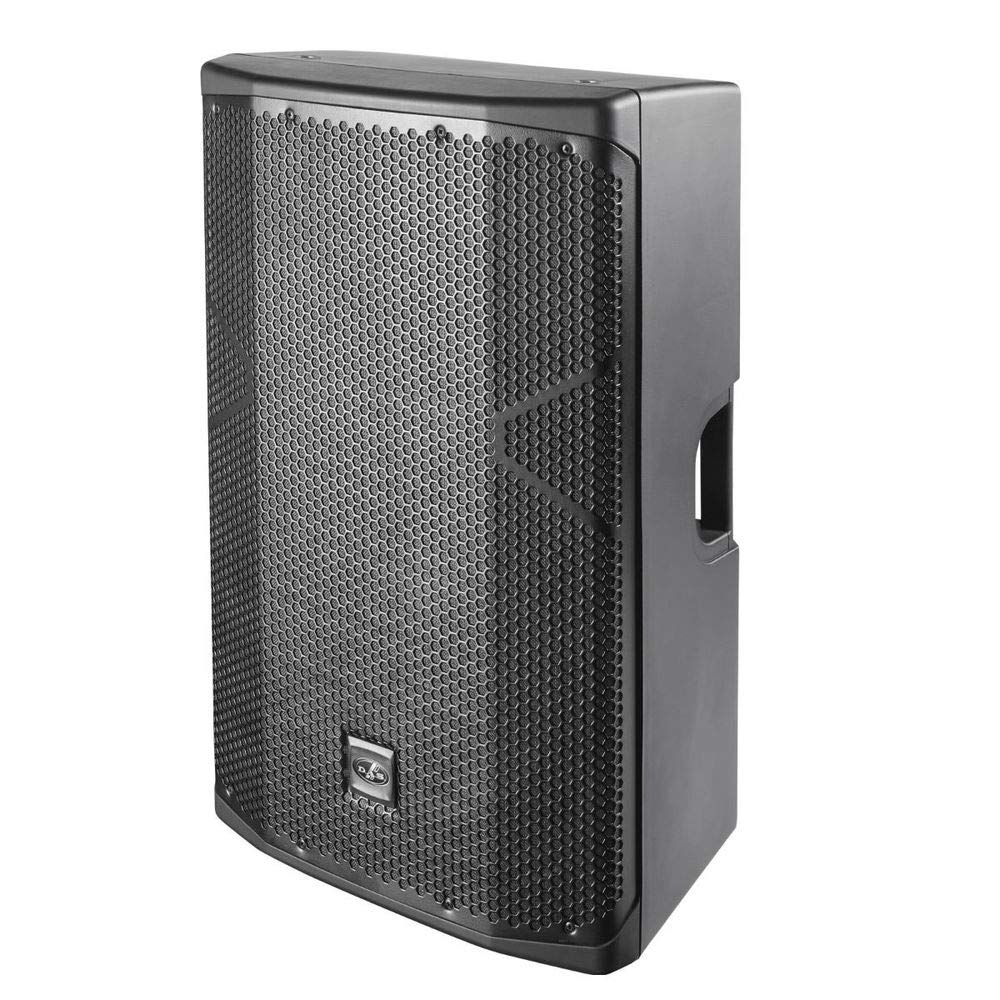
Image 1.1: The DAS Audio ALTEA-415A 15-Inch 2-Way Powered Speaker. This image shows the speaker's robust design, suitable for various professional audio environments.
2. Safety Information
Please read and understand all safety instructions before operating the ALTEA-415A speaker. Retain this manual for future reference.
- Power Source: Connect the unit only to a power supply of the type described in this manual and marked on the unit. Ensure the power cord is not damaged or pinched.
- Ventilation: Do not block any ventilation openings. Install in accordance with the manufacturer's instructions.
- Water and Moisture: Do not expose this apparatus to rain or moisture. Do not use near water or in wet conditions.
- Heat: Do not install near any heat sources such as radiators, heat registers, stoves, or other apparatus (including amplifiers) that produce heat.
- Servicing: Do not attempt to service this product yourself. Refer all servicing to qualified service personnel. Servicing is required when the apparatus has been damaged in any way, such as power-supply cord or plug is damaged, liquid has been spilled or objects have fallen into the apparatus, the apparatus has been exposed to rain or moisture, does not operate normally, or has been dropped.
- Mounting: When mounting the speaker on a stand, ensure the stand is stable and capable of supporting the speaker's weight. Always follow recommended safety procedures for rigging and mounting.
3. Package Contents
Verify that all items are present in the package:
- 1 x DAS Audio ALTEA-415A Powered Speaker
- 1 x AC Power Cord
- 1 x User Manual (this document)
4. Setup
Proper setup is crucial for optimal performance and safety of your ALTEA-415A speaker.
4.1. Placement and Mounting
The ALTEA-415A features a multi-angle enclosure, allowing it to be used in various configurations:
- Floor Standing: For main P.A. applications, the speaker can be placed on a flat, stable surface or mounted on a speaker pole.
- Stage Monitor: The angled design allows the speaker to be placed on its side on a stage floor, directing sound towards performers.
When using a speaker pole or stand, ensure it is rated for the weight of the ALTEA-415A and is placed on a level, stable surface to prevent tipping.

Image 4.1: The ALTEA-415A speaker shown in both pole-mounted (floor standing) and stage monitor configurations. This illustrates the versatility of its multi-angle enclosure.
4.2. Connections
The ALTEA-415A offers wired connectivity for audio input and output.
- Audio Input: Connect your audio source (mixer, instrument, etc.) to the speaker using an XLR cable or a 3.5mm mini jack cable. The rear panel provides appropriate input connectors.
- Audio Output: An XLR output is typically available for linking multiple speakers or sending the signal to another device.
- Power: Connect the supplied AC power cord to the power inlet on the rear panel and then to a suitable electrical outlet.

Image 4.2: Detailed view of the ALTEA-415A's rear panel. This image highlights the XLR input/output, 3.5mm mini jack input, power inlet, and the control interface.
5. Operating
Once the speaker is properly set up and connected, follow these steps for operation:
5.1. Powering On/Off
- Ensure all audio connections are secure and source devices are at a low volume.
- Flip the power switch on the rear panel to the 'ON' position. An indicator light will illuminate.
- To power off, reduce the volume on your audio source and then flip the power switch to 'OFF'.
5.2. Adjusting Settings
The ALTEA-415A features a rotary-knob interface and an LCD screen on the rear panel for adjusting various settings:
- Gain Control: Use the rotary knob to adjust the input gain (volume) of the speaker. Start with a low setting and gradually increase to the desired level.
- Voicing Modes: Navigate through the LCD menu to select different voicing presets optimized for various applications (e.g., music playback, speech, live performance).
- Filter and EQ Modes: Access and adjust built-in filters and equalization settings to fine-tune the speaker's frequency response to your environment and preferences.
- System Information: The LCD screen also displays important system information and status.
Refer to the on-screen menu for detailed navigation and parameter adjustments. The ALTEA-415A provides stereo audio output with 2.0 channels, compatible with devices such as desktops, laptops, MP3 players, smartphones, and tablets.
6. Maintenance
Regular maintenance helps ensure the longevity and optimal performance of your ALTEA-415A speaker.
- Cleaning: Use a soft, dry cloth to clean the exterior of the speaker. For stubborn dirt, a slightly damp cloth can be used, followed by a dry cloth. Do not use abrasive cleaners, solvents, or waxes.
- Grille: Periodically check the front grille for dust or debris accumulation. Use a soft brush or vacuum cleaner with a brush attachment to gently remove any buildup.
- Connections: Ensure all cables and connectors are clean and free from corrosion. Disconnect and reconnect cables periodically to maintain good contact.
- Storage: When not in use for extended periods, store the speaker in a dry, dust-free environment, ideally in its original packaging or a protective cover.
7. Troubleshooting
If you encounter issues with your ALTEA-415A speaker, refer to the following common troubleshooting steps:
- No Power:
- Check if the power cord is securely connected to both the speaker and the electrical outlet.
- Verify that the power outlet is functional by plugging in another device.
- Ensure the power switch on the speaker's rear panel is in the 'ON' position.
- No Sound:
- Confirm that the audio source (mixer, player) is powered on and sending a signal.
- Check all audio cables (XLR, 3.5mm mini jack) for secure connections and damage.
- Increase the gain control on the speaker's rear panel and the volume on your audio source.
- Ensure the correct input is selected if applicable via the LCD menu.
- Distorted Sound:
- Reduce the input gain on the speaker and the output volume from your audio source to prevent clipping.
- Check for damaged audio cables.
- Ensure the speaker is not overloaded beyond its maximum output power.
- Intermittent Sound:
- Inspect all cable connections for looseness or damage.
- Test with different cables if possible.
If these steps do not resolve the issue, contact qualified service personnel or DAS Audio support.
8. Specifications
Detailed technical specifications for the DAS Audio ALTEA-415A Powered Speaker:
| Feature | Specification |
|---|---|
| Brand | DAS Audio |
| Model Name | ALTEA-415A |
| Model Number | 415A |
| Speaker Maximum Output Power | 800 Watts (Peak) |
| Connectivity Technology | Wired |
| Audio Output Mode | Stereo |
| Mounting Type | Floor Standing |
| Speaker Type | Monitor |
| Subwoofer Diameter | 15 Inches |
| Controller Type | Corded Electric (Control Interface) |
| Is Waterproof | FALSE |
| Warranty Type | Limited |
| Control Method | Voice (via internal DSP settings, not external voice control) |
| Speaker Size | 15 Inches |
| Woofer Diameter | 15 Inches |
| Connectivity Protocol | XLR, 3.5mm mini jack |
| Power Source | Corded Electric |
| Number of Audio Channels | 2.0 |
| Compatible Devices | Desktop, Laptop, MP3 Player, Smartphone, Tablet |
| Audio Driver Type | Dynamic Driver |
| Audio Driver Size | 15 Inches |
9. Warranty and Support
The DAS Audio ALTEA-415A comes with a Limited Warranty. For specific terms and conditions of your warranty, please refer to the warranty card included with your product or visit the official DAS Audio website.
For technical support, service, or further inquiries, please contact your authorized DAS Audio dealer or visit the official DAS Audio support portal. Ensure you have your product model number (ALTEA-415A) and serial number ready when contacting support.