
1. Introduction
The Triomph Smart Body Weight Scale (Model TRSC37) is a digital bathroom scale designed to provide comprehensive body composition analysis. Utilizing high-precision sensors and Bio Impedance Analysis (BIA) technology, this scale measures not only your weight but also estimates body fat, BMI, water percentage, muscle mass, calorie expenditure, and bone mass. It supports a maximum capacity of 400 lbs (180 kg) and features automatic user recognition for up to 10 personal profiles. The scale is equipped with a large, backlit LCD display for easy readability and connects via Bluetooth 4.0 to the "AIlFit" app for data tracking.
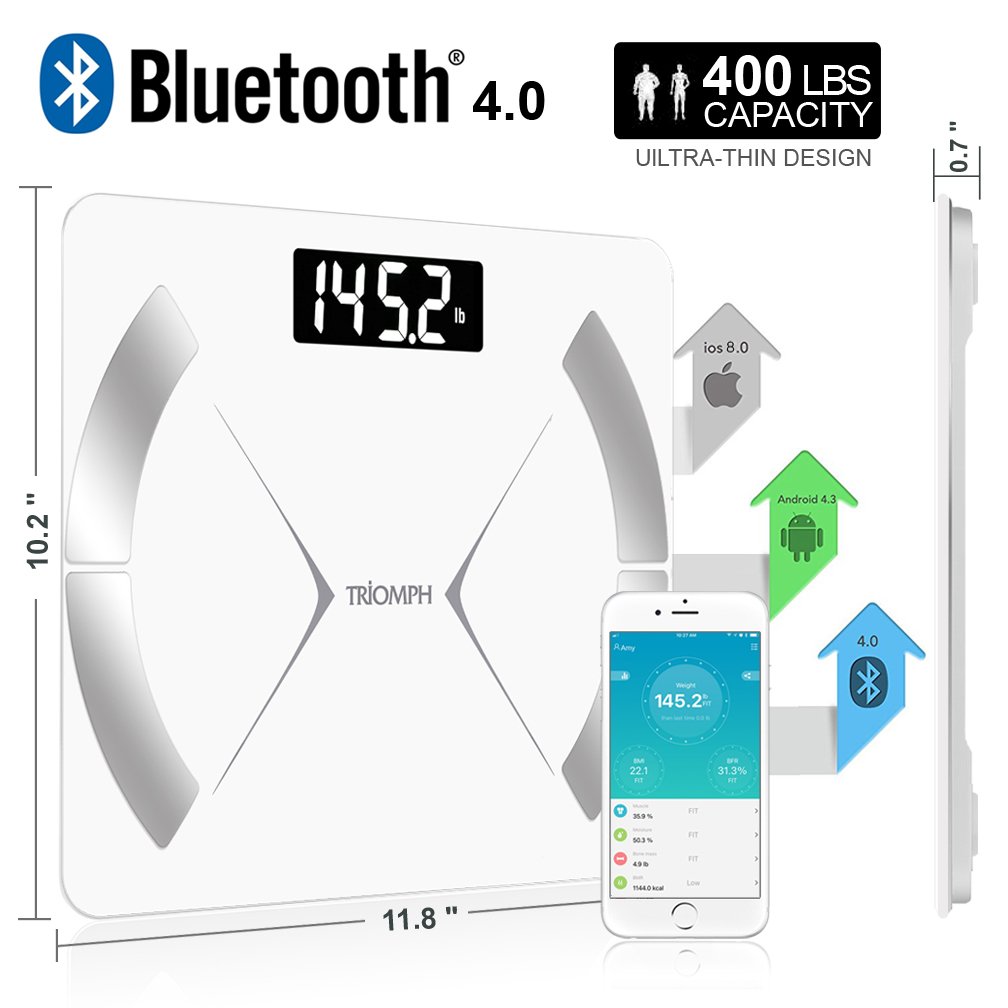
Image: The Triomph Smart Body Weight Scale, showing its ultra-thin design, 400 lbs capacity, Bluetooth 4.0 connectivity, and compatibility with iOS 8.0 and Android 4.3. Dimensions are indicated as 10.2 inches by 11.8 inches, with a thickness of 0.7 inches. A smartphone displaying the companion app is also shown.
2. Safety Information
- Do not use if you have a pacemaker or other internal medical device.
- Do not use if you are pregnant.
- Consult your physician before starting any diet or exercise program.
- The scale is intended for household use only.
- Do not step on the edge of the scale; always stand centrally to avoid tipping.
- Keep the scale dry. Do not use on wet or slippery surfaces.
- Do not drop or jump on the scale.
- Keep out of reach of children.
- Dispose of batteries according to local regulations.
3. Package Contents
Please check the package contents to ensure all items are present:
- 1 x Triomph Smart Body Weight Scale (Model TRSC37)
- 4 x AAA Batteries
- 1 x User Manual (this document)
4. Setup
4.1. Battery Installation
- Locate the battery compartment on the underside of the scale.
- Open the battery compartment cover.
- Insert the 4 AAA batteries, ensuring correct polarity (+/-).
- Close the battery compartment cover securely.

Image: Detailed view of the scale showing high-precision sensors, smooth edges for safety, and the battery compartment with slip-guards.
4.2. Unit Selection
To change the weight unit (kg, lb, st:lb), locate the unit switch inside the battery compartment. Toggle the switch to your desired unit.
4.3. App Download and Pairing
- Download the "AIlFit" app from the Apple App Store (for iOS 8.0 and above) or Google Play Store (for Android 4.3 and above). You can search for "AIlFit" or scan the QR code provided in the product packaging.
- Open the AIlFit app and register your personal information to create a user profile. This typically includes gender, age, height, and activity level, which are used for accurate body composition calculations.
- Ensure Bluetooth is enabled on your smartphone.
- Step onto the scale with bare feet to activate it and initiate the measurement process. The scale will automatically attempt to connect to the app via Bluetooth.
- Once connected, your measurement data will be automatically received and displayed in the app.

Image: Visual guide illustrating the four steps: 1) Download the "AIlFit" app, 2) Complete user profile in the app, 3) Start measurement by loading batteries, turning on Bluetooth, and standing on the scale barefoot, and 4) Measurement completed with automatic data reception.
5. Operation
5.1. Taking a Measurement
- Place the scale on a hard, flat surface. Avoid carpets or uneven flooring.
- Step onto the scale with bare, dry feet. Ensure your feet are positioned on the metal electrodes for body composition analysis.
- The scale will automatically turn on and display your weight. It will then cycle through other body composition metrics on its LCD display.
- If connected to the AIlFit app, the data will be transmitted automatically to your profile.
5.2. Understanding Body Composition Data
The Triomph Smart Body Weight Scale provides 18 different health data points, which can be viewed on the scale's display and in more detail within the AIlFit app. These include:
- Weight: Your current body weight.
- BMI (Body Mass Index): A measure of body fat based on height and weight.
- Body Fat Percentage: The proportion of fat in your body.
- Water Percentage (Moisture): The amount of water in your body.
- Muscle Mass: The total weight of muscle in your body.
- Bone Mass: The total weight of bone in your body.
- BMR (Basal Metabolic Rate): The number of calories your body needs to function at rest.
- Visceral Fat: Fat stored around your organs.
- Subcutaneous Fat: Fat stored directly under the skin.
- Protein Rate: The percentage of protein in your body.
- Body Age: An estimation of your body's biological age.
- Standard Weight: An ideal weight range based on your profile.
- Weight Control: Guidance for weight management.
- Weight without Fat: Your body weight excluding fat.
- And other related metrics.

Image: An infographic illustrating the 18 healthy data terms measured by the scale, including Weight, BMI, Body Fat, Bone Mass, Muscle, Moisture, BMR, Visceral Fat, Subcutaneous Fat, Protein Rate, Body Age, Standard Weight, Weight Control, and Weight without Fat.
5.3. Automatic User Recognition
The scale can automatically recognize and store readings for up to 10 users. Once you have created your profile in the AIlFit app and taken an initial measurement, the scale will associate your weight and body composition data with your profile. When multiple users with similar weights use the scale, the app may prompt you to select the correct user.

Image: An illustration demonstrating that the Triomph scale and its mobile app can store data for up to 8 personal profiles, allowing family and friends to share the device and track their individual progress.
5.4. Data Synchronization and Tracking
The AIlFit app provides a comprehensive overview of your health data, allowing you to track trends over time. Measurements are uploaded quickly and seamlessly to your profile.

Image: A screenshot of the AIlFit mobile application interface, displaying various health metrics such as Weight, BMI, BFR, Moisture, Muscle, Bone Mass, BMR, Visceral Fat, Protein Rate, Body Age, Standard Weight, Weight Control, Weight without Fat, and the amount of protein. The app also shows historical data tracking.
6. Maintenance
6.1. Cleaning
- Wipe the scale surface with a damp cloth and mild detergent.
- Do not use abrasive cleaners or immerse the scale in water.
- Ensure the scale is dry before storage or next use.
6.2. Storage
- Store the scale in a cool, dry place.
- Avoid storing objects on top of the scale for extended periods.
- If the scale will not be used for a long time, remove the batteries to prevent leakage.
7. Troubleshooting
| Problem | Possible Cause | Solution |
|---|---|---|
| Inaccurate Readings | Scale not on a hard, flat surface; scale moved; initial calibration needed. | Place scale on a hard, flat surface. Step on and off quickly to calibrate to zero before taking a measurement. Ensure feet are bare and dry. |
| Scale Not Turning On | Dead batteries; batteries incorrectly installed. | Replace the 4 AAA batteries. Check battery polarity. |
| No Body Composition Data (Weight Only) | Feet not bare or dry; feet not making contact with electrodes; user profile not set up in app. | Ensure bare, dry feet are making full contact with the metal electrodes. Set up your personal profile in the AIlFit app. |
| Bluetooth Connection Issues | Bluetooth off on phone; app not open; scale too far from phone. | Ensure Bluetooth is enabled on your phone. Open the AIlFit app. Keep phone close to the scale during measurement. |
| "Err" or Overload Indication | Weight exceeds maximum capacity (400 lbs / 180 kg). | The scale's capacity has been exceeded. |
| "Lo" or Low Battery Indication | Batteries are low. | Replace the 4 AAA batteries. |
8. Specifications
| Feature | Detail |
|---|---|
| Model Number | TRSC37 |
| Brand | Triomph |
| Weight Capacity | 6.6 lbs - 400 lbs (3 kg - 180 kg) |
| Readout Accuracy | +/- 0.2 lb / 0.1 kg |
| Measurement Units | kg, lb, st:lb |
| Sensors | 4 High-precision sensors |
| Display Type | Large LCD with cool-blue LED backlight |
| Special Features | Backlit Display, Body Fat, Bodyweight, Auto-zero, Auto-on, Auto-off, Automatic User Recognition (up to 10 users) |
| Connectivity | Bluetooth 4.0 (for AIlFit app) |
| Power Source | 4 x AAA Batteries (included) |
| Surface Material | 6 mm Tempered Glass |
| Bottom Material | High quality ABS plastic |
| Product Dimensions | 11 x 11 x 1 inches (280 x 280 x 26 mm) |
| Item Weight | 3.2 Pounds (1.45 kg) |
| UPC | 718930073048 |
9. Warranty & Support
Triomph products are manufactured to high-quality standards. For specific warranty information, please refer to the documentation included with your purchase or contact Triomph customer support. If you encounter any issues or have questions regarding your Triomph Smart Body Weight Scale, please reach out to the manufacturer's customer service for assistance.
Manufacturer: Triomph