
Phoncoo ARC470A1
Phoncoo ARC470A1 Air Conditioner Remote Controller User Manual
Compatible with Daikin ARC470A11, ARC470A16, ARC469A5, ARC455A1, KTDJ002 models.
1. Introduction
This manual provides detailed instructions for the proper use and maintenance of your Phoncoo ARC470A1 Air Conditioner Remote Controller. This remote is designed as a replacement or spare for various Daikin air conditioner models, ensuring comfortable and efficient control over your indoor climate. Please read this manual thoroughly before using the remote controller to ensure optimal performance and longevity.
2. Safety Information
- Battery Handling: Always use AAA batteries of the correct type and ensure they are inserted with the correct polarity (+/-). Do not mix old and new batteries, or different types of batteries. Remove batteries if the remote will not be used for an extended period to prevent leakage.
- Disposal: Dispose of used batteries and the remote controller according to local regulations. Do not dispose of batteries in fire.
- General Precautions: Do not expose the remote controller to direct sunlight, high temperatures, humidity, or water. Avoid dropping or subjecting the remote to strong impacts. Keep out of reach of children.
3. Package Contents
The package contains the following item:
- 1 x Phoncoo ARC470A1 Air Conditioner Remote Controller
4. Product Overview
The Phoncoo ARC470A1 remote controller features a clear LCD display and ergonomically placed buttons for easy operation of your air conditioning unit. The design prioritizes user-friendliness, allowing quick access to essential functions.

Figure 4.1: Front view of the Phoncoo ARC470A1 remote controller, showing the LCD display and all control buttons.
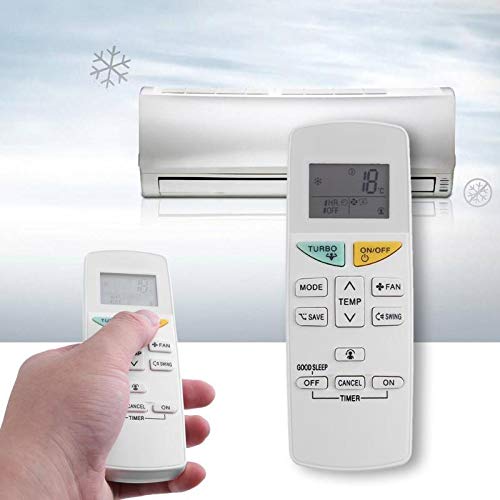
Figure 4.2: The remote controller positioned in front of an air conditioning unit, illustrating its intended use.
Button Functions:
- ON/OFF: Powers the air conditioner on or off.
- MODE: Cycles through operating modes (e.g., Cool, Heat, Fan, Dry, Auto).
- TEMP ▲/▼: Adjusts the temperature setting up or down.
- FAN: Adjusts the fan speed.
- SWING: Activates or deactivates the air swing function.
- TURBO: Engages maximum power for rapid cooling or heating.
- SAVE: Stores or recalls preferred settings.
- GOOD SLEEP: Activates a specialized sleep mode for comfort during rest.
- TIMER (OFF/CANCEL/ON): Sets the timer for automatic power off or on, or cancels a set timer.
5. Setup
5.1 Battery Installation
To begin using your remote controller, you must install two AAA batteries (not included).
- Locate the battery compartment cover on the back of the remote controller.
- Slide the cover downwards or press the latch and lift to open the compartment.
- Insert two new AAA batteries, ensuring the positive (+) and negative (-) terminals align correctly with the markings inside the compartment.
- Replace the battery compartment cover by sliding it back into place until it clicks securely.
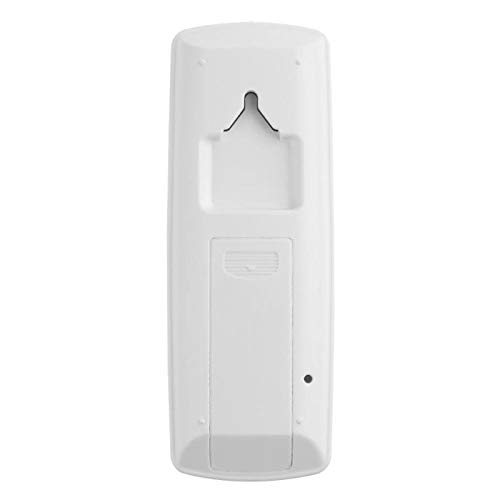
Figure 5.1: Rear view of the remote controller, illustrating the battery compartment location.
After battery installation, the LCD display should illuminate, indicating the remote is ready for use. No pairing or programming is typically required for this replacement remote, as it is pre-programmed for compatible Daikin models.
6. Operating Instructions
Point the remote controller directly at the air conditioner's receiver when operating. Ensure there are no obstructions between the remote and the unit.
6.1 Power On/Off
- Press the ON/OFF button once to turn the air conditioner on.
- Press the ON/OFF button again to turn the air conditioner off.
6.2 Mode Selection
- Press the MODE button repeatedly to cycle through the available operating modes: Cool, Heat, Fan, Dry, Auto (modes may vary depending on your specific air conditioner model). The selected mode will be displayed on the remote's LCD screen.
6.3 Temperature Adjustment
- Press the TEMP ▲ button to increase the desired temperature.
- Press the TEMP ▼ button to decrease the desired temperature.
6.4 Fan Speed Control
- Press the FAN button repeatedly to cycle through different fan speed settings (e.g., Low, Medium, High, Auto).
6.5 Air Swing Function
- Press the SWING button to activate or deactivate the automatic air swing function, which helps distribute air evenly.
6.6 Turbo Mode
- Press the TURBO button to quickly reach the desired temperature. This mode typically operates the air conditioner at its maximum capacity for a set period.
6.7 Save Function
- The SAVE button allows you to store and recall your preferred operating settings (e.g., mode, temperature, fan speed). Consult your air conditioner's main manual for specific instructions on setting and recalling saved preferences.
6.8 Good Sleep Mode
- Press the GOOD SLEEP button to activate a specialized mode that adjusts temperature and fan speed automatically throughout the night for optimal sleeping comfort and energy efficiency.
6.9 Timer Functions
- TIMER ON: Press the TIMER ON button to set a time for the air conditioner to automatically turn on. Use the TEMP buttons to adjust the desired time.
- TIMER OFF: Press the TIMER OFF button to set a time for the air conditioner to automatically turn off. Use the TEMP buttons to adjust the desired time.
- CANCEL: Press the CANCEL button to deactivate any active timer settings.
7. Maintenance
7.1 Cleaning the Remote Controller
- Wipe the surface of the remote controller with a soft, dry cloth.
- Do not use liquid cleaners, abrasive materials, or chemical solvents, as these can damage the remote's surface or internal components.
7.2 Battery Replacement
- Replace batteries when the remote's display becomes dim or the remote becomes unresponsive.
- Follow the battery installation steps outlined in Section 5.1.
8. Troubleshooting
If you encounter issues with your remote controller, please refer to the following common solutions:
| Problem | Possible Cause | Solution |
|---|---|---|
| Remote not responding | Dead or incorrectly installed batteries. Obstruction between remote and AC unit. Remote out of range. | Replace batteries, ensuring correct polarity. Remove any obstructions. Move closer to the AC unit. |
| Display is dim or blank | Low battery power. | Replace batteries with new ones. |
| Air conditioner not responding to commands | Remote not compatible with AC unit. AC unit power issue. | Verify compatibility with your specific Daikin model. Check if the AC unit is powered on and functioning correctly. |
9. Specifications
The following are the technical specifications for the Phoncoo ARC470A1 Remote Controller:
- Model: ARC470A1
- Material: Plastic
- Color: White
- Size: Approximately 14 x 5 x 2 cm (5.5 x 1.96 x 0.78 inches)
- Power Supply: 2 x AAA Batteries (NOT Included)
- Connectivity Technology: Radio Frequency (RF)
- Controller Type: Button Control
- Compatible Devices: Daikin ARC470A11, ARC470A16, ARC469A5, ARC455A1, KTDJ002
10. Warranty and Support
Specific warranty information for the Phoncoo ARC470A1 Air Conditioner Remote Controller is not provided in the product details. For any support inquiries or further assistance, please refer to the seller or retailer from whom the product was purchased.
Ask a question about this manual
Ask about setup, troubleshooting, compatibility, parts, safety, or missing instructions. Manuals+ will review the question and use this page’s manual context to help answer it.