
1. Introduction
This manual provides comprehensive instructions for the installation, operation, and maintenance of your TAFFIO 10.25-inch Android GPS Carplay Navigation System. This system is designed for seamless integration into compatible Mercedes-Benz vehicles, enhancing your driving experience with advanced multimedia and navigation capabilities.
The TAFFIO system features integrated CAN bus support, ensuring retention of original vehicle functions such as radio controls, service indicators, settings, steering wheel controls, fiber optic sound system, original reverse camera, 360° camera system, and parking distance control (PDC).
2. Compatibility
This TAFFIO navigation system is compatible with the following Mercedes-Benz models:
- Mercedes E-Class Coupe A207, C207, W207 (2013 – 2016)
The vehicle must be equipped with the NTG5 system and either a 3.5mm AUX IN or an AUX Media Interface (AMI).
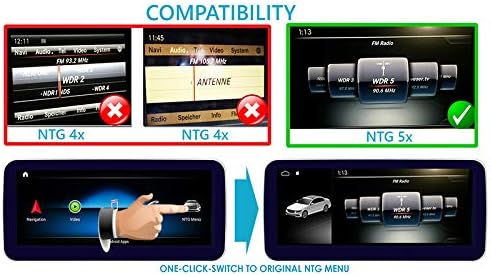
Figure 2.1: Compatibility chart illustrating the difference between NTG 4x (not compatible) and NTG 5x (compatible) systems, and the one-click switch to the original NTG menu.
3. Key Features
- Display: 10.25-inch capacitive touchscreen with 1280 x 480 pixel resolution, featuring day and night viewing modes and an HD Anti-Glare Blue Ray Display.
- User Interface: Intuitive multi-language interface with access to Google Play Store for various applications.
- Smartphone Integration: Built-in Wireless Carplay and Android Auto. Supports Airplay & Miracast Mirror Link for smartphone screen and audio mirroring.
- Connectivity: Integrated WiFi for direct connection to smart hotspots. Features a 3G/4G LTE SIM card slot.
- Navigation: Integrated GPS receiver with pre-installed European maps and Points of Interest (POI) database, including free lifetime updates. Supports installation of any Android navigation software.
- Multimedia: Two USB ports and one SD card slot for music, images, and videos. Supports 1080P H264 MP4 AVI RMVB FLV MKV video formats and MP3 WMA FLAC APE AAC audio formats.
- Bluetooth: Hands-free calling with phonebook synchronization and Bluetooth music streaming from smartphones.
- Camera Support: Rear camera connection with dynamic auxiliary lines and automatic switching function. Supports original reverse camera and 360° camera systems.
- Optional Accessories Support: Compatible with optional DAB+ digital radio, Apple CarPlay & Android Auto modules, TPMS (Tire Pressure Monitoring System), Dashcam, DVB-T2 tuner, and OBDII 2 diagnostic tools.

Figure 3.1: Main Android menu interface, showing primary functions like Navigation, Video, Music, and Phone, along with an option to access the original NTG menu.

Figure 3.2: Android applications menu, displaying a grid of installed apps such as Chrome, Settings, Play Store, File Manager, Maps, and other multimedia and utility applications.

Figure 3.3: Picture-in-Picture (PIP) functionality, demonstrating simultaneous display of a navigation map and a video playback window.

Figure 3.4: Comparison of Wireless Carplay (top) and USB Android Auto (bottom) interfaces, showcasing their respective app layouts and functionalities.
4. Package Contents
Please verify that all items listed below are included in your package:
- TAFFIO Android Display Unit
- Power Connection Cables
- GPS Antenna
- Camera / Video AV Cable
- USB Cable
- Auxiliary Cable
- PDF Manual (digital)

Figure 4.1: Overview of the package contents, including the Android multimedia system, mounting panels, various connection cables (power, display/USB/CAM), GPS antenna, and two WiFi antennas.
5. Setup and Installation
The TAFFIO system is designed for a Plug and Play installation, minimizing the need for complex modifications to your vehicle's original system. It integrates directly with the existing wiring and components.
5.1 Pre-Installation Checklist
- Ensure the vehicle's ignition is off and the battery is disconnected before starting installation.
- Confirm all package contents are present.
- Review your vehicle's specific dashboard disassembly instructions if available.
5.2 Installation Steps (General Guide)
- Carefully remove the original display unit and associated trim from your vehicle's dashboard.
- Connect the provided power cable harness to the original radio power plug.
- Connect the display/USB/CAM cable to the TAFFIO Android Display and route the necessary connections for USB, camera input, and auxiliary input.
- Install the GPS antenna in a location with a clear view of the sky (e.g., dashboard, under windshield).
- Install the WiFi antennas for optimal signal reception.
- Connect any optional accessories (e.g., DAB+, TPMS, Dashcam) as per their respective manuals.
- Carefully mount the TAFFIO Android Display into the dashboard opening, ensuring all cables are properly routed and secured.
- Reconnect the vehicle battery and test the system before fully reassembling the dashboard trim.

Figure 5.1: View of a Mercedes-Benz interior after installation, demonstrating how the TAFFIO display integrates seamlessly with the existing dashboard, retaining functionality of the factory command knob, touch mouse, and steering wheel controls.

Figure 5.2: Detailed wiring diagram illustrating the various connections for the TAFFIO system, including links to the original radio, CANBUS, USB, GPS antenna, WiFi antennas, camera inputs (CAM IN, 360° CAM DETECT), DVR IN, and LVDS display plug.
6. Operating Instructions
6.1 Powering On/Off
The system powers on automatically with the vehicle's ignition. To power off, turn off the vehicle's ignition.
6.2 Navigating the Interface
The TAFFIO system features a capacitive touchscreen for direct interaction. You can also utilize the original vehicle's command knob, touch mouse, and steering wheel controls for navigation within the Android interface and to switch between the Android system and the original NTG menu.
6.3 Switching Between Android and Original NTG System
A dedicated icon or button on the Android interface allows for a one-click switch back to the vehicle's original NTG menu. Similarly, you can switch back to the Android system from the original NTG menu.
6.4 Using Carplay and Android Auto
- Wireless Carplay: Connect your iPhone wirelessly via Bluetooth and Wi-Fi. Follow the on-screen prompts to pair your device.
- Android Auto: Connect your Android smartphone via USB. Ensure Android Auto is installed on your phone.
Once connected, the respective interface will appear on the display, allowing access to navigation, music, calls, and other compatible apps.
6.5 GPS Navigation
Access the pre-installed navigation application from the main menu. You can input destinations, view maps, and receive turn-by-turn directions. The system supports installation of other Android navigation software from the Google Play Store.
6.6 Multimedia Playback
Use the USB ports or SD card slot to play music, videos, or view images. The system supports a wide range of audio and video formats. Bluetooth music streaming is also available from connected smartphones.
7. Specifications
- Model Number: TXH248R
- Screen Size: 10.25 Inches
- Resolution: 1280 x 480 pixels
- Input Interface: Capacitive Touchscreen
- Control Method: Touch, Original Vehicle Controls (Command Knob, Steering Wheel)
- Connectivity Technology: Bluetooth, Wi-Fi, USB, SD Card, 3G/4G LTE SIM slot
- Compatible Devices: Smartphone
- Map Type: Europe (pre-installed)
- Manufacturer: Real Media Shop - Germany
- First Available Date: March 2, 2020
8. Maintenance
To ensure optimal performance and longevity of your TAFFIO navigation system, follow these maintenance guidelines:
- Cleaning: Use a soft, lint-free cloth to clean the display. For stubborn marks, slightly dampen the cloth with water or a screen-safe cleaner. Avoid abrasive materials or harsh chemicals.
- Software Updates: Periodically check for software updates to ensure the system has the latest features and security patches. Updates can typically be performed via Wi-Fi.
- Temperature: Avoid exposing the unit to extreme temperatures for extended periods.
- Connections: Ensure all cables are securely connected. Loose connections can lead to intermittent issues.
9. Troubleshooting
If you encounter issues with your TAFFIO navigation system, please refer to the following common troubleshooting steps:
- No Power: Check all power connections. Ensure the vehicle's ignition is on. If the issue persists, verify the vehicle's fuse for the multimedia system.
- No Sound: Check the volume settings on both the TAFFIO system and the original vehicle's audio system. Ensure the correct audio input (e.g., AUX) is selected on the original radio.
- Touchscreen Unresponsive: Try restarting the system by turning the vehicle off and on. If the problem persists, a factory reset might be necessary (refer to the system settings).
- GPS Signal Lost: Ensure the GPS antenna has a clear view of the sky. Check the antenna connection.
- Carplay/Android Auto Not Connecting: Verify Bluetooth and Wi-Fi are enabled on your smartphone and the TAFFIO system. For Android Auto, ensure the USB cable is functional and Android Auto is installed on your phone.
- Original NTG Functions Not Working: Ensure the CAN bus connections are secure. If the issue persists, consult a professional installer.
For further assistance, please contact TAFFIO customer support.
10. Warranty and Support
The TAFFIO 10.25-inch Android GPS Carplay Navigation System comes with a 2-year warranty from the date of purchase. Please retain your invoice for warranty claims.
For technical support, warranty inquiries, or service, please contact your retailer or the manufacturer directly. Contact information can typically be found on the manufacturer's official website or your purchase documentation.