
Fame AE-60
Fame AE-60 Acoustic Guitar Combo Amplifier
User Manual
Introduction
Thank you for choosing the Fame AE-60 Acoustic Guitar Combo Amplifier. This amplifier is designed to provide clear, natural amplification for acoustic guitars and vocals, offering a balanced combination of refined finishes and selected materials. This manual provides essential information for the proper setup, operation, and maintenance of your amplifier to ensure optimal performance and longevity.
Setup
Unpacking and Inspection
Carefully remove the amplifier from its packaging. Inspect the unit for any signs of damage that may have occurred during shipping. If any damage is found, contact your dealer immediately. Retain the original packaging for future transport or storage.

Figure 1: Front view of the Fame AE-60 Acoustic Guitar Combo Amplifier, showcasing its brown textured finish and metal grille.
Power Connection
Before connecting the power cable, ensure the amplifier's power switch is in the OFF position. Connect the supplied AC power cable to the amplifier's power input socket on the rear panel and then to a suitable grounded AC outlet. The amplifier supports various voltages (AC100V-240V) as indicated on the rear panel.

Figure 2: Close-up of the rear panel, showing the AC power input socket and external speaker outputs (R/L).
Connecting Instruments and Microphones
The AE-60 features dedicated inputs for both acoustic guitar and a microphone.
- Microphone Input: Use an XLR cable to connect your microphone to the "INPUT MICROPHONE" jack.
- Guitar Input: Use a standard 1/4-inch (6.35mm) instrument cable to connect your acoustic guitar to the "INPUT GUITAR" jack.
- CD Input: For connecting external audio sources like CD players or MP3 players, use an RCA cable to the "CD INPUT" jacks (L/R).
- External Speaker: The amplifier includes "EXT. SPEAKER" outputs (R/L) for connecting additional speakers, if desired.
- Footswitch: Connect an optional footswitch to the "FOOTSWITCH" jack to control Chorus and Reverb effects.
- Line Out/Send/Return: These jacks provide options for connecting to external mixers, recording devices, or effects loops.

Figure 3: Detail of the microphone and guitar input sections on the amplifier's control panel.
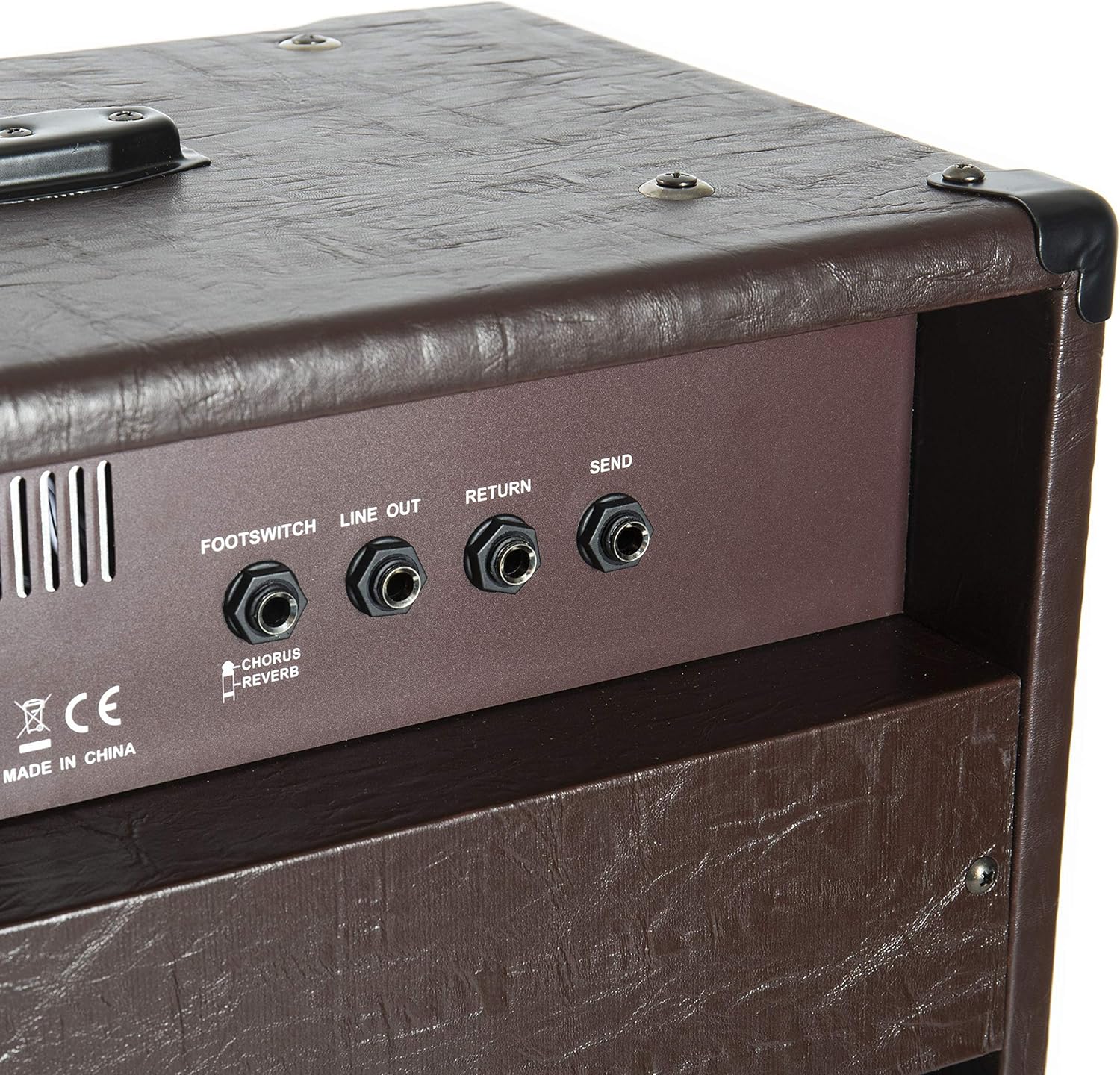
Figure 4: Detail of the rear panel connections, including Footswitch, Line Out, Return, and Send jacks.
Operating Instructions
Once all connections are made, turn on the amplifier using the "POWER" switch located on the front panel. Slowly increase the "MASTER" volume control to a desired listening level.
Microphone Channel Controls
- TONE: Adjusts the overall tonal character of the microphone input.
- LEVEL: Controls the volume of the microphone input.
Guitar Channel Controls
- LEVEL: Controls the volume of the guitar input.
- BASS: Adjusts the low-frequency response of the guitar sound.
- MID: Adjusts the mid-frequency response of the guitar sound. The frequency can be swept from 200Hz to 1kHz.
- TREBLE: Adjusts the high-frequency response of the guitar sound.
- CHORUS (SPEED/DEPTH/ON/OFF): Adds a rich, swirling effect to the guitar sound. "SPEED" controls the rate of the effect, "DEPTH" controls its intensity. The "ON/OFF" switch activates or deactivates the chorus.
- REVERB (MIC/GUITAR): Adds spaciousness and decay to the sound. Separate controls are provided for the microphone and guitar channels.

Figure 5: Detail of the guitar channel controls, including EQ, Chorus, and Reverb knobs.
Master Section and Equalizer
- MASTER: Controls the overall output volume of the amplifier.
- CD INPUT: Volume control for the external audio source connected to the CD Input jacks.
- EQUALIZER: A 5-band graphic equalizer (100Hz, 400Hz, 1KHz, 3KHz, 6KHz) allows for fine-tuning the overall tonal output of the amplifier. Adjust the sliders to boost or cut specific frequency ranges.

Figure 6: Detail of the master volume, CD input, power switch, and the 5-band graphic equalizer.
Maintenance
Cleaning
To clean the amplifier, use a soft, dry cloth. For stubborn dirt, a slightly damp cloth can be used, followed by a dry cloth. Do not use abrasive cleaners, solvents, or waxes, as these can damage the finish and internal components.
Storage
When not in use for extended periods, store the amplifier in a cool, dry place, away from direct sunlight and extreme temperatures. If possible, use the original packaging for protection.
Safety Precautions
- Do not expose the amplifier to rain or moisture.
- Do not block ventilation openings.
- Do not place objects containing liquids on the amplifier.
- Refer all servicing to qualified service personnel.
Troubleshooting
This section addresses common issues you might encounter with your Fame AE-60 amplifier. If the problem persists after following these steps, please contact qualified service personnel.
No Sound Output
- Ensure the amplifier is powered on and the power indicator light is illuminated.
- Check that the "MASTER" volume control is turned up.
- Verify that the "LEVEL" controls for the microphone and guitar channels are turned up.
- Check all cable connections (instrument, microphone, power) for secure fit.
- Test with a different instrument cable or microphone to rule out faulty accessories.
Distorted Sound
- Reduce the "LEVEL" controls for the microphone or guitar channel.
- Reduce the "MASTER" volume control.
- Check if any effects (Chorus, Reverb) are set too high.
- Ensure your instrument's output level is not excessively high.
Hum or Noise
- Ensure all cables are properly shielded and in good condition.
- Try plugging the amplifier into a different electrical outlet, preferably on a different circuit.
- Keep the amplifier away from other electronic devices that might cause interference.
Specifications
| Feature | Detail |
|---|---|
| Model | Fame AE-60 |
| Manufacturer Reference | GIT0046285-000 |
| Power Output | 60 Watts |
| Dimensions (L x W x H) | 68.5 x 56.5 x 37 cm (approx. 27 x 22.2 x 14.6 inches) |
| Weight | 19.15 kg (approx. 42.2 lbs) |
| Number of Output Channels | 2 |
| Amplifier Type | Acoustic Guitar Amplifier |
| Compatible Devices | Guitar |
| Color | AE-60 (Brown) |
Note: Specifications are subject to change without notice for product improvement.

Figure 7: Rear view of the amplifier, showing the dual speakers and various input/output jacks.
Warranty and Support
Warranty information for the Fame AE-60 Acoustic Guitar Combo Amplifier is not provided within this manual. For details regarding warranty coverage, service, and technical support, please refer to the official Fame website or contact your authorized dealer. Keep your purchase receipt as proof of purchase for any warranty claims.
Ask a question about this manual
Ask about setup, troubleshooting, compatibility, parts, safety, or missing instructions. Manuals+ will review the question and use this page’s manual context to help answer it.