
1. Introduction
This manual provides comprehensive instructions for the MPOW RA51123 B1.0 In-Car Bluetooth Receiver. Please read this guide carefully before using the device to ensure proper operation, optimal performance, and to understand all features. Keep this manual for future reference.
The MPOW RA51123 B1.0 is designed to enable wireless audio streaming from your Bluetooth-enabled devices, such as smartphones or tablets, to your car's audio system via an AUX input. Enjoy your music and hands-free calls with ease.
2. Product Overview
2.1 Package Contents
- MPOW RA51123 B1.0 Bluetooth Receiver
- 3.5mm Audio Cable
- USB Charging Cable
- User Manual
2.2 Device Layout
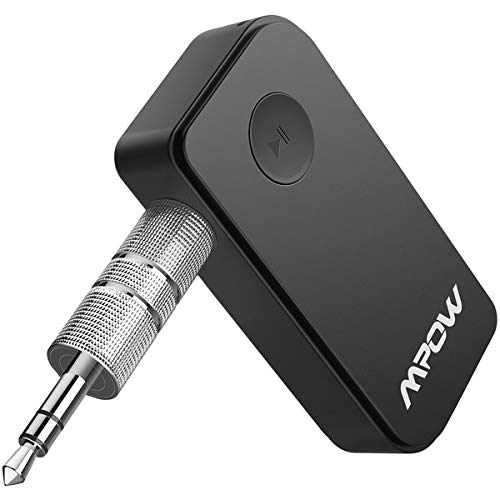
Image: MPOW RA51123 B1.0 In-Car Bluetooth Receiver. This image displays the compact design of the receiver, typically featuring a main button, indicator light, 3.5mm audio output, and a micro-USB charging port.
The MPOW RA51123 B1.0 Bluetooth Receiver is a compact device designed for portability and ease of use in a vehicle. It typically includes:
- Multi-function Button (MFB): For power on/off, play/pause, answer/end calls.
- LED Indicator: Shows power status, connection status, and charging status.
- 3.5mm Audio Output Jack: Connects to your car's AUX input.
- Micro-USB Charging Port: For charging the internal battery.
- Microphone: For hands-free calling.
3. Setup
3.1 Charging the Receiver
- Connect the small end of the USB charging cable to the Micro-USB port on the receiver.
- Connect the larger end of the USB charging cable to a USB power source (e.g., car charger, USB wall adapter, computer USB port).
- The LED indicator will typically show a solid red light during charging and turn off or change color when fully charged.
- A full charge usually takes approximately 1.5 to 2 hours.
3.2 Connecting to Car Audio
- Ensure your car's audio system has an AUX input port.
- Plug one end of the 3.5mm audio cable into the 3.5mm audio output jack on the MPOW receiver.
- Plug the other end of the 3.5mm audio cable into your car's AUX input port.
- Set your car's audio source to AUX mode.
3.3 Pairing with a Bluetooth Device
- Power On: Press and hold the Multi-function Button (MFB) for approximately 3 seconds until the LED indicator flashes blue and red alternately. This indicates the receiver is in pairing mode.
- Activate Bluetooth: On your smartphone or other Bluetooth device, enable Bluetooth.
- Search for Devices: In your device's Bluetooth settings, search for available devices. You should see "MPOW B1.0" or "RA51123" in the list.
- Connect: Select "MPOW B1.0" or "RA51123" to connect. Once successfully paired, the LED indicator will flash blue slowly, and you may hear an audible confirmation.
- If a passcode is required, enter "0000".
- The receiver will automatically attempt to reconnect to the last paired device when powered on.
4. Operating Instructions
4.1 Power On/Off
- Power On: Press and hold the MFB for 3 seconds. The LED will flash blue.
- Power Off: Press and hold the MFB for 3 seconds. The LED will flash red and then turn off.
4.2 Music Playback
- Play/Pause: Press the MFB once.
- Next Track: Double-press the MFB.
- Previous Track: Triple-press the MFB.
- Volume Control: Adjust volume directly on your paired smartphone or car audio system. The receiver itself typically does not have dedicated volume buttons.
4.3 Hands-Free Calling
- Answer Call: Press the MFB once when an incoming call rings.
- End Call: Press the MFB once during a call.
- Reject Call: Press and hold the MFB for 2 seconds when an incoming call rings.
- Redial Last Number: Double-press the MFB when not on a call.
- Activate Voice Assistant (Siri/Google Assistant): Press and hold the MFB for 1 second when not on a call.
5. Maintenance
To ensure the longevity and optimal performance of your MPOW RA51123 B1.0 Bluetooth Receiver, follow these maintenance guidelines:
- Cleaning: Use a soft, dry cloth to wipe the device. Do not use liquid cleaners or aerosols, as they may damage the device.
- Storage: Store the device in a cool, dry place away from direct sunlight and extreme temperatures.
- Avoid Moisture: Keep the device away from water and other liquids.
- Handle with Care: Avoid dropping or subjecting the device to strong impacts.
- Charging: Use only the provided USB charging cable or a certified equivalent. Do not overcharge the device.
6. Troubleshooting
If you encounter issues with your MPOW RA51123 B1.0, refer to the following troubleshooting steps:
| Problem | Possible Cause | Solution |
|---|---|---|
| Device does not power on. | Low battery. | Charge the device fully using the provided USB cable. |
| Cannot pair with Bluetooth device. | Receiver not in pairing mode; Bluetooth off on source device; too many paired devices. |
|
| No sound after connecting. | Car audio not set to AUX; volume too low; cable not fully inserted. |
|
| Poor sound quality. | Interference; low battery; faulty cable. |
|
7. Specifications
| Feature | Detail |
|---|---|
| Model Number | RA51123 |
| Brand | MPOW |
| Connectivity Technology | Bluetooth |
| Special Feature | Integrated Bluetooth |
| Number of Channels | 4 |
| Audio Output Type | Speakers |
| Dimensions (L x W x H) | 17.45 x 34.9 x 26.17 cm |
| Weight | 90.72 grams |
| Batteries Required | No (internal rechargeable battery) |
| UPC | 850001599177 |
8. Safety Information
Please observe the following safety precautions to prevent damage to the device or injury to yourself:
- Do not disassemble, repair, or modify the product.
- Do not expose the device to extreme temperatures (hot or cold), direct sunlight, or fire.
- Avoid contact with water or other liquids.
- Do not use the device during thunderstorms.
- Keep out of reach of children.
- Dispose of the device and its battery responsibly according to local regulations.
- Always prioritize safe driving. Do not operate the device in a way that distracts you from the road.
9. Warranty and Support
MPOW products typically come with a limited warranty. For specific warranty terms and conditions, please refer to the warranty card included in your product packaging or visit the official MPOW website.
For technical support, troubleshooting assistance, or any questions regarding your MPOW RA51123 B1.0 Bluetooth Receiver, please contact MPOW customer service through their official website or the contact information provided in your product documentation.
Website: www.xmpow.com (Example, actual URL may vary)


