
1. Introduction and Overview
The APPS2Car Magnetic Phone Mount is designed to provide a secure and convenient solution for holding your smartphone in your vehicle. It features an innovative industrial design with simulated stitching and premium leather texture embossing, enhancing your car's interior.
Equipped with 6 high-grade magnets, this mount ensures a strong grip for your device when used with the included metal plates. Its industrial-strength suction cup allows for versatile mounting on dashboards and windshields, providing a stable and reliable hold.
The mount also includes an easy one-pull-push telescopic arm for effortless single-handed operation and optimal viewing angles, and a rotatable ball-joint head for 360-degree adjustment.

Figure 1: APPS2Car Magnetic Phone Mount
2. Setup and Installation
Proper installation is crucial for the optimal performance and longevity of your magnetic phone mount. Follow these steps carefully:
2.1 Attaching the Metal Plate to Your Device
- Stick the metal plate (round or rectangular) to the outside of your phone case.
- Press down firmly on the plate for 10 seconds to ensure a secure bond.
- Wait for 24 hours to allow the adhesive to fully set before attaching your phone to the magnetic holder.
Note: For iPhone 12-16 series (including iPhone 15), it is essential to attach the metal plate to the phone case.

Figure 2: Metal Plate Installation on Phone Cases
2.2 Mounting the Suction Cup
- For Dashboard Mounting: Use the included 3M Pad to provide a smooth flat surface for the suction cup. Ensure the dashboard material is not leather or soft material, as the 3M Pad is not suitable for these surfaces.
- For Windshield Mounting: It is recommended to use a static UV reflective film as an intermediate layer. This prevents adhesive residue from the suction cup on your car's glass surface and makes future cleaning and removal easier. Do not use the extra dashboard pad for windshield/glass/window mounting.

Figure 3: 3M VHB Sticky Pad for Dashboard Installation

Figure 4: UV Reflective Film for Windshield Installation
3. Operating Instructions
The APPS2Car Magnetic Phone Mount is designed for ease of use and optimal viewing while driving.
3.1 Adjusting the Telescopic Arm
The adjustable telescopic arm extends from 4.6 to 6.29 inches. It features a patent-pending Easy One Pull-Push mechanism, allowing for effortless single-handed operation to adjust the arm length and achieve optimal viewing angles.

Figure 5: Telescopic Arm Adjustment and Rotation

Figure 6: One-Handed Operation of the Telescopic Arm
3.2 Utilizing the Magnetic Hold
The mount is equipped with 6 strong N45 magnets that provide a secure grip for your device. Once the metal plate is attached to your phone case, simply place your phone onto the magnetic head for a firm hold, even on rough roads.

Figure 7: Strong Magnetic Hold in Action
3.3 Adjusting Viewing Angle
The magnetic head is connected via a 360-degree rotatable ball-joint, allowing you to freely adjust your phone to any desired viewing angle for optimal visibility and safety.
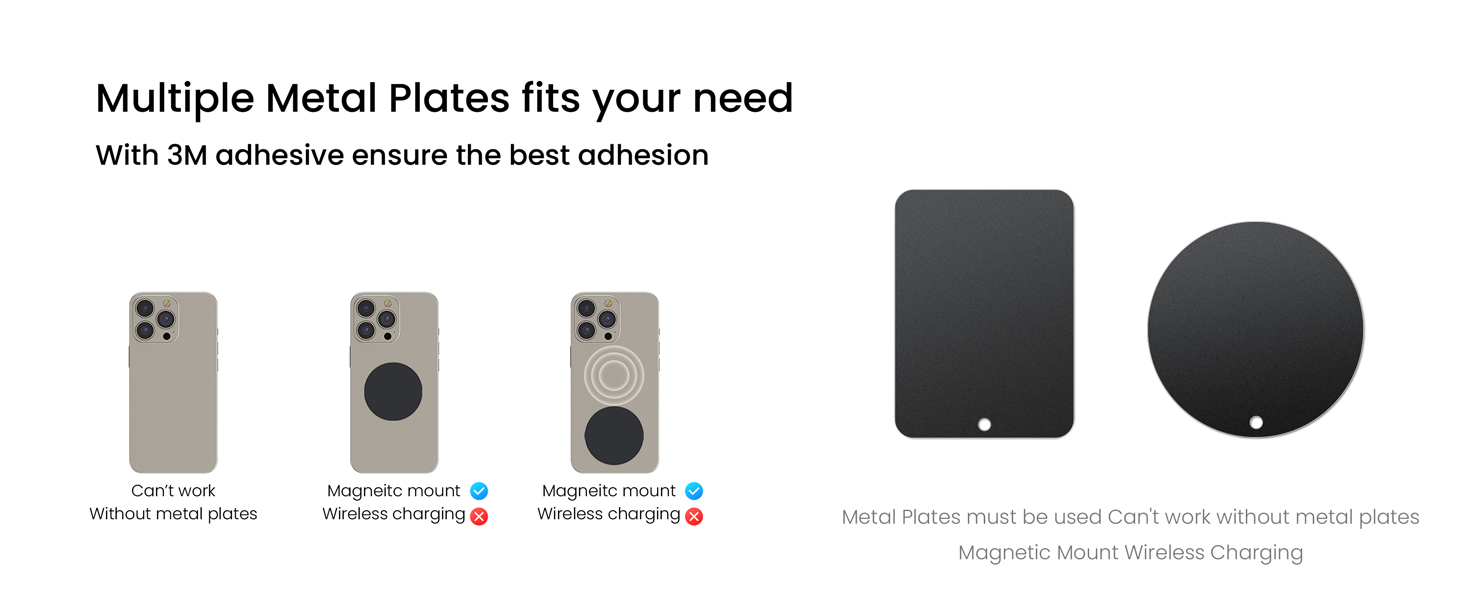
Figure 8: 360-Degree Rotation for Optimal Viewing
4. Maintenance
To maintain the strong adhesion of the suction cup, it is designed to be reusable and washable. If the suction cup loses its stickiness, simply wash it under flowing water and let it air dry. The stickiness will return, allowing for continued reliable use.

Figure 9: Suction Cup Cleaning and Reusability
5. Troubleshooting
- Suction Cup Not Sticking: Ensure the mounting surface (dashboard or windshield) is clean and dry. If using on the dashboard, confirm it's not leather or soft material. For windshield, consider using the UV reflective film. If the suction cup itself is dirty, wash it with water and let it air dry to restore stickiness.
- Phone Not Holding Securely: Verify that the metal plate is correctly attached to the outside of your phone case and has been allowed 24 hours for the adhesive to fully set. This mount requires the use of the included metal plates and is not compatible with MagSafe or phones without a metal plate.
- Telescopic Arm Movement: Ensure the locking mechanism for the telescopic arm is securely tightened after adjustment to prevent unwanted movement.
6. Specifications
| Feature | Detail |
|---|---|
| Product Dimensions | 4.53 x 2.76 x 2.36 inches |
| Item Weight | 7.4 ounces |
| Item Model Number | M02 Pro-S02 |
| Color | Black-Red |
| Compatible Devices | Smartphones |
| Compatible Phone Models | iPhone, Samsung, Moto, Galaxy, All SmartPhones |
| Mounting Type | Windshield & Dashboard |
7. Warranty and Support
Specific warranty details are not provided in this manual. For any support inquiries, product assistance, or warranty claims, please contact APPS2Car customer service directly through their official channels or the retailer from whom the product was purchased.