

1. Introduction and Overview
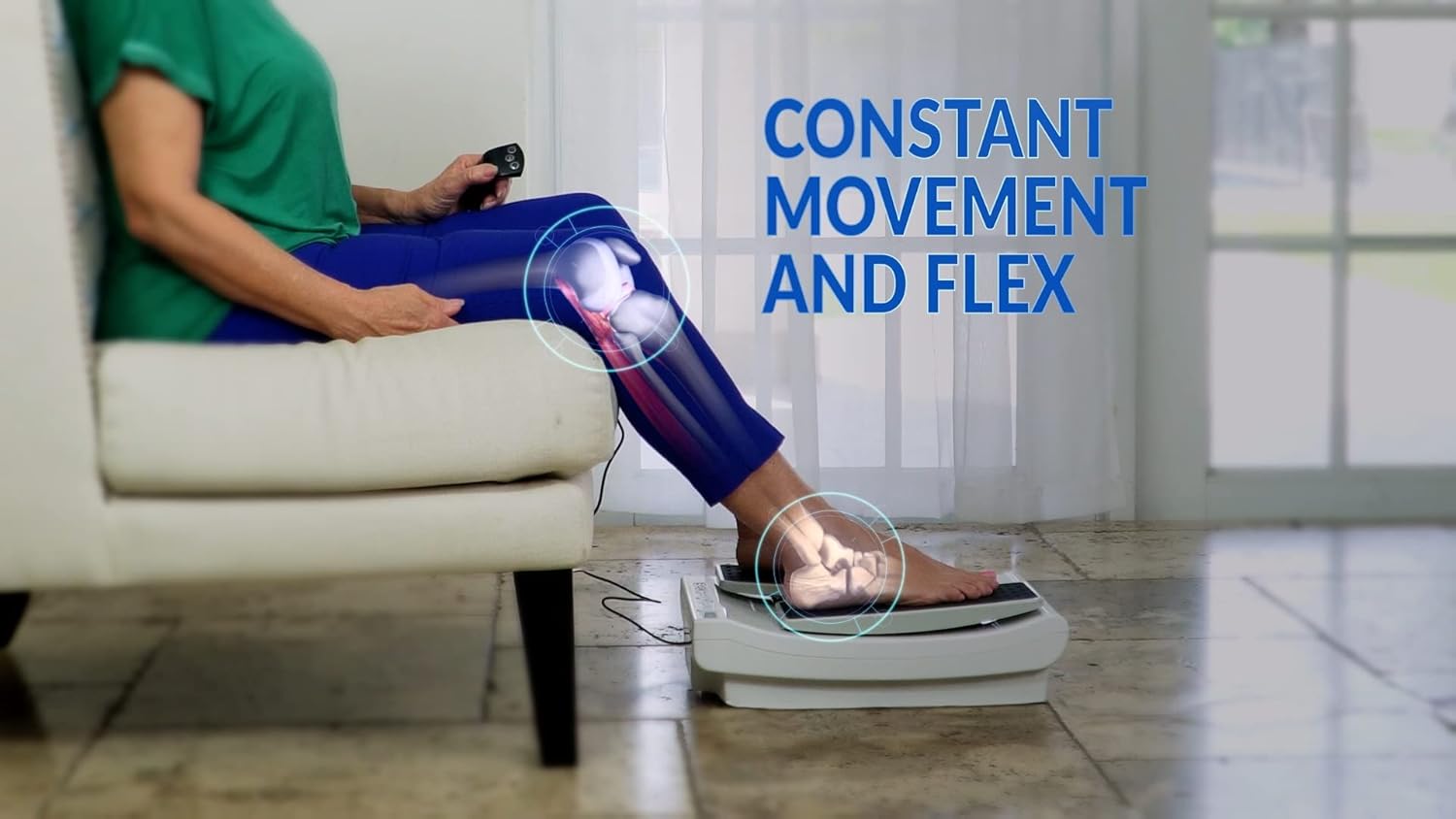
The LegXercise PRO is an innovative device designed to provide gentle, continuous movement to your legs, promoting circulation and alleviating discomfort. It is particularly beneficial for individuals with limited mobility, leg pain, restless legs, or those whose legs are weakened due to inactivity. The device offers a passive exercise experience, allowing users to improve leg health while seated comfortably.
Key features include:
- Light & Slow Continuous Movement
- Strengthens Legs Weakened due to Inactivity
- Soothes Leg Pain and Calms Restless Legs

The LegXercise PRO supports improved leg health and mobility.
2. Setup
Setting up your LegXercise PRO is quick and easy. Follow these steps to get started:
- Unpack the Device: Carefully remove the LegXercise PRO from its packaging. Ensure all components, including the main unit, remote control, and power adapter, are present.
- Position the Device: Place the LegXercise PRO on a flat, stable surface in front of your chair. Ensure there is enough space for comfortable use and that the power cord can reach an outlet without being strained.
- Extend Incline Legs (Optional): On the underside of the device, you will find two foldable incline legs. These can be flipped up to provide a slight angle for varied use.
- Connect Power: Plug the power adapter into the designated port on the LegXercise PRO unit. Then, plug the other end of the power adapter into a standard electrical outlet.
- Connect Remote Control: The remote control is wired and connects to a port on the side of the main unit. Ensure it is securely plugged in.

The LegXercise PRO main unit and its wired remote control.
The remote control features buttons for speed settings and power.
3. Operating Instructions
Once set up, operating your LegXercise PRO is straightforward:
- Sit Comfortably: Ensure you are seated in a stable chair with your feet able to rest naturally on the device's foot pedals.
- Place Your Feet: Gently place both feet onto the textured foot pedals of the LegXercise PRO. The device is designed for passive movement, so do not force your feet or legs.
- Power On: Use the remote control to turn on the device. The remote has buttons for two speed settings (1 and 2) and an OFF button.
- Select Speed: Choose your desired speed setting. Speed 1 offers a slower, gentler movement, while Speed 2 provides a slightly faster pace.
- Monitor Movement Counter: The device features a digital display that shows the number of movements completed. This can help you track your usage.
- Stay Seated: It is crucial to remain seated while using the LegXercise PRO. This device is not designed for standing use and doing so may cause injury or damage to the unit.
- Turn Off: When you are finished, press the OFF button on the remote control. The movement counter will reset to zero once the device is turned off.

Proper posture while using the LegXercise PRO.

The concave track design guides the feet through a natural motion.

The digital display tracks the number of movements.
4. Maintenance
To ensure the longevity and optimal performance of your LegXercise PRO, follow these simple maintenance guidelines:
- Cleaning: Wipe the device regularly with a soft, damp cloth. Avoid using abrasive cleaners or solvents that could damage the plastic or electronic components.
- Cord Care: Always keep the power cord and remote control cord clear of the moving parts and out of the way to prevent tripping hazards or damage. Do not bend or crimp the cords excessively.
- Storage: When not in use, store the LegXercise PRO in a dry, cool place away from direct sunlight or extreme temperatures. Ensure it is placed where it will not be a tripping hazard.
5. Troubleshooting
If you encounter any issues with your LegXercise PRO, please refer to the following common troubleshooting tips:
- Device Not Turning On:
- Ensure the power adapter is securely plugged into both the device and a working electrical outlet.
- Check if the remote control is properly connected to the unit.
- Pedals Not Moving Smoothly or Stopping:
- Do not force the pedals. The device is designed for passive, gentle movement. Excessive pressure can cause the motor to strain or stop.
- Ensure no obstructions are blocking the movement of the pedals.
- Remote Control Issues:
- Verify the remote control's wire connection to the main unit is firm.
- Noise During Operation:
- A slight motor hum is normal. If you experience unusual grinding or loud noises, ensure the device is on a flat surface and not being forced.
If these steps do not resolve the issue, please contact customer support for further assistance.
6. Specifications
| Feature | Detail |
|---|---|
| Product Dimensions | 16.14 x 12.2 x 6.5 inches |
| Weight | 8.99 Pounds |
| Material | Strong Noise Reduction Plastic |
| Controls Type | Remote |
| Display Type | LED |
| Manufacturer | Intellibrands |
| Date First Available | December 3, 2018 |
7. Warranty & Support
For any warranty claims, product support, or additional inquiries, please contact the manufacturer, Intellibrands, directly. Refer to the contact information provided with your product packaging or visit their official website for details on warranty coverage and customer service.
It is always recommended to consult with your healthcare professional before starting any new exercise regimen or using a device like the LegXercise PRO, especially if you have pre-existing medical conditions.