1. Safety Information
Please read all instructions carefully before assembly and use. Keep this manual for future reference.
- Assembly may require tools and careful handling.
- Do not exceed the maximum weight recommendation of 280 pounds for safe use.
- Ensure all screws and bolts are securely tightened before use.
- Avoid standing on the chair or using it as a step stool.
- Keep children and pets away from the assembly area.
2. Package Contents
Verify that all components are present before beginning assembly. If any parts are missing or damaged, please contact customer support.
- Backrest
- Seat
- Armrests (2)
- Headrest Pillow
- Lumbar Cushion
- Base (Star Base)
- Wheels (Casters) (5)
- Hydraulic Piston (Gas Lift)
- Mechanism Plate
- Assembly Hardware (screws, washers, Allen wrenches)
- Installation Instruction Book
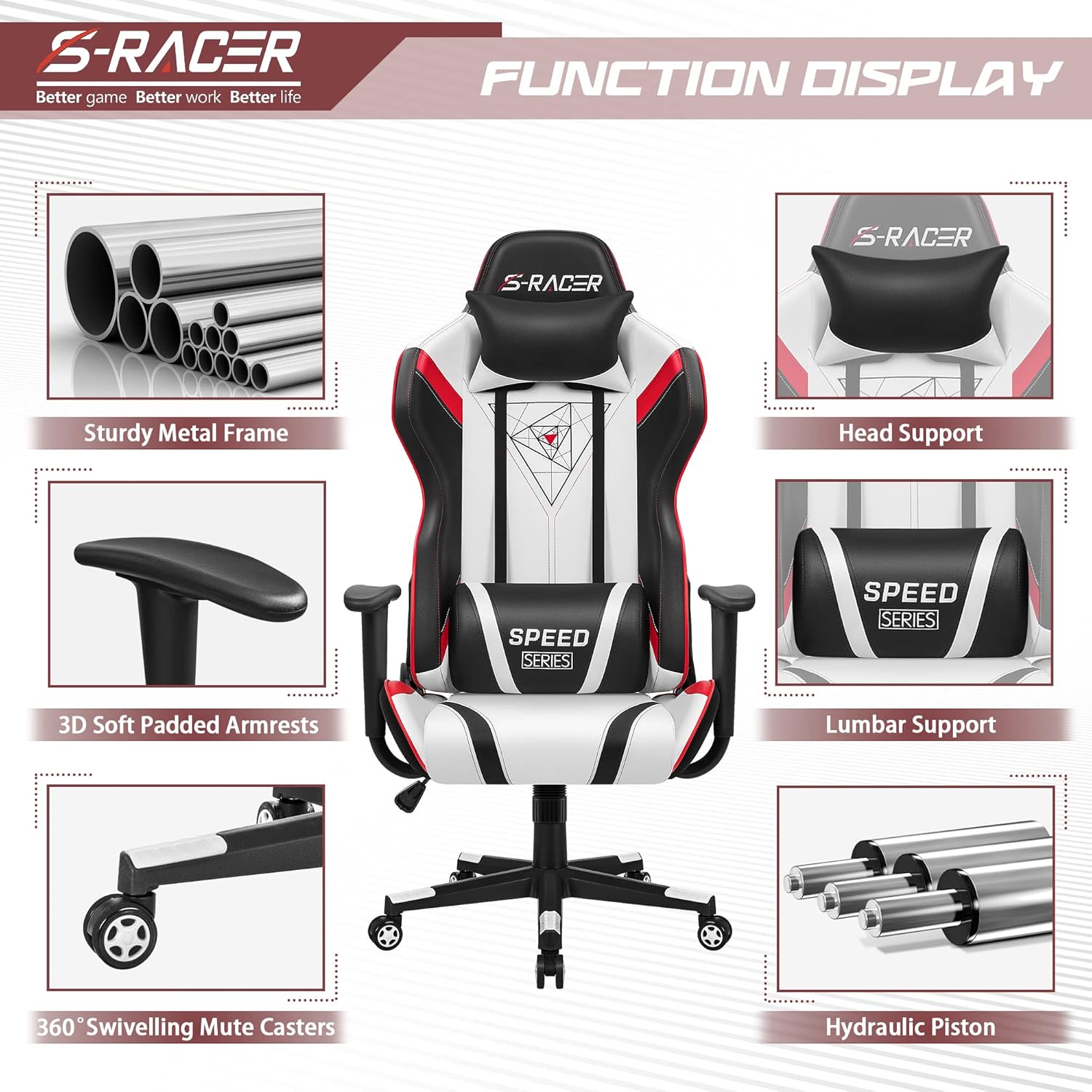
Figure 2.1: Overview of chair components.
3. Setup and Assembly
Assembly typically takes less than 45 minutes. Follow the detailed steps in the included instruction book. The following provides a general overview:
- Attach Casters to Base: Insert the five casters into the holes on the star base.
- Insert Hydraulic Piston: Place the hydraulic piston into the center hole of the star base.
- Attach Mechanism Plate to Seat: Secure the mechanism plate to the underside of the seat using the provided screws. Ensure the front side of the plate aligns with the front of the seat.
- Connect Seat to Piston: Carefully place the assembled seat onto the hydraulic piston.
- Attach Armrests: Secure the armrests to the sides of the seat using the provided hardware.
- Attach Backrest: Connect the backrest to the seat and armrests using the appropriate screws.
- Install Pillows: Attach the headrest pillow and lumbar cushion using their elastic straps. The lumbar cushion is adjustable and can be moved up or down, or removed if preferred.

Figure 3.1: Fully assembled Homall S-Racer Series Gaming Chair.
4. Operating Instructions
The Homall S-Racer Series chair offers multiple adjustment options for personalized comfort.
- Height Adjustment: Use the lever located under the seat on the right side to adjust the chair's height. Pull the lever up to raise the seat; sit on the chair and pull the lever up to lower it.
- Recline Function: The chair features a 90 to 180-degree backwards movement. Use the recline lever on the side of the seat to adjust the backrest angle. Push the lever down to recline, and pull it up to lock the desired position.
- Rocking Function: An enjoyable rocking function is available. This can typically be enabled or disabled via a knob or lever under the seat, which controls the tension of the rocking mechanism.
- Armrest Adjustment: The armrests are designed for smooth adjustment. Refer to the specific mechanism on your armrests for height or swivel adjustments.
- Headrest and Lumbar Support: The headrest pillow and lumbar cushion are removable and adjustable via elastic straps, allowing you to position them for optimal ergonomic support.
- Retractable Footrest: Some models may include a retractable footrest for added comfort during recline. To extend, pull the footrest out from under the seat. To retract, push it back in.
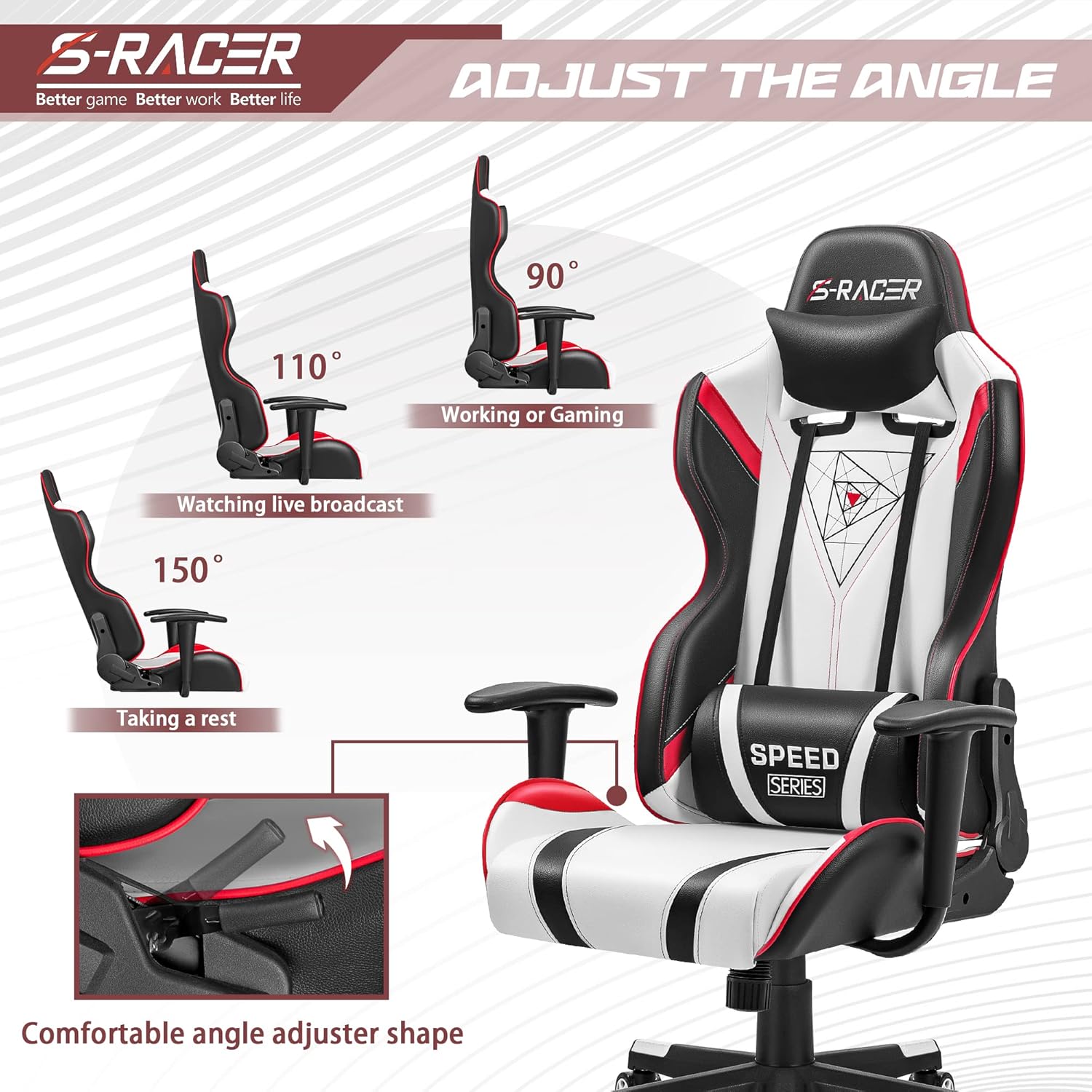
Figure 4.1: Chair angle adjustments for various activities.

Figure 4.2: Ergonomic design for comfort and support.
5. Maintenance
Proper maintenance ensures the longevity and appearance of your chair.
- Cleaning: For the PU leather, use a dedicated leather cleaner and a soft cloth to wipe down the surfaces every couple of weeks. Avoid harsh chemicals or abrasive materials.
- Casters: Periodically check the 360-degree swiveling mute casters for any debris (hair, dust) that might hinder smooth movement. Clean as needed.
- Hardware: Regularly inspect all screws and bolts to ensure they remain tight. Tighten any loose connections to maintain stability and prevent noise.
6. Troubleshooting
If you encounter any issues with your chair, consider the following:
- Squeaking/Noise: Ensure all bolts are tightened. Applying white lithium grease to exterior metal contact points and springs may help reduce noise.
- Difficulty Adjusting Height: Check if the hydraulic piston is correctly seated and free from obstructions. Ensure the lever mechanism is functioning properly.
- Unstable Chair: Verify that the base is fully assembled and all casters are securely in place. Re-tighten all assembly screws.
7. Specifications
| Feature | Detail |
|---|---|
| Brand | Homall |
| Model Name | Racing Office Chair High Back PU Leather Computer Desk Chair |
| Color | White & Black |
| Product Dimensions | 20"D x 21.5"W x 51"H |
| Maximum Weight Recommendation | 280 Pounds |
| Material | PU Leather, Foam (Fill Material), Metal (Form Factor) |
| Special Features | Ergonomic, Arm Rest, Swivel, Adjustable Height, Head Support, Removable Cover, Rolling, Reclining (3 positions) |
| Included Components | Backrest, Seat, Armrest, Headrest, Base, Feet, Wheels |
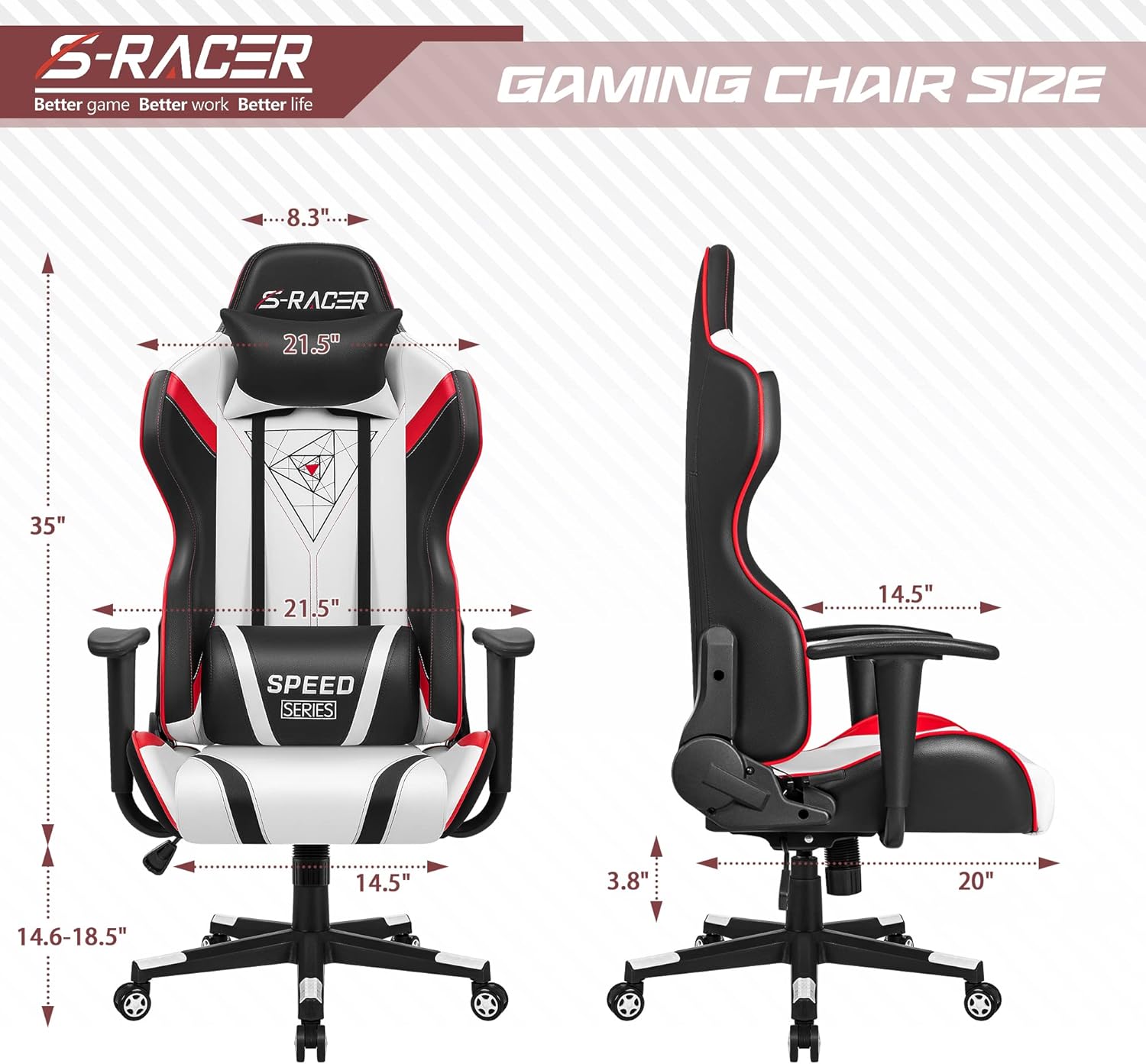
Figure 7.1: Detailed dimensions of the Homall S-Racer Gaming Chair.
8. Warranty and Support
Homall provides support for product-related issues.
- Homall Exchange: Free exchange is offered for installation problems, damage, and missing parts.
- If you are not satisfied with your purchase, Homall is glad to exchange your replacement or refund your money, with no extra fee required.
- For further assistance, please refer to the customer support information provided with your purchase or visit the official Homall website.


